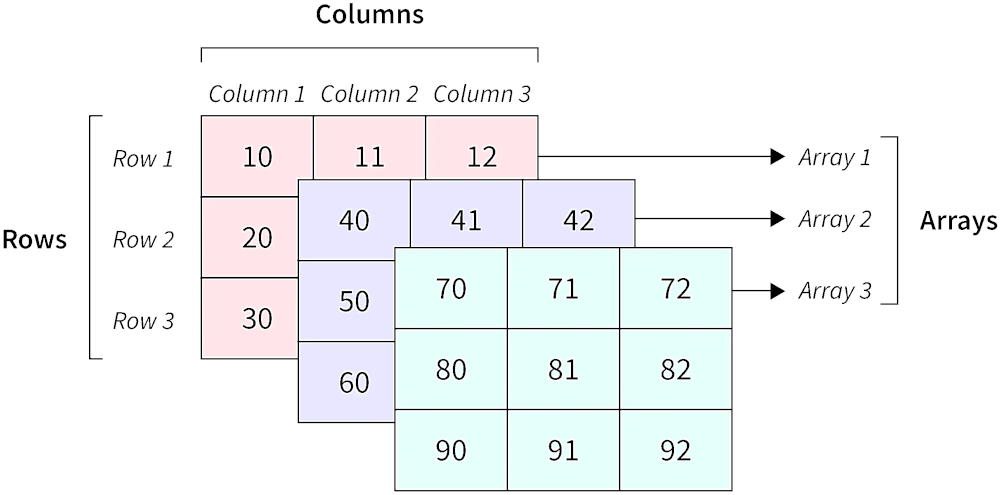
n_dimensional_array 패키지는 Dart에서 차원 수에 제한 없이 다차원 배열을 생성하고 효율적으로 조작할 수 있도록 해줍니다. 다양한 플랫폼에서 배열 요소의 초기화, 접근 및 수정을 위한 깔끔하고 직관적인 API를 제공합니다. 수학 계산, 데이터 처리, 구조화된 데이터 저장이 필요한 과학적 응용 분야에 적합합니다. 이 패키지는 가볍고 Flutter 프로젝트와 원활하게 통합됩니다.
사용 사례
과학 계산
데이터 분석
게임 개발
머신러닝 전처리
수학적 모델링
주요 기능
임의의 차원을 지원합니다
효율적인 요소 접근
간편한 초기화 구문
크로스 플랫폼 호환성
불변 및 가변 배열 변형
적합한 대상
행렬과 텐서를 사용하는 개발자
수학 알고리즘 구현
구조화된 다차원 데이터가 필요한 응용 프로그램
고려 사항
매우 큰 배열에 최적화되지 않음
제한된 내장 수학 연산
배열 경계를 수동으로 처리해야 합니다
내장된 직렬화 지원 없음
원본 README
연결된 소스 저장소의 README 원문 스냅샷입니다. 최신 내용은 저장소에서 확인하세요.
n-Dimensional Array
The n-Dimensional Array package is a powerful tool that empowers Flutter developers to create and work with multi-dimensional arrays. With this package, developers can easily define and manipulate n-dimensional arrays in their applications. This package offers a simple and intuitive interface to handle arrays of various dimensions efficiently.
Installation
In the pubspec.yaml of your flutter project, add the following dependency:
Just like with a normal list in Dart, you cannot add elements beyond the length of the list. For a list, you would use the add() method. Expanding a multi-dimensional list is a bit more complicated; so, the reshape method was created.
// The list from Example 1List myList = [[[1, 2], [3, 4]], [[5, 6], [7, 8]], [[9, 10], [11, 12]]];
NdArray ndArray = NdArray.fromList(myList);
// The current shape is [3, 2, 2]List<int> shape = ndArray.shape;
// Add one more element to the 3rd dimension
ndArray.reshape([3, 2, 3]);
// Note: Since we are only changing the third// dimension, we could alternatively call:// ndArray.reshape([-1, -1, 3]);// The `-1` counts as a placeholder, and the// original shape value is used.// The list now looks like:// [[[1, 2, null], [3, 4, null]], [[5, 6, null], [7, 8, null]], [[9, 10, null], [11, 12, null]]];// Shrink the array down.
ndArray.reshape([1, 1, 2]);
// The list now looks like:// [[[1, 2]]]// Note: The truncated data is lost. Be careful// when shrinking your arrays. Make sure that is// really what you want to do.
Example 3 - Getting and Setting values
You can get or set a value very much like a normal list, where you would call myList[i].
// 2D list is easier to followList myList = [[1, 2], [3, 4]];
NdArray ndArray = NdArray.fromList(myList);
// Some current valuesint value1 = ndArray[0][1]; // 2int value2 = ndArray[1][1]; // 4// Set a value
ndArray[0][1] = 8;
value1 = ndArray[0][1]; // 8// The list now looks like:// [[1, 8], [3, 4]]
Example 4 - Copy
When you use the copy() method, you create a new NdArray that is identical to the original. Any modifications to one does not affect the other.
Note: Any non-primitive data types that use references (like custom objects) might not create new versions of themselves when copied. If this is the case, changes to one of those objects will appear in both NdArrays.
// 2D list is easier to followList myList = [[1, 2], [3, 4]];
NdArray ndArray = NdArray.fromList(myList);
NdArray ndArrayCopy = ndArray.copy();
// Change only the copy
ndArrayCopy[0][0] = 99;
// The lists now look like:// ndArray.data == [[1, 2], [3, 4]]// ndArrayCopy.data == [[99, 2], [3, 4]]
If you found this helpful, please consider donating. Thanks!