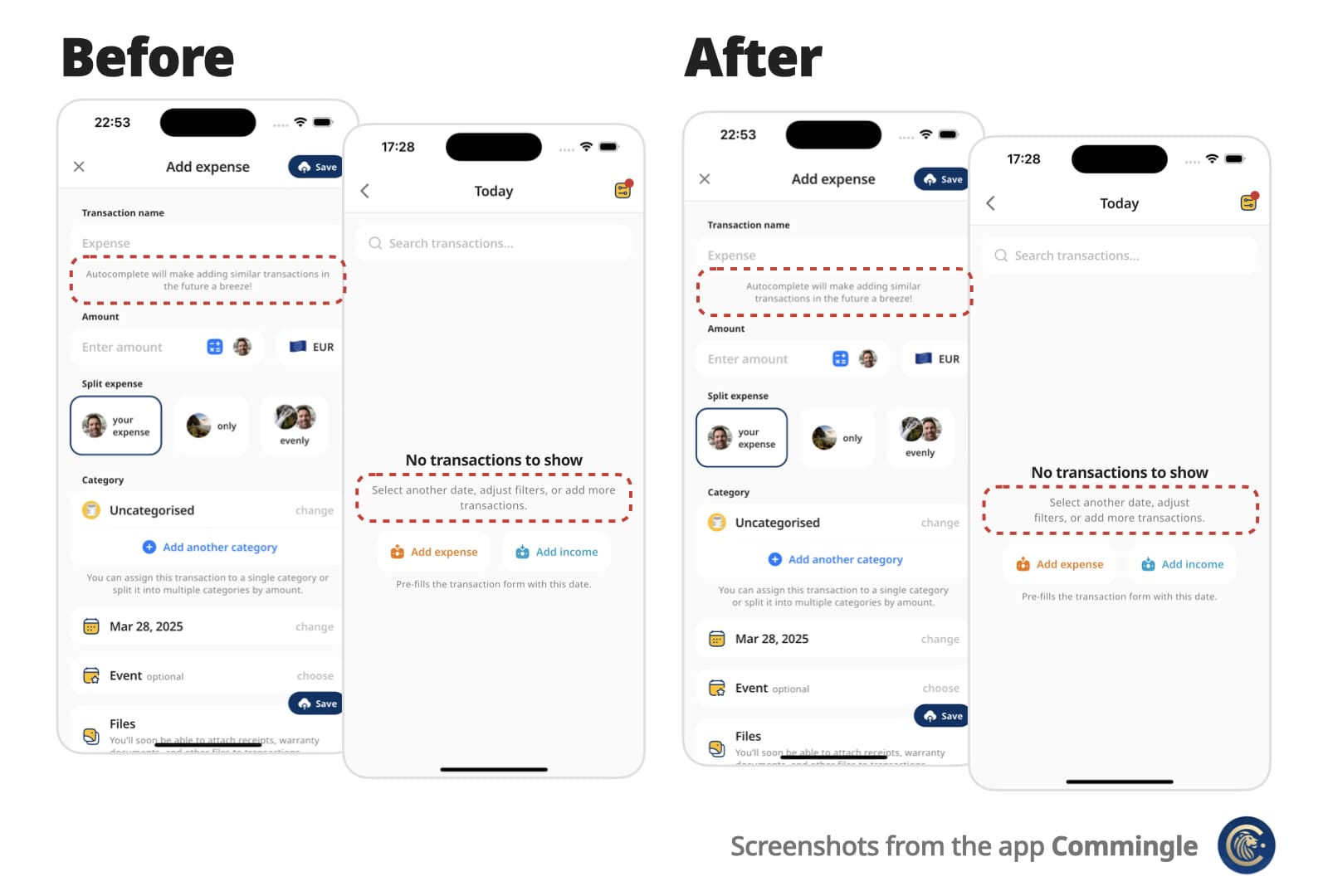
OptimalWrapText는 다중 줄 텍스트를 지능적으로 줄바꿈하여 길이가 유사한 시각적으로 균형 잡힌 줄을 생성함으로써 텍스트 레이아웃을 향상시키는 Flutter 위젯입니다. 표준 Text 위젯과 달리, 불균형한 줄 바꿈을 최소화하여 짧은 단락이나 레이블이 포함된 UI에서 가독성과 미적 매력을 향상시킵니다. 대시보드, 카드, 양식 등 타이포그래피의 조화가 중요한 인터페이스에 적합합니다. 이 패키지는 모든 주요 플랫폼을 지원하며 기존의 Flutter 프로젝트에 쉽게 통합할 수 있습니다.
사용 사례
텍스트가 많은 UI에서 시각적 균형 개선
작은 레이아웃에서 가독성 향상
레이블과 카드에서 일관된 줄 길이 만들기
반응형 디자인에서 텍스트 표시 최적화
다이어그램 및 데이터 요약에서 사용
주요 기능
선 길이를 지능적으로 균형 조정합니다
부자연스러운 줄 바꿈을 줄입니다
모든 플러터 플랫폼을 지원합니다
기존 Text 위젯과의 간편한 통합
원본 텍스트 내용과 스타일을 유지합니다
적합한 대상
서체 조화를 우선시하는 디자이너
반응형 UI를 구축하는 개발자
밀집된 텍스트 콘텐츠를 포함한 앱
정교한 텍스트 표시가 필요한 프로젝트
사용자 경험에 집중하는 팀 세부 정보
고려 사항
렌더링 복잡성을 약간 증가시킬 수 있습니다
성능상의 이유로 매우 긴 텍스트에는 적합하지 않습니다
라인 균형을 넘어서는 사용자 정의 제한
다양한 화면 크기에서 신중한 테스트가 필요합니다
짧은에서 중간 길이의 텍스트 블록과 함께 사용하는 것이 가장 좋습니다
원본 README
연결된 소스 저장소의 README 원문 스냅샷입니다. 최신 내용은 저장소에서 확인하세요.
Optimal Wrap Text
A Flutter Text replacement that wraps short multi-line text over similarly sized lines for better visual balance.
Instead of awkward standard line breaks like these:
My slightly longer text that will span 2 or
3 lines

My slightly longer text that will span 2 or
                  3 lines
You get cleaner, balanced output like these:
My slightly longer text that
will span 2 or 3 lines

        My slightly longer text that
           will span 2 or 3 lines
Perfect for small, informative footnotes or short multi-line messages that deserve to look good.
✨ Features
Drop-in replacement for the Text widget
Supports all Text attributes, including style, textDirection (RTL), textHeightBehavior…
Rich text via OptimalWrapRichText, including WidgetSpan (icons and other inline widgets)
Automatically finds optimal line breaks — no more manual \n
Optional minLines to wrap onto at least that many lines when there are enough words
Adjusts to different screen sizes and text scaling
📌 For centered or right-aligned text, you may still want to wrap it in a Center, Align, or Row, just like with a regular Text widget.
Use minLines to wrap onto at least that many lines when the text has enough
words. A single unbreakable word is never forced to break.
OptimalWrapText(
  'Hello there friend',
  minLines: 2,
  textAlign: TextAlign.center,
)
Use shrinkWrap: true when the parent should hug the optimally wrapped width
(for example a chip or speech bubble). By default the widgets expand to the
available width via Align, matching typical full-width text layout.
For custom rich-text children, wrap them with the exported OptimalWrapChild
primitive instead.
🧠 How does it work?
Optimal Wrap Text uses TextPainter to determine how many lines your text will take at full available width in the given widget tree.
It runs a binary search to find the narrowest width that still fits in the same number of lines — ensuring optimal wrapping. With minLines, that target is raised so the text wraps onto at least that many lines when there are enough words.
e.g.
300px → 2 lines (width from the current BuildContext)
150px → 4 lines ❌
225px → 2 lines ✅
188px → 3 lines ❌
206px → 2 lines ✅
... and so on
Worst-case scenario for mobile screen widths (e.g. iPhone) is about 9 iterations, but typical cases resolve in 6 attempts.
It wraps the final Text in a SizedBox constrained to that optimal width.
⚠️ Known Limitations
It uses LayoutBuilder to get width in the given widget tree, which doesn’t work inside some slivers, such as SliverFillRemaining, which rely on intrinsic sizing.
For OptimalWrapRichText with WidgetSpans, prefer intrinsically sized inline children (icons, small badges, fixed-size boxes). Same as Flutter’s Text.rich, each inline widget is constrained by the paragraph’s max width — very wide or full-bleed children can prevent meaningful narrowing.
💡 You can work around this by passing a manual width:
CustomScrollView(
  slivers: [
    ...,
    SliverFillRemaining(
      child: Padding(
        padding: EdgeInsets.only(left: 15, right: 30),
        child: OptimalWrapText(
          'My slightly longer text that will span 2 or 3 lines',
          width: MediaQuery.sizeOf(context).width - 15 - 30
        ),
      )
    ),
  ]
)
📄 Copyright and License
Optimal Wrap Text is maintained by Chris Rutkowski as part of the Commingle app, and open-sourced under the MIT License.