패키지, 저장소 및 앱 카테고리 검색

page_animator 표지
패키지 상세v1.0.1

page_animator

사용자 정의 효과를 제공하는 부드러운 페이지 전환 및 애니메이션을 제공하는 플러터 패키지입니다. 수평 페이지 탐색과 함께 매력적인 사용자 인터페이스를 만들기에 적합합니다.

AndroidiOSWebmacOSWindowsLinux
30일 다운로드
14
좋아요
9
Pub 점수
160

패키지 설치

flutter pub add page_animator

패키지 개요

공개 정보를 바탕으로 생성한 선택 가이드입니다.

PageAnimator는 수평 탐색을 위한 부드럽고 사용자 정의 가능한 페이지 전환 및 애니메이션을 제공하도록 설계된 Flutter 패키지입니다. 유연한 시각적 효과를 통해 사용자 인터페이스를 향상시켜 앱 탐색을 더욱 매력적이고 직관적으로 만듭니다. 온보딩 흐름, 대시보드 또는 다단계 프로세스와 같은 동적 화면 전환이 필요한 앱에 적합합니다. 이 패키지는 Android, iOS, Web, macOS, Windows, Linux 등 모든 주요 플랫폼을 지원하여 장치 간 일관된 성능을 보장합니다.

사용 사례

  • 온보딩 화면
  • 대시보드 탐색
  • 다단계 폼
  • 인터랙티브 튜토리얼
  • 스와이프 가능한 콘텐츠
  • 애니메이션 탭 전환

주요 기능

  • 사용자 정의 전환 효과
  • 부드러운 수평 페이지 애니메이션
  • 크로스 플랫폼 호환성
  • PageView와의 간편한 통합
  • 제스처 기반 탐색 지원
  • 사용자 정의 가능한 지속 시간 및 곡선

적합한 대상

  • 애니메이션 네비게이션을 찾는 개발자
  • 스와이프 가능한 인터페이스를 가진 앱
  • 디자인 중심의 UI 구현
  • 풍부한 상호작용을 갖춘 모바일 및 웹 애플리케이션
  • 사용자 경험을 우선시하는 팀

고려 사항

  • 복잡한 애니메이션과 함께 성능에 영향을 미칠 수 있습니다
  • 최적의 사용자 경험을 위해 신중한 조정이 필요합니다
  • 제한된 내장 사전 설정(사용자 정의 필요)
  • 간단한 정적 페이지에는 적합하지 않음
  • 중간 애니메이션 복잡도에 가장 적합

원본 README

연결된 소스 저장소의 README 원문 스냅샷입니다. 최신 내용은 저장소에서 확인하세요.

Page Animator

A Flutter package that provides smooth page transitions and animations with customizable effects. Perfect for creating engaging user interfaces with horizontal page navigation.

Features

  • Multiple animation types for page transitions, switchable in realtime
  • Infinite scrolling in both directions, with ability to set bounds in realtime
  • Animated switcher - tap on a page, and it will zoom out, similar to Kindle reader
  • Immersive mode support

Animation Types

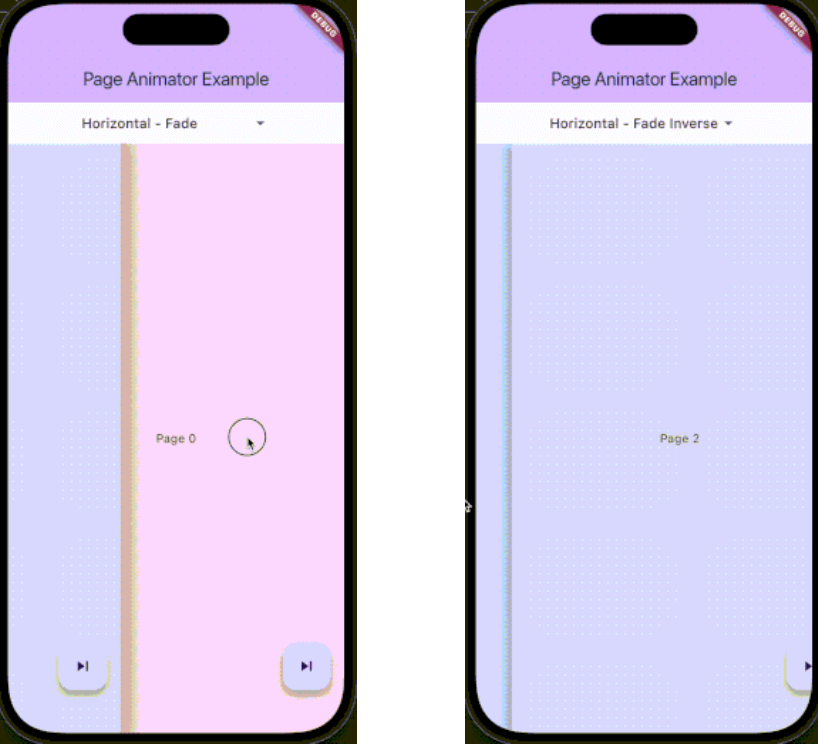
The package supports various animation types through PageAnimatorType. Here's a comprehensive list of all available animations:

Preview Preview Preview
Uncompressed gif
animatedSwitcher - Animated switcher transition
Uncompressed gif
noAnimation - No animation effect, instant page switch
Uncompressed gif
horizontalSimple - Simple horizontal slide transition
Uncompressed gif
horizontalFade - Horizontal slide with fade effect
Uncompressed gif
horizontalFadeInverse - Horizontal slide with inverse fade effect
Uncompressed gif
verticalSimple - Simple vertical slide transition
Uncompressed gif
verticalFade - Vertical slide with fade effect
Uncompressed gif
verticalFadeInverse - Vertical slide with inverse fade effect

You can change the animation type dynamically using the controller:

pageAnimatorController.type.value = PageAnimatorType.verticalFade;

Installation

Add this to your package's pubspec.yaml file:

dependencies:
  page_animator: ^1.0.0

Usage

  1. Import the package:
import 'package:page_animator/page_animator.dart';
  1. Create a PageAnimatorController:
final pageAnimatorController = PageAnimatorController(
  type: PageAnimatorType.horizontalFade,
);
  1. Use the PageAnimator widget:
PageAnimator(
  controller: pageAnimatorController,
  onPageChanged: (int currentPage) {
    print('Page offset: $currentPage');
  },
  leftMostIndex: -3,
  rightMostIndex: 3,
  children: [
    // Your page widgets here
  ],
  enableImmersiveSwitch: true,
)
Page Bounds

The PageAnimator widget allows you to set bounds for page navigation using leftMostIndex and rightMostIndex parameters:

  • leftMostIndex: The minimum page offset that can be reached by swiping left
  • rightMostIndex: The maximum page offset that can be reached by swiping right

These bounds can be changed in realtime, allowing you to dynamically control the navigation range. For example:

// Initially allow navigation indefinitelly
PageAnimator(
  leftMostIndex: null,
  rightMostIndex: null,
  // ... other parameters
)

// Later, you can update the bounds
PageAnimator(
  leftMostIndex: -3,
  rightMostIndex: 3,
  // ... other parameters
)

When a bound is reached, the page will stop scrolling in that direction, providing a natural end to the navigation.

Example

Here's a complete example showing how to use the package:

class MyPage extends StatefulWidget {
  @override
  State<MyPage> createState() => _MyPageState();
}

class _MyPageState extends State<MyPage> {
  final pageAnimatorController = PageAnimatorController(
    type: PageAnimatorType.horizontalFade,
  );

  @override
  Widget build(BuildContext context) {
    return Scaffold(
      body: PageAnimator(
        controller: pageAnimatorController,
        onPageChanged: (int currentPage) {
          print('Page offset: $currentPage');
        },
        leftMostIndex: -3,
        rightMostIndex: 3,
        children: [
          for (final page in List.generate(3, (index) => index))
            _buildPage(page),
        ],
        enableImmersiveSwitch: true,
      ),
    );
  }

  Widget _buildPage(int page) {
    return Scaffold(
      body: Center(
        child: Text('Page $page'),
      ),
      floatingActionButton: FloatingActionButton(
        onPressed: () => pageAnimatorController.animateToOffset(1),
        child: const Icon(Icons.skip_next),
      ),
    );
  }
}

Controller Methods

The PageAnimatorController provides several methods to control page transitions:

  • animateToOffset(int offset): Animate to a specific page offset
  • type: Change the animation type dynamically
  • switcherActive: Control the page switcher state

Contributing

Contributions are welcome! Please feel free to submit a Pull Request.

License

This project is licensed under the MIT License - see the LICENSE file for details.

Parameters

  • children: List of widgets to display as pages
  • onPageChanged: Callback when page is changed
  • leftMostIndex: The first page user can go to
  • rightMostIndex: The last page user can go to
  • controller: PageAnimatorController instance
  • enableImmersiveSwitch: Optional boolean that controls whether to enable immersive mode while switcher is inactive, and automatically disable it when user enters switcher. If not specified, defaults to true.
  • onDragStart: Optional callback when drag starts
  • onDragEnd: Optional callback when drag ends
  • onDragAnimationStart: Optional callback when animation starts
  • onDragAnimationEnd: Optional callback when animation ends

카테고리

의존성

의존성 목록 1 개

소스 저장소

이 패키지를 사용하는 프로젝트

아직 데이터가 없습니다.