연결된 소스 저장소의 README 원문 스냅샷입니다. 최신 내용은 저장소에서 확인하세요.
paymob_payment
Easily accept payments through Online Cards in your Flutter app with Paymob.
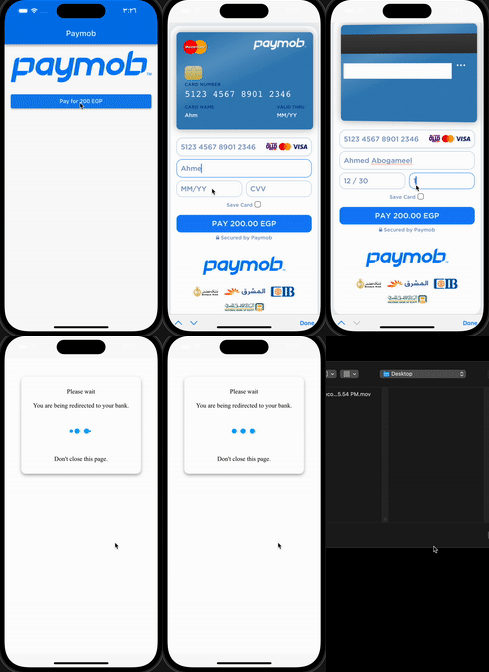
:rocket: Installation
Add this to dependencies in your app's pubspec.yaml
paymob_payment : latest_version
:hammer: Initialization
PaymobPayment.instance.initialize(
apiKey: "",
integrationID: 123456,
iFrameID: 123456,
);
:pushpin: Note :
You can use this singleton (instance)
or
Create your own
if you want to create different iFrames or integrations
final PaymobPayment paymobPayment = PaymobPayment();
  paymobPayment.initialize(
  apiKey: "",
  integrationID: 123456,
  iFrameID: 123456,
);
:bookmark: Usage
final PaymobResponse? response = await PaymobPayment.instance.pay(
context: context,
currency: "EGP",
amountInCents: "20000",
onPayment: (response) => setState(() => this.response = response),
)
:incoming_envelope: PaymobResponse
| Variable |
Type |
Description |
| success |
bool |
Indicates if the transaction was successful or not |
| transactionID |
String? |
The ID of the transaction |
| responseCode |
String? |
The response code for the transaction |
| message |
String? |
A brief message describing the transaction |
:test_tube: Testing Cards
:white_check_mark: Successful payment
| Variable |
Description |
| Card Number |
5123456789012346 |
| Expiry Month |
12 |
| Expiry Year |
30 |
| CVV |
123 |
:negative_squared_cross_mark: Declined payment
Change cvv to 111 or expiry year to 20
:pushpin: Note :
May be you have to contact paymob support to activate your test card
