패키지, 저장소 및 앱 카테고리 검색

responsive 표지
패키지 상세v0.3.11+11

responsive

모바일, 데스크톱 및 웹용 Flutter 애플리케이션에 대한 반응형 UI를 쉽게 만들 수 있는 방법을 제공하며, 각 화면 크기와 기기 방향에 따라 다른 위젯 크기를 허용합니다.

AndroidiOSWebmacOSWindowsLinux
30일 다운로드
75
좋아요
66
Pub 점수
140

패키지 설치

flutter pub add responsive

패키지 개요

공개 정보를 바탕으로 생성한 선택 가이드입니다.

반응형 패키지는 모바일, 데스크톱 및 웹 플랫폼에서 Flutter 애플리케이션의 적응형 사용자 인터페이스를 만드는 것을 단순화합니다. 화면 크기와 기기 방향에 따라 서로 다른 위젯 크기와 레이아웃을 정의할 수 있게 해주어 일관되고 최적의 UI 경험을 보장합니다. 직관적인 API를 통해 복잡한 조건 로직이나 수동 미디어 쿼리 처리 없이 반응형 디자인을 쉽게 구현할 수 있습니다. 다양한 화면 크기를 가진 여러 형태의 기기 대상 앱에 특히 유용합니다.

사용 사례

  • 크로스 플랫폼 앱 개발
  • 모바일 및 데스크톱용 적응형 레이아웃
  • 화면 방향에 따른 동적 UI 크기 조정
  • 확장 가능한 웹 인터페이스 구축
  • 태블릿 및 대형 화면을 위한 반응형 디자인

주요 기능

  • 자동 화면 크기 감지
  • 방향 인식 위젯 크기 조정
  • 반응형 위젯을 위한 간단한 API
  • 모든 주요 플러터 플랫폼 지원
  • 일반 장치용 내장 브레이크포인트

적합한 대상

  • 다중 플랫폼 플러터 앱을 개발하는 개발자
  • 기기 간 UI 일관성에 중점을 두는 팀
  • 동적 레이아웃 조정을 필요로 하는 프로젝트

고려 사항

  • 여러 기기 유형에서 테스트를 수행해야 할 수 있습니다
  • 과도한 중첩 반응형 위젯으로 인한 성능 영향
  • 사전 정의된 브레이크포인트를 초과한 사용자 지정은 제한적입니다

원본 README

연결된 소스 저장소의 README 원문 스냅샷입니다. 최신 내용은 저장소에서 확인하세요.

responsive

build status Pub support

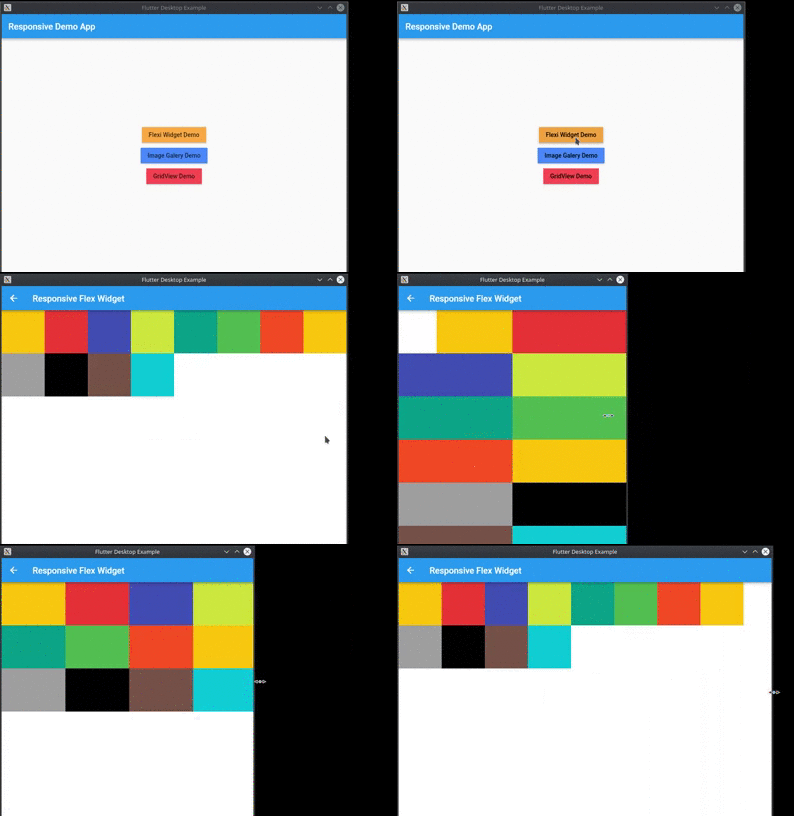
Provide a easy way to make responsive UI for Flutter Applications in mobile, desktop and web, allow different widget size for each screen size and device orientation..

Made by Marvin Quevedo and [Víctor Guardiola](mailto:victor.guardiola@gmail.com) of FlutterEs Community.

Este paquete ha sido creado por la comunidad de Flutter en Español, si deseas ser parte de nosotros, puedes visitar cualquiera de estos links:

Facebook

Slack

Twitter

www.flutter-es.io

Telegram

portrait view

landscape view

Video example

Add dependency
dependencies:
  responsive: 0.2.3

Usage

You have two ways of use it:

You can use the ReponsiveRow widget and the FlexResponsive widget to make the layout

or

you can use the static method Responsive.calcColumns to assign the correct number of columns to a widget like a GridView.

Easy to use

import 'package:flutter/material.dart';
import 'package:responsive/flex_widget.dart';
import 'package:responsive/responsive_row.dart';

void main() => runApp(MyApp());

class MyApp extends StatelessWidget {
  // This widget is the root of your application.
  @override
  Widget build(BuildContext context) {
    return MaterialApp(
      title: 'Responsive Example',
      theme: ThemeData(
        primarySwatch: Colors.blue,
      ),
      home: Scaffold(
        appBar: AppBar(),
        body: ListView(
          children: <Widget>[
            ResponsiveRow(
              columnsCount: 12,
              crossAxisAlignment: WrapCrossAlignment.center,
              children: <Widget>[
                FlexWidget(
                  child: Container(
                    height: 100,
                    color: Colors.amber,
                  ),
                  xs: 4,
                  xsOffset: 2,
                  sm: 3,
                  md: 2,
                  lg: 1,
                  xsLand: 4,
                  xsLandOffset: 0,
                  smLand: 2,
                  mdLand: 1,
                  lgLand: 1,
                ),
                FlexWidget(
                  child: Container(
                    height: 100,
                    color: Colors.red,
                  ),
                  xs: 6,
                  sm: 3,
                  md: 2,
                  lg: 1,
                  xsLand: 4,
                  smLand: 2,
                  mdLand: 1,
                  lgLand: 1,
                ),
                FlexWidget(
                  child: Container(
                    height: 100,
                    color: Colors.indigo,
                  ),
                  xs: 6,
                  sm: 3,
                  md: 2,
                  lg: 1,
                  xsLand: 4,
                  smLand: 2,
                  mdLand: 1,
                  lgLand: 1,
                ),
                FlexWidget(
                  child: Container(
                    height: 100,
                    color: Colors.lime,
                  ),
                  xs: 6,
                  sm: 3,
                  md: 2,
                  lg: 1,
                  xsLand: 4,
                  smLand: 2,
                  mdLand: 1,
                  lgLand: 1,
                ),
                FlexWidget(
                  child: Container(
                    height: 100,
                    color: Colors.teal,
                  ),
                  xs: 6,
                  sm: 3,
                  md: 2,
                  lg: 1,
                  xsLand: 4,
                  smLand: 2,
                  mdLand: 1,
                  lgLand: 1,
                ),
                FlexWidget(
                  child: Container(
                    height: 100,
                    color: Colors.green,
                  ),
                  xs: 6,
                  sm: 3,
                  md: 2,
                  lg: 1,
                  xsLand: 4,
                  smLand: 2,
                  mdLand: 1,
                  lgLand: 1,
                ),
                FlexWidget(
                  child: Container(
                    height: 100,
                    color: Colors.deepOrange,
                  ),
                  xs: 6,
                  sm: 3,
                  md: 2,
                  lg: 1,
                  xsLand: 4,
                  smLand: 2,
                  mdLand: 1,
                  lgLand: 1,
                ),
                FlexWidget(
                  child: Container(
                    height: 100,
                    color: Colors.amber,
                  ),
                  xs: 6,
                  sm: 3,
                  md: 2,
                  lg: 1,
                  xsLand: 4,
                  smLand: 2,
                  mdLand: 1,
                  lgLand: 1,
                ),
                FlexWidget(
                  child: Container(
                    height: 100,
                    color: Colors.grey,
                  ),
                  xs: 6,
                  sm: 3,
                  md: 2,
                  lg: 1,
                  xsLand: 4,
                  smLand: 2,
                  mdLand: 1,
                  lgLand: 1,
                ),
                FlexWidget(
                  child: Container(
                    height: 100,
                    color: Colors.black,
                  ),
                  xs: 6,
                  sm: 3,
                  md: 2,
                  lg: 1,
                  xsLand: 4,
                  smLand: 2,
                  mdLand: 1,
                  lgLand: 1,
                ),
                FlexWidget(
                  child: Container(
                    height: 100,
                    color: Colors.brown,
                  ),
                  xs: 6,
                  sm: 3,
                  md: 2,
                  lg: 1,
                  xsLand: 4,
                  smLand: 2,
                  mdLand: 1,
                  lgLand: 1,
                ),
                FlexWidget(
                  child: Container(
                    height: 100,
                    color: Colors.cyan,
                  ),
                  xs: 6,
                  sm: 3,
                  md: 2,
                  lg: 1,
                  xsLand: 4,
                  smLand: 2,
                  mdLand: 1,
                  lgLand: 1,
                ),
              ],
            )
          ],
        ),
      ),
    );
  }
}

카테고리

소스 저장소

이 패키지를 사용하는 프로젝트

아직 데이터가 없습니다.