패키지, 저장소 및 앱 카테고리 검색

패키지 상세v1.0.10

riverpod_navigator

riverpod 및 Navigator 2.0를 사용한 간단하지만 강력한 Flutter 탐색

30일 다운로드
91
좋아요
25
Pub 점수
60

패키지 설치

flutter pub add riverpod_navigator

패키지 개요

공개 정보를 바탕으로 생성한 선택 가이드입니다.

Riverpod_Navigator는 상태 관리를 위한 Riverpod과 Navigator 2.0의 선언적 접근 방식을 사용하여 네비게이션을 간소화하는 가벼운 Flutter 패키지입니다. 반응형 라우트 처리를 통해 깔끔하고 확장 가능한 라우팅을 가능하게 하며, 상태 기반으로 앱 내 탐색 흐름을 쉽게 관리할 수 있습니다. 이 패키지는 Riverpod과 원활하게 통합되어 애플리케이션 상태의 변화에 따라 라우트가 동적으로 반응할 수 있도록 합니다. 현대적인 Flutter 앱을 위해 설계되었으며, 라우팅 로직과 UI 컴포넌트 간의 관심사 분리를 통해 유지보수성과 테스트 가능성을 높입니다.

사용 사례

  • Flutter 앱에서의 선언형 탐색
  • 상태 인식 라우트 전환
  • 공급자 값에 기반한 반응형 라우팅
  • 중첩 라우트를 포함한 복잡한 탐색 흐름
  • 격리된 상태에서 탐색 로직 테스트

주요 기능

  • 상태 관리용 Riverpod과의 통합
  • Navigator 2.0의 선언적 라우팅 지원
  • 상태에 기반한 동적 경로 업데이트
  • 라우팅 로직의 명확한 분리
  • 경로 정의 및 탐색을 위한 간단한 API

적합한 대상

  • 상태 관리에 Riverpod을 사용하는 개발자
  • 반응형 탐색이 필요한 앱
  • 확장 가능한 라우팅 아키텍처를 목표로 하는 프로젝트
  • 테스트 가능하고 유지보수 가능한 코드에 집중하는 팀
  • 복잡한 탐색을 갖춘 현대적인 Flutter 애플리케이션

고려 사항

  • Riverpod 및 Navigator 2.0에 익숙해야 합니다
  • 간단한 앱에 복잡성을 추가할 수 있습니다
  • 제한된 플랫폼 지원 (특정 플랫폼이 나열되지 않음)

원본 README

연결된 소스 저장소의 README 원문 스냅샷입니다. 최신 내용은 저장소에서 확인하세요.

Riverpod navigation

If you are interested in the motivation why the package was created and a detailed description of what problems it solves, read this MEDIUM article: Simple Flutter navigation with Riverpod.

Simple but powerful Flutter navigation with riverpod and Navigator 2.0 that solves the following:
  • Strictly typed navigation:
    you can use navigate([HomeSegment(),BookSegment(id: 2)]); instead of navigate('home/book;id:2'); in your code
  • asynchronous navigation ...
    ... is the case when changing the navigation state requires asynchronous actions (such as loading or saving data from the Internet)
  • multiple providers ...
    ... is the case when the navigation state depends on multiple riverpod providers
  • easier coding:
    the navigation problem is reduced to manipulating the class collection
  • better separation of concerns: UI x Model (thanks to riverpod :+1:):
    navigation logic can be developed and tested without typing a single flutter widget
  • nested navigation
    just use the nested riverpod ProviderScope() and Flutter Router widget

Index

Terminology used

Take a look at the following terms related to URL path home/book;id=2

  • string-path: e.g. home/book;id=2
  • string-segment: the string-path consists of two slash-delimited string-segments (home and book;id=2)
  • typed-segment describes coresponding string-segments (HomeSegment() for 'home' and BookSegment(id:2) for 'book;id=2')
    typed-segment is class TypedSegment {}'s descendant.
  • typed-path describes coresponding string-path ([HomeSegment(), BookSegment(id:2)])
    typed-path is typedef TypedPath = List<TypedSegment>
  • Flutter Navigator 2.0 navigation-stack is uniquely determined by the TypedPath (where each TypedPath's TypedSegment instance corresponds to a screen and page instance):
    pages = [MaterialPage (child: HomeScreen(HomeSegment())), MaterialPage (child: BookScreen(BookSegment(id:2)))]

Simple example

Create an application using these simple steps:

Step1 - define classes for the typed-segment
class HomeSegment extends TypedSegment {
  const HomeSegment();
  factory HomeSegment.decode(UrlPars pars) => const HomeSegment();
}

class BookSegment extends TypedSegment {
  const BookSegment({required this.id});
  factory BookSegment.decode(UrlPars pars) => BookSegment(id: pars.getInt('id'));

  final int id;
  @override
  void encode(UrlPars pars) => pars.setInt('id', id);
}

encode and decncode helps to convert typed-segment to string-segment and back.

Step2 - configure AppNavigator...

... by extending the RNavigator class.

class AppNavigator extends RNavigator {
  AppNavigator(Ref ref)
      : super(
          ref,
          [
            /// 'home' and 'book' strings are used in web URL, e.g. 'home/book;id=2'
            /// decode is used to decode URL to HomeSegment/BookSegment
            /// HomeScreen/BookScreen.new are screen builders for a given segment
            RRoute<HomeSegment>(
              'home',
              HomeSegment.decode,
              HomeScreen.new,
            ),
            RRoute<BookSegment>(
              'book',
              BookSegment.decode,
              BookScreen.new,
            ),
          ],
        );
}
Step3 - use the AppNavigator in MaterialApp.router

If you are familiar with the Flutter Navigator 2.0 and the riverpod, the following code is clear:

class App extends ConsumerWidget {
  const App({Key? key}) : super(key: key);

  @override
  Widget build(BuildContext context, WidgetRef ref) {
    final navigator = ref.read(navigatorProvider) as AppNavigator;
    return MaterialApp.router(
      title: 'Riverpod Navigator Example',
      routerDelegate: navigator.routerDelegate,
      routeInformationParser: navigator.routeInformationParser,
    );
  }
}
Step4 - configure riverpod ProviderScope ...

... in main entry point

void main() => runApp(
      ProviderScope(
        // [HomeSegment()] as home TypedPath and navigator constructor are required
        overrides: riverpodNavigatorOverrides([HomeSegment()], AppNavigator.new),
        child: const App(),
      ),
    );
Step5 - code screen widgets

There are two screen to code: HomeScreen and BookScreen. Extend this screens from RScreen widget.

class BookScreen extends RScreen<AppNavigator, BookSegment> {
  const BookScreen(BookSegment segment) : super(segment);

  @override
  Widget buildScreen(ref, navigator, appBarLeading) => Scaffold(
        appBar: AppBar(
          title: Text('Book ${segment.id}'),
          /// [appBarLeading] overrides standard back button behavior
          leading: appBarLeading,
        ),
        body: 
...

RScreen widget:

  • replaces the standard Android back button behavior (using Flutter BackButtonListener widget)
  • will provide appBarLeading icon to replace the standard AppBar back button behavior

This is essential for asynchronous navigation to function properly.

And that's all

See:

The link Go to book: [3, 13, 103] in the running example would not make much sense in the real Books application. But it shows the navigation to the four-screen navigation stack:

  • string-path = home/book;id=3/book;id=13/book;id=103.
  • typed-path = [HomeSegment(), BookSegment(id:3), BookSegment(id:13), BookSegment(id:103)].
  • navigation-stack (flutter Navigator.pages) = [MaterialPage (child: HomeScreen(HomeSegment())), MaterialPage (child: BookScreen(BookSegment(id:3))), MaterialPage (child: BookScreen(BookSegment(id:13))), MaterialPage (child: BookScreen(BookSegment(id:103)))].

Development and testing without GUI

Navigation logic can be developed and tested without typing a single flutter widget:

  test('navigation model', () async {
    final container = ProviderContainer(
      overrides: riverpodNavigatorOverrides([HomeSegment()], AppNavigator.new),
    );
    final navigator = container.read(navigatorProvider);
    
    Future navigTest(Future action(), String expected) async {
      await action();
      await container.pump();
      expect(navigator.navigationStack2Url, expected);
    }

    await navigTest(
      () => navigator.navigate([HomeSegment(), BookSegment(id: 1)]),
      'home/book;id=1',
    );
    await navigTest(
      () => navigator.pop(),
      'home',
    );
    await navigTest(
      () => navigator.push(BookSegment(id: 2)),
      'home/book;id=2',
    );
    await navigTest(
      () => navigator.replaceLast<BookSegment>((old) => BookSegment(id: old.id + 1)),
      'home/book;id=3',
    );
  });

URL parsing

Flutter Navigator 2.0 and its MaterialApp.router constructor requires a URL parser (RouteInformationParser). We use URL syntax, see section 3.3. of RFC 3986, note *For example, one URI producer might use a segment such as "name;v=1.1"..."

Each TypedSegment must be converted to string-segment and back. The format of string-segment is

<unique TypedSegment id>[;<property name>=<property value>]*, e.g. book;id=3.

encode/decode example:

Instead of directly converting to/from the string, we convert to/from
typedef UrlPars = Map<String,String>

So far, we support the following types of TypedSegment property:
int, double, bool, String, int?, double?, bool?, String?.

class TestSegment extends TypedSegment {
  const TestSegment({required this.i, this.s, required this.b, this.d});

  factory TestSegment.decode(UrlPars pars) => TestSegment(
        i: pars.getInt('i'),
        s: pars.getStringNull('s'),
        b: pars.getBool('b'),
        d: pars.getDoubleNull('d'),
      );

  @override
  void encode(UrlPars pars) => 
    pars.setInt('i', i).setString('s', s).setBool('b', b).setDouble('d', d);

  final int i;
  final String? s;
  final bool b;
  final double? d;
}

After registering TestSegment by RRoute<TestSegment>('test',TestSegment.decode, the following URL's are correct:

  • test;i=1;b=true
  • test;i=2;b=true;d=12.6;s=abcd
  • test;i=2;b=true/test;i=2;b=true;d=12.6;s=abcd/test;i=3;b=false
Customization

Every aspect of URL conversion can be customized, e.g.

  • support another property type (as a DateTime, providing getDateTime, getDateTimeNull and setDateTime in your own UrlPars's extension)
    See extension UrlParsEx on UrlPars in path_parser.dart.
  • rewrite the entire IPathParser and use a completely different URL syntax. Then use your parser in AppNavigator:
class AppNavigator extends RNavigator {
  AppNavigator(Ref ref)
      : super(
....
  	pathParserCreator: (router) => MyPathParser(router),
...         

Place navigation events in AppNavigator

It is good practice to place the code for all events (specific to navigation) in AppNavigator. These can then be used not only for writing screen widgets, but also for testing.

class AppNavigator extends RNavigator {
  ......
  /// navigate to next book
  Future toNextBook() => replaceLast<BookSegment>((last) => BookSegment(id: last.id + 1));
  /// navigate to home
  Future toHome() => navigate([HomeSegment()]);
}

In the screen widget, it is used as follows:

...
ElevatedButton(
  onPressed: navigator.toNextBook,
  child: Text('Book $id'),
), 
... 

and in the test code as follows:

  await navigTest(navigator.toNextBook, 'home/book;id=3');

Async navigation

Async navigation means that navigation is delayed until the asynchronous actions are performed. These actions for each screen are:

  • opening (before opening a new screen)
  • closing (before closing the old screen)
  • replacing (before replacing the screen with a screen with the same segment type)

The opening and closing actions can return an asynchronous result that can be used later when building a new screen.

Define classes for the typed-segment

Apply a AsyncSegment mixin with appropriate type (String) to TypedSegment's.

class HomeSegment extends TypedSegment with AsyncSegment<String>{
  ....
}

class BookSegment extends TypedSegment  with AsyncSegment<String>{
  ....
}
Configure AppNavigator

Add opening, closing or replacing actions to RRoute definition.

class AppNavigator extends RNavigator {
  AppNavigator(Ref ref)
      : super(
          ref,
          [
            RRoute<HomeSegment>(
              'home',
              HomeSegment.decode,
              HomeScreen.new,
              opening: (sNew) => sNew.setAsyncValue(_simulateAsyncResult('Home.opening', 2000)),
            ),
            RRoute<BookSegment>(
              'book',
              BookSegment.decode,
              BookScreen.new,
              opening: (sNew) => sNew.setAsyncValue(_simulateAsyncResult('Book ${sNew.id}.opening', 240)),
              replacing: (sOld, sNew) => sNew.setAsyncValue(_simulateAsyncResult('Book ${sOld.id}=>${sNew.id}.replacing', 800)),
              closing: (sOld) => Future.delayed(Duration(milliseconds: 500)),
            ),
          ],
        );
....
}

// simulates an action such as saving-to/loading-from external storage
Future<String> _simulateAsyncResult(String asyncResult, int msec) async {
  await Future.delayed(Duration(milliseconds: msec));
  return '$asyncResult: async result after $msec msec';
}
Use the result of an asynchronous action when building the screen
...
Text('Async result: "${segment.asyncValue}"'),
...
See:

Other features and examples

Installation of examples

After cloning the riverpod_navigator repository, go to examples/doc subdirectory and execute:

  • flutter create .
  • flutter pub get

See the /lib subdirectory for examples.

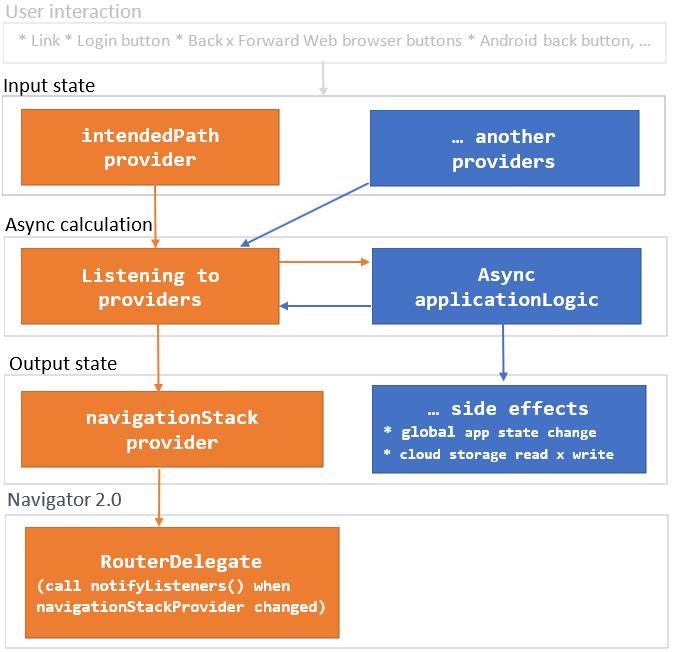
Navigator Data Flow Diagram:

riverpod_navigator

As you can see, changing the Input state starts the async calculation. The result of the calculations is Output state which can have app-specific Side effects. Navigator 2.0 RouterDelegate is then synchronized with navigationStackProvider

Roadmap

I prepared this package for my new project. Its further development depends on whether the community will use it.

  • proofreading because my English is not good. Community help is warmly welcomed.
  • parameterization allowing Cupertino

카테고리

의존성

의존성 목록 5 개

소스 저장소

이 패키지를 사용하는 프로젝트

아직 데이터가 없습니다.