RxNotifier는 ValueNotifier를 투명한 함수형 반응형 프로그래밍(TFRP)으로 확장하는 Flutter/Dart 패키지입니다. 개발자가 함수형 연산자를 사용하여 상태 변경을 조합하고 변환할 수 있게 해주어 반응형 상태 관리를 가능하게 하면서도 ValueNotifier의 단순성을 유지합니다. 기존의 Flutter 앱에 쉽게 통합되며, 빌러플레이트 없이 반응형 패턴을 사용한 상태 관리의 가벼운 대안을 제공합니다. 모든 주요 플랫폼을 지원하며, 불변 업데이트와 스트림과 유사한 변환을 통해 깔끔하고 테스트 가능한 코드를 촉진합니다.
사용 사례
반응형 UI 상태 업데이트
복잡한 상태 로직 조합
여러 ValueNotifiers 교체
상태 변환 간소화
반응형 폼 만들기
비동기 상태 관리
주요 기능
함수형 반응형 프로그래밍
투명한 TFRP 통합
불변 상태 업데이트
스트림 유사 연산자
최소한의 보일러플레이트
크로스 플랫폼 지원
적합한 대상
반응형 상태 관리를 찾는 개발자
조합 가능한 상태 로직이 필요한 앱
함수형 프로그래밍을 선호하는 팀
무거운 상태 관리자를 피하는 프로젝트
Flutter 초보자들이 반응형 패턴을 배우고 있습니다
경량 상태 솔루션을 필요로 하는 앱
고려 사항
함수형 프로그래밍 개념을 이해하고 있어야 합니다
초보자에게 학습 곡선을 도입할 수 있습니다
ValueNotifier를 기반으로 한 반응형 패턴에 국한됨
매우 대규모 상태 관리에 적합하지 않음
중간 복잡도의 상태 요구 사항에 가장 적합
완전한 반응형 프레임워크(예: RxDart)를 대체하지 않습니다
원본 README
연결된 소스 저장소의 README 원문 스냅샷입니다. 최신 내용은 저장소에서 확인하세요.
rx_notifier
The ValueNotifier is a simple, native form of Flutter reactivity.
This extension aims to transparently apply functional reactive programming (TFRP).
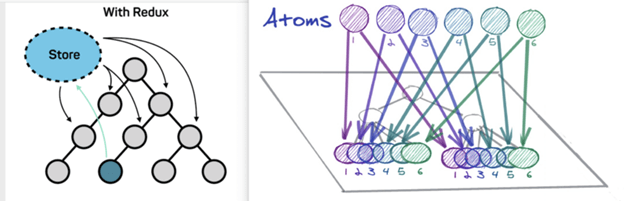
It is possible to implement Recoil Atoms pattern using RxNotifier.
This pattern consists of the state being an object with its own reactivity.
Motivation
Developers still have trouble understanding state management in Flutter.
We had this conclusion after several research in the community fluttering and also
in partner companies.
Atomic State is a noob-friendly state management approuch at the same time
that maintains a reliable structure thinking of scalability and maintenance.
We must take into account some architectural limits to execute this Approach:
All states must be an atom(RxNotifier instance).
All actions must be an atom(RxNotifier instance).
Business rules must be created in the Reducer and not in the Atom.
Layers
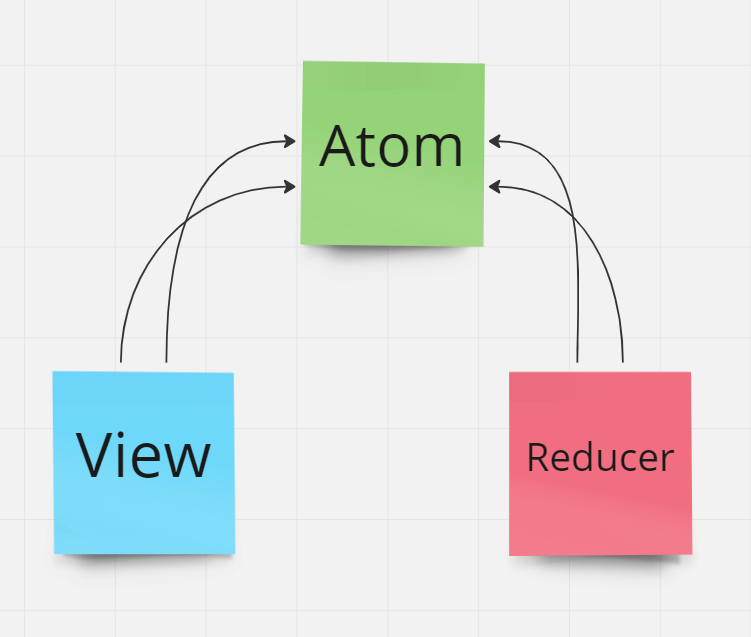
We will have 3 main layers, they are: Atoms, Reducers and Views;
Note that the View (which is the presentation layer) does not know about the Reducer (which is the business rule execution layer).
These two layers share atoms that in turn represent the state and the dispatch of state actions.
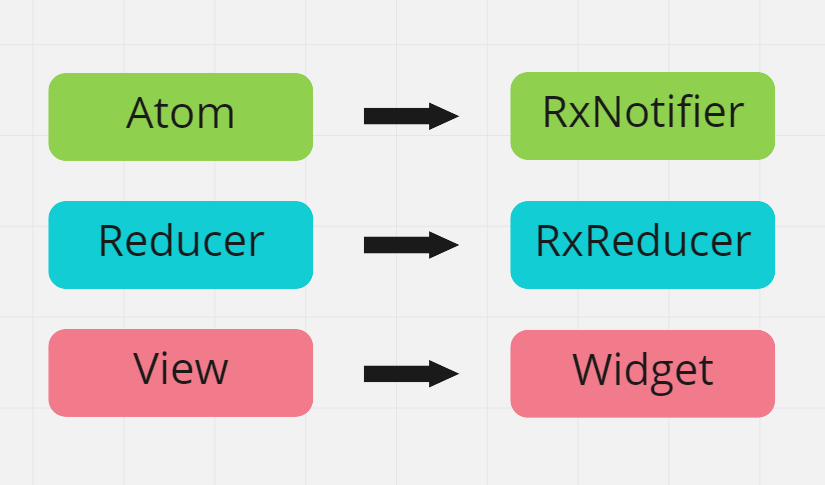
In Flutter these layers translate to Atom(RxNotifier), Reducer(RxReducer) and View(Widget):
Atoms (RxNotifier)
Atom represent the reactive state of an application.
Each atom has its own reactivity.
In this architecture you are forced to split state management
of business rules, which may seem strange at first when seen
that we are always managing and reducing state in the same layer as BLoC and ChangeNotifier for example.
However, dividing state management and business rule execution will help us distribute multiple states to the same widget, and these multiple states will not need to be concatenated beforehand through a facade or proxy.
The layer responsible for making business decisions will be called Reducer:
Reducers can register methods/functions that listen to the reactivity of an Atom(RxNotifier).
View (Widget)
Any widget can listen to changes of one or many atoms,
provided they have the RxRoot widget as their ancestor.
For more details about RxRoot, Read the documentation.
The context.select() method is added via Extension to BuildContext and can be called on any type of Widget, StatefulWidget and StatelessWidget.