패키지, 저장소 및 앱 카테고리 검색

share_social_network 표지
패키지 상세v1.2.9

share_social_network

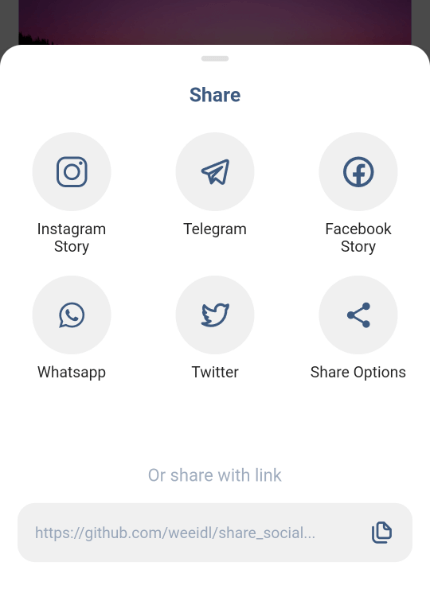
다양한 공유 방법을 제공하는 완성된 플랫폼으로, 특정 인기 앱에 직접 액세스를 제공하거나 내장된 기본 공유 기능만 사용하여 공유해야 합니다.

AndroidiOS
30일 다운로드
16
좋아요
26
Pub 점수
105

패키지 설치

flutter pub add share_social_network

패키지 개요

공개 정보를 바탕으로 생성한 선택 가이드입니다.

share_social_network 패키지는 Flutter 앱에 공유 기능을 간단하게 통합할 수 있는 방법을 제공하며, 사용자가 인기 있는 소셜 플랫폼을 통해 콘텐츠를 공유하거나 시스템의 기본 공유 옵션을 사용할 수 있도록 합니다. 안드로이드 및 iOS에서 네이티브 공유 인텐트에 접근하는 과정을 단순화하여 부가 코드를 줄입니다. 개발자는 최소한의 구성으로 공유를 쉽게 트리거할 수 있으며, 직접 앱 전용 공유와 일반적인 시스템 레벨 공유를 모두 지원합니다. 이 패키지는 복잡한 설정 없이 빠르고 신뢰할 수 있는 공유 기능이 필요한 앱에 이상적입니다.

사용 사례

  • 소셜 미디어 앱 내에서 링크 또는 텍스트 공유
  • 사용자 생성 콘텐츠 배포 활성화
  • 기본 시스템 공유 대화 상자 통합
  • 다중 플랫폼 공유 워크플로우 지원
  • 앱 UI에 공유 버튼 추가하기

주요 기능

  • Flutter와의 간단한 통합
  • Android 및 iOS 지원
  • 인기 소셜 앱에 직접 액세스
  • 시스템 기본 공유로 전환
  • 필수 최소 구성

적합한 대상

  • 기본 공유 기능이 필요한 앱
  • 빠른 공유 구현을 찾는 개발자
  • 크로스 플랫폼 모바일 애플리케이션
  • 소셜 미디어 통합
  • 콘텐츠 공유 플랫폼

고려 사항

  • 공유 인터페이스의 사용자 정의가 제한적
  • 기기의 설치된 소셜 앱에 따라 다릅니다
  • 공유에 대한 내장 분석 없음
  • 일부 플랫폼에서는 적절한 권한이 필요합니다
  • 모든 니치 소셜 네트워크를 지원하지 않을 수 있습니다

원본 README

연결된 소스 저장소의 README 원문 스냅샷입니다. 최신 내용은 저장소에서 확인하세요.

Share Social Network

pub package

A ready-made platform that provides a wide range of ways to share, you will need to provide access directly to certain popular applications or just share using the built-in default sharing.

Platforms

Works on both platforms Android and iOS

Image Image Image
Video Photo Video

Initial settings

Android Configuration
Paste the following attribute in the AndroidManifest.xml tag in the android/app/src/main/AndroidManifest.xml:
 		`xmlns:tools="http://schemas.android.com/tools"`
For example:
        <manifest xmlns:android="http://schemas.android.com/apk/res/android"
         xmlns:tools="http://schemas.android.com/tools"
         package...
Create a xml file named filepaths.xml in the app/src/main/res/xml folder and paste this code in the file :
<?xml version="1.0" encoding="utf-8"?>
<paths xmlns:android="http://schemas.android.com/apk/res/android">
    <cache-path name="image" path="/"/>
</paths>
Add this code snippet to the very bottom manifest/application in the android/app/src/main/AndroidManifest.xml insert after meta-data:
 		     <provider
            android:name="androidx.core.content.FileProvider"
            android:authorities="${applicationId}.com.weeidl.share_social_network"
            android:exported="false"
            android:grantUriPermissions="true"
            tools:replace="android:authorities">
            <meta-data
                android:name="android.support.FILE_PROVIDER_PATHS"
                android:resource="@xml/filepaths" />
        </provider>
iOS Configuration
Add this to your Info.plist to use share on instagram and facebook story
<key>LSApplicationQueriesSchemes</key>
	<array>
	<string>instagram-stories</string>
	<string>facebook-stories</string>
	<string>facebook</string>
	<string>instagram</string>
	<string>twitter</string>
	<string>whatsapp</string>
 <string>tg</string>
	</array>
Add this if you are using share on facebook. For this you have to create an app on https://developers.facebook.com/ and get the App ID
<key>FacebookAppID</key>
<string>xxxxxxxxxxxxxxx</string>

Getting Started

Add the package to your pubspec.yaml:

   share_social_network: ^1.2.9

In your dart file, import the library:

    import 'package:share_social_network/share_social_network.dart';

Instead of using a ShareSocialNetwork use ShareSocialNetwork.show Widget:

  ShareSocialNetwork.show(
    context: context,
    backgroundColor: Colors.white,
    pillColor: Colors.black12,
    transitionDuration: Duration(milliseconds: 300),
    screenshotController: screenshotController,
    copyToClipboard: "https://github.com/weeidl/share_social...",
    telegram: Telegram(
      content: "Hello World \n https://github.com/weeidl",
    ),
    instagram: Instagram(
      backgroundBottomColor: "#FF7391",
      backgroundTopColor: "#591E78",
      attributionURL: "https://deep-link-url",
      imagePath: imagePath,
    ),
    facebook: Facebook(
      backgroundTopColor: "#ffffff",
      attributionURL: "https://github.com/weeidl",
      backgroundBottomColor: "#000000",
      imagePath: imagePath,
      appId: "xxxxxxxxxxxxx",
    ),
    more: More(
      message: 'Hello World \n https://github.com/weeidl',
    ),
    twitter: Twitter(
      captionText: 'Share twitter',
      hashtags: ["hello", "world", "weeild", "artur"],
      url: 'https://github.com/weeidl',
      trailingText: " \nweeidl",
    ),
    whatsapp: Whatsapp(
      content: 'Hello World \n https://github.com/weeidl',
    ),
  );
 }
Example:

Example of how to send something to instagram:

ScreenshotController screenshotController = ScreenshotController();
void shareSocialNetwork(BuildContext context) async {
  String imagePath = await screenshotController.capture().then((image) async {
    final directory = await getApplicationDocumentsDirectory();
    final file = await File('${directory.path}/temp.png').create();
    await file.writeAsBytes(image!);
    return file.path;
  });
  ShareSocialNetwork.show(
    context: context,
    backgroundColor: Colors.white,
    pillColor: Colors.black12,
    transitionDuration: Duration(milliseconds: 300),
    screenshotController: screenshotController,
    copyToClipboard: "https://github.com/weeidl/share_social...",
    instagram: Instagram(
      backgroundBottomColor: "#FF7391",
      backgroundTopColor: "#591E78",
      attributionURL: "https://deep-link-url",
      imagePath: imagePath,
    ),
  );
}
Follow Me:

instagram Telegram LinkedIn GitHub

카테고리

의존성

의존성 목록 3 개

소스 저장소

이 패키지를 사용하는 프로젝트

아직 데이터가 없습니다.