패키지, 저장소 및 앱 카테고리 검색

show_up_animation 표지
패키지 상세v2.1.2

show_up_animation

"표시" 애니메이션 구현을 간소화하는 플러터 패키지

AndroidiOSWebmacOSWindowsLinux
30일 다운로드
1.7천
좋아요
175
Pub 점수
160

패키지 설치

flutter pub add show_up_animation

패키지 개요

공개 정보를 바탕으로 생성한 선택 가이드입니다.

위젯이 사용자 지정 가능한 시간과 효과로 화면에 부드럽게 나타나는 '쇼업' 애니메이션을 만들기 쉽게 해주는 플러터 패키지입니다. 동적 콘텐츠를 가진 앱에서 사용자 경험을 향상시키기 위해 요소를 화면에 애니메이션으로 표시하는 깔끔하고 직관적인 API를 제공합니다. 이 패키지는 모바일, 웹, 데스크톱을 포함한 모든 주요 플랫폼을 지원하며 장치 간 일관된 동작을 보장합니다. 개발자는 복잡한 애니메이션 로직을 작성하지 않고도 어떤 위젯에도 진입 애니메이션을 쉽게 적용할 수 있습니다.

사용 사례

  • 온보딩 화면
  • 로딩 콘텐츠 전환
  • 리스트 항목 노출 애니메이션
  • 모달 팝업 입구
  • 동적 UI 업데이트

주요 기능

  • 입장 애니메이션을 위한 간단한 API
  • 사용자 정의 가능한 지속 시간 및 지연
  • 크로스 플랫폼 호환성
  • 다양한 애니메이션 유형을 지원합니다
  • 기존 위젯과의 간편한 통합

적합한 대상

  • 초보자 플러터 개발자
  • 마이크로 인터랙션을 구현하는 UI/UX 디자이너
  • 부드러운 시각적 전환을 필요로 하는 앱
  • 동적 콘텐츠 로딩을 가진 프로젝트
  • 애니메이션을 통한 사용자 참여도 향상

고려 사항

  • 과도하게 사용할 경우 성능에 영향을 줄 수 있습니다
  • 기본 애니메이션 외에 사용자 지정 기능이 제한적
  • 거친 효과를 피하기 위해 신중한 타이밍이 필요합니다
  • 복잡한 애니메이션 시퀀스에 적합하지 않습니다
  • UX의 명확성을 유지하기 위해 적절하게 사용하는 것이 좋습니다

원본 README

연결된 소스 저장소의 README 원문 스냅샷입니다. 최신 내용은 저장소에서 확인하세요.

show_up_animation Build Status

A flutter package to simplify the implementation of "show up" animation

Getting Started

Install dependencies

dependencies:
  show_up_animation: ^2.1.2

Then import wherever you want to implement the animation

import 'package:show_up_animation/show_up_animation.dart';
ShowUpAnimation

Wrap any widget you want to animate inside ShowUpAnimation widget and provide a Duration() to delayStart field to control after how much delay the animation fires.

ShowUpAnimation(
  delayStart: Duration(seconds: 1),
  animationDuration: Duration(seconds: 1),
  curve: Curves.bounceIn,
  direction: Direction.vertical,
  offset: 0.5,
  child: YourWidget(),
),
ShowUpList

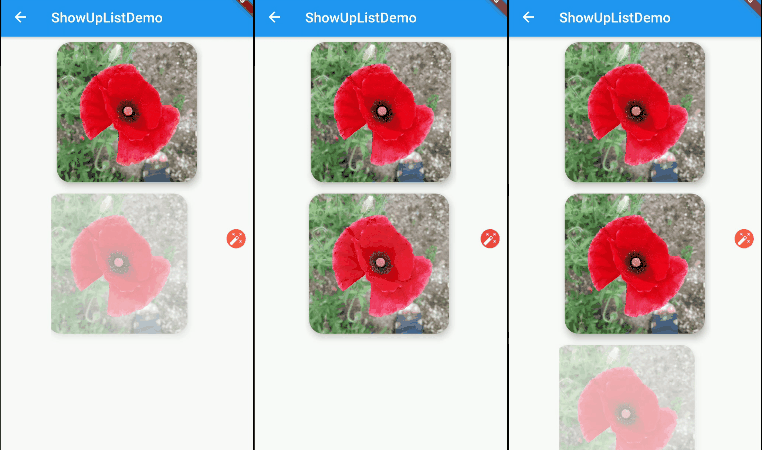
To create a list of "show up" animations, use ShowUpList and provide your list of widgets to children parameter.

ShowUpList(
  direction: Direction.horizontal,
  animationDuration: Duration(milliseconds: 1500),
  delayBetween: Duration(milliseconds: 800),
  offset: -0.2,
  children: <Widget>[
    Widget1(),
    Widget2(),
    Widget3(),
    Widget4(),
  ],
),

Properties

ShowUpAnimation Properties

You can customize how to do you want to animate your child using the parameters described below.

Property Function
child The widget on which to apply the given ShowUpAnimation
offset The offset by which to slide and [child] into view from [Direction]. Use negative value to reverse animation [direction]. Defaults to 0.2
curve The curve used to animate the [child] into view. Defaults to [Curves.easeIn]
direction horizontal or vertical
delayStart The delay with which to animate the [child]. Takes in a [Duration] and defaults to 0 seconds
animationDuration The total duration in which the animation completes. Defaults to 800 milliseconds
ShowUpList Properties
Property Function
children The list of widgets on which to apply the given ShowUpAnimation
offset The offset by which to slide and [child] into view from [Direction]. Use negative value to reverse animation [direction]. Defaults to 0.2
curve The curve used to animate each [child] into view. Defaults to [Curves.easeIn]
direction horizontal or vertical
delayBetween he delay between animating each [children] into view. Takes in a [Duration] and defaults to 300 milliseconds
animationDuration The total duration in which the animation of each child completes. Defaults to 500 milliseconds

Demo

Text demo Show up list demo

카테고리

소스 저장소

이 패키지를 사용하는 프로젝트

아직 데이터가 없습니다.