패키지, 저장소 및 앱 카테고리 검색

speech_balloon 표지
패키지 상세v0.0.4

speech_balloon

이것은 간단한 대화창을 생성하는 플러터 위젯입니다. 이 위젯은 단순한 대화창을 표시하고 테두리가 있는 대화창을 재현할 수 있습니다.

AndroidiOSWebmacOSWindowsLinux
30일 다운로드
6.1천
좋아요
43
Pub 점수
155

패키지 설치

flutter pub add speech_balloon

패키지 개요

공개 정보를 바탕으로 생성한 선택 가이드입니다.

간단하고 사용자 정의 가능한 말풍선을 생성하는 플러터 위젯이며, 선택적 테두리도 지원합니다. 채팅 인터페이스, 도구 설명 또는 알림 팝업에 적합하며, 안드로이드, iOS, 웹, 맥OS, 윈도우, 리눅스 등 다양한 플랫폼을 지원합니다. 가볍고 쉽게 통합할 수 있어 개발자가 최소한의 설정으로 전통적인 말풍선 형식으로 텍스트를 표시할 수 있습니다. 소셜 미디어 앱이나 대화 요소가 필요한 UI에 특히 유용합니다.

사용 사례

  • 채팅 인터페이스
  • 툴팁 및 힌트
  • 알림 팝업
  • 소셜 미디어 UI
  • 사용자 피드백 버블

주요 기능

  • 간단한 대화 버블 디자인
  • 선택적 테두리 지원
  • 크로스 플랫폼 호환성
  • 간편한 통합
  • 사용자 정의 가능한 외관
  • 경량 구현

적합한 대상

  • UI 디자이너
  • 채팅 앱 개발자
  • 모바일 및 웹 앱 제작자
  • 교육 앱 개발자
  • 프로토타이핑 도구

고려 사항

  • 기본 사용자 정의를 넘어서는 스타일링 옵션이 제한적입니다
  • 복잡한 애니메이션에 적합하지 않습니다
  • 정적 텍스트 표시에 최적
  • 수동 위치 지정이 필요합니다
  • 내장된 화살표 방향 제어 없음

원본 README

연결된 소스 저장소의 README 원문 스냅샷입니다. 최신 내용은 저장소에서 확인하세요.

speech_balloon

A flutter widget that emulates a speech balloon.

This widget is a copy of https://pub.dev/packages/speech_balloon

I created this because the previous creator doesn't seem to have updated it.

Changes from speech_balloon include the ability to display a border.

Installing

Dart Pub: https://pub.dartlang.org/packages/speech_balloon#-installing-tab-

  1. Depend on it

    Add this to your package's pubspec.yaml file:

  speech_balloon: ^0.0.4
  1. Install it

    You can install packages from the command line:

$ flutter packages get

Alternatively, your editor might support flutter packages get. Check the docs for your editor to learn more.

  1. Import it

Now in your Dart code, you can use:

import 'package:speech_balloon/speech_balloon.dart';

Usage

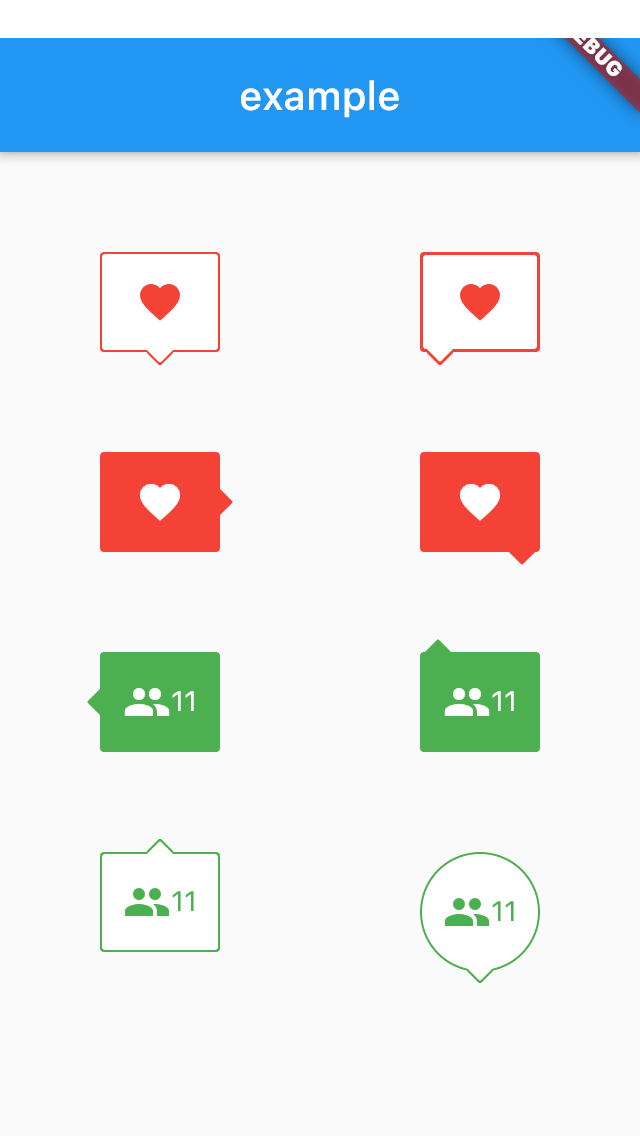
Creates a widget that emulates a speech balloon. Could be used for a tooltip, or as a pop-up notification, etc.

Example Project

Example Code

import 'package:flutter/material.dart';
import 'package:speech_balloon/speech_balloon.dart';

void main() => runApp(MyApp());

class MyApp extends StatefulWidget {
  @override
  _MyAppState createState() => _MyAppState();
}

class _MyAppState extends State<MyApp> {
  @override
  Widget build(BuildContext context) {
    return MaterialApp(
      home: Scaffold(
        appBar: AppBar(
          title: const Text('example'),
        ),
        body: Center(
          child: Row(
            mainAxisAlignment: MainAxisAlignment.spaceAround,
            children: [
              Column(
                children: [
                  SizedBox(height: 50),
                  SpeechBalloon(
                    nipLocation: NipLocation.bottom,
                    borderColor: Colors.red,
                    color: Colors.white,
                    child: Icon(
                      Icons.favorite,
                      color: Colors.red,
                    ),
                  ),
                  SizedBox(height: 50),
                  SpeechBalloon(
                    nipLocation: NipLocation.right,
                    color: Colors.red,
                    child: Icon(
                      Icons.favorite,
                      color: Colors.white,
                    ),
                  ),
                  SizedBox(height: 50),
                  SpeechBalloon(
                    nipLocation: NipLocation.left,
                    color: Colors.green,
                    child: Row(
                      mainAxisAlignment: MainAxisAlignment.center,
                      children: [
                        Icon(
                          Icons.people,
                          color: Colors.white,
                        ),
                        Text(
                          '11',
                          style: TextStyle(color: Colors.white),
                        ),
                      ],
                    ),
                  ),
                  SizedBox(height: 50),
                  SpeechBalloon(
                    nipLocation: NipLocation.top,
                    borderColor: Colors.green,
                    child: Row(
                      mainAxisAlignment: MainAxisAlignment.center,
                      children: [
                        Icon(
                          Icons.people,
                          color: Colors.green,
                        ),
                        Text(
                          '11',
                          style: TextStyle(color: Colors.green),
                        ),
                      ],
                    ),
                  ),
                ],
              ),
              Column(
                children: [
                  SizedBox(height: 50),
                  SpeechBalloon(
                    nipLocation: NipLocation.bottomLeft,
                    borderColor: Colors.red,
                    color: Colors.white,
                    borderWidth: 3,
                    child: Icon(
                      Icons.favorite,
                      color: Colors.red,
                    ),
                  ),
                  SizedBox(height: 50),
                  SpeechBalloon(
                    nipLocation: NipLocation.bottomRight,
                    color: Colors.red,
                    child: Icon(
                      Icons.favorite,
                      color: Colors.white,
                    ),
                  ),
                  SizedBox(height: 50),
                  SpeechBalloon(
                    nipLocation: NipLocation.topLeft,
                    color: Colors.green,
                    child: Row(
                      mainAxisAlignment: MainAxisAlignment.center,
                      children: [
                        Icon(
                          Icons.people,
                          color: Colors.white,
                        ),
                        Text(
                          '11',
                          style: TextStyle(color: Colors.white),
                        ),
                      ],
                    ),
                  ),
                  SizedBox(height: 50),
                  SpeechBalloon(
                    nipLocation: NipLocation.bottom,
                    borderColor: Colors.green,
                    height: 60,
                    width: 60,
                    borderRadius: 40,
                    offset: Offset(0, -1),
                    child: Row(
                      mainAxisAlignment: MainAxisAlignment.center,
                      children: [
                        Icon(
                          Icons.people,
                          color: Colors.green,
                        ),
                        Text(
                          '11',
                          style: TextStyle(color: Colors.green),
                        ),
                      ],
                    ),
                  ),
                ],
              ),
            ],
          ),
        ),
      ),
    );
  }
}

카테고리

소스 저장소

이 패키지를 사용하는 프로젝트

아직 데이터가 없습니다.