패키지, 저장소 및 앱 카테고리 검색

stacked_listview 표지
패키지 상세v1.0.4

stacked_listview

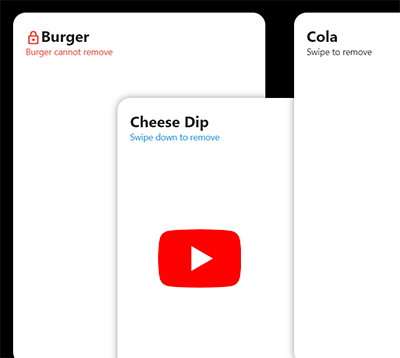
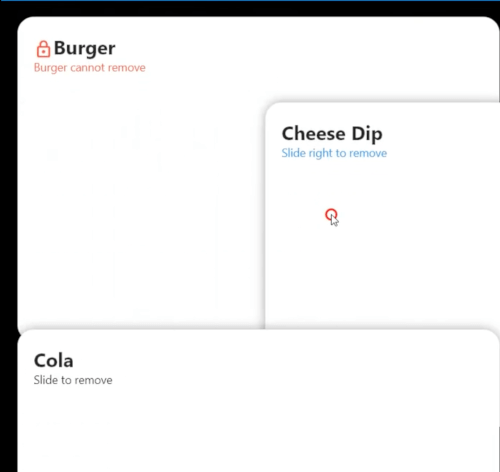
겹쳐진 자식 요소가 있는 ListView입니다. 스크롤할 때 각 자식 요소가 먼저 겹쳐집니다.

AndroidiOSWebmacOSWindowsLinux
30일 다운로드
1.6천
좋아요
52
Pub 점수
150

패키지 설치

flutter pub add stacked_listview

패키지 개요

공개 정보를 바탕으로 생성한 선택 가이드입니다.

StackedListView는 자식 요소들을 서로 위에 겹쳐서 표시하는 Flutter 위젯으로, 첫 번째 항목은 완전히 보이고 사용자가 스크롤할수록 후속 항목이 부분적으로 겹쳐집니다. 항목들이 서로 쌓여 있는 듯한 시각적인 효과를 만들어내며, 동적이고 계층적인 리스트 인터페이스를 만들기에 적합합니다. 이 패키지는 Android, iOS, Web, macOS, Windows, Linux 등 모든 주요 플랫폼을 지원하여 크로스플랫폼 애플리케이션에 매우 유연하게 활용할 수 있습니다. 복잡한 커스텀 페인팅 없이 독특한 리스트 애니메이션을 원하는 개발자를 위한 것입니다.

사용 사례

  • 계층적 스크롤 가능한 목록 만들기
  • 깊이를 가진 카드 기반 UI 디자인
  • 시각적으로 풍부한 피드 레이아웃 구축
  • 인터랙티브 스택 아이템 전환 구현
  • 시각적 신호를 통한 모바일 앱 탐색 향상

주요 기능

  • 스택된 자식 렌더링
  • 레이어 효과를 갖춘 부드러운 스크롤링
  • 크로스 플랫폼 호환성
  • pub를 통한 간단한 통합
  • 사용자 정의 가능한 스택 동작
  • 내장 애니메이션 지원

적합한 대상

  • 시각적 깊이를 찾는 UI 디자이너
  • 현대적인 앱 인터페이스를 구축하는 개발자
  • 카드 또는 타임라인 스타일 콘텐츠를 가진 앱
  • 미세한 애니메이션 목록 효과가 필요한 프로젝트
  • Flutter 초보자가 고급 리스트 패턴 탐색

고려 사항

  • 항목이 많을 경우 성능에 영향을 줄 수 있습니다
  • 신중한 레이아웃 계획이 필요합니다
  • 중간 규모의 항목 수에 가장 적합
  • 스택을 넘어서는 사용자 정의가 제한적
  • 밀집된 데이터 목록에 적합하지 않음
  • 저사양 기기에서 테스트 필요

원본 README

연결된 소스 저장소의 README 원문 스냅샷입니다. 최신 내용은 저장소에서 확인하세요.

A Stacked ListView

Video

v1.0.4 Breaking Change

  • onRemove(int index) changed to onRemove(int index, AxisDirection dir)
  • beforeRemove(int index) changed to beforeRemove(int index, AxisDirection dir)
🎉🎉 Yes, Now you can know the user's swipe direction for each list item 🎉🎉

Install

flutter pub add stacked_listview

Example code:

Scaffold(
  appBar: AppBar(),
  backgroundColor: Colors.black,
  body: SafeArea(
    child: StackedListView(
      padding: EdgeInsets.only(left: 20, right: 20, top: 50),
      itemCount: data.length,
      itemExtent: itemHeight,
      heightFactor: 0.7,
      fadeOutFrom: 0.7,
      onRemove: (index, direction) {
        setState(() {
          data.removeAt(index);
        });
      },
      beforeRemove: (index, direction) async {
        return await showDialog<bool>(
          context: context,
          builder: (_) => AlertDialog(
            title: Text('Delete ${data[index]} ?'),
            actions: [
              TextButton(
                  onPressed: () => Navigator.pop(context),
                  child: Text('Cancel')),
              ElevatedButton(
                onPressed: () => Navigator.pop(context, true),
                child: Text('Delete'),
              ),
            ],
          ),
        ).then((value) => value == true);
      },
      builder: (_, index) {
        return Container(
          width: double.infinity,
          height: itemHeight,
          decoration: BoxDecoration(
            borderRadius: BorderRadius.all(Radius.circular(20.0)),
            color: Colors.white,
            boxShadow: [
              BoxShadow(color: Colors.black.withAlpha(100), blurRadius: 10),
            ],
          ),
          child: Column(
            crossAxisAlignment: CrossAxisAlignment.start,
            children: [
              Text(
                data[index],
                style: TextStyle(fontSize: 24, fontWeight: FontWeight.bold),
              ),
              Text('Slide to left or right to delete'),
            ],
          ),
          padding: EdgeInsets.all(20),
        );
      },
    ),
  ),
);

카테고리

소스 저장소

이 패키지를 사용하는 프로젝트

아직 데이터가 없습니다.