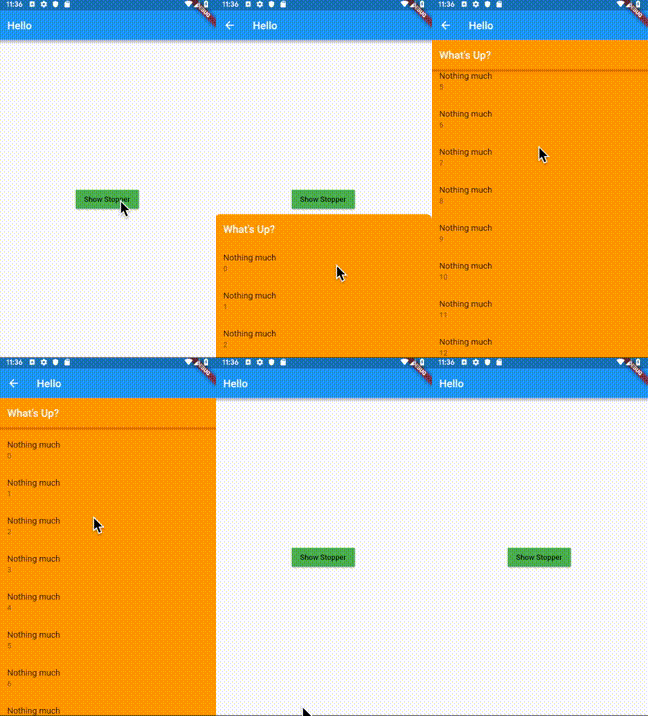
Stopper는 미리 정의된 정지 높이를 갖춘 하단 시트를 제공하는 플러터 패키지입니다. 사용자는 시트를 드래그하여 특정 위치까지 확장할 수 있습니다. 설정된 한계 내에서 부드럽고 제어 가능한 확장을 통해 사용자 인터랙션을 향상시키며, 모달이나 보조 콘텐츠 패널에 적합합니다. 이 패키지는 가볍고 기존 플러터 앱에 원활하게 통합됩니다. 사용자 정의 정지 지점과 애니메이션을 지원하여 직관적인 UI 디자인에 적합합니다. 소스 코드는 투명성과 기여를 위해 GitHub에서 공개되어 있습니다.
사용 사례
고정 확장 수준을 가진 인터랙티브 바텀 시트
사용자 정의 가능한 모달 패널
패널 높이에 대한 사용자 제어 향상
동적 콘텐츠 오버레이
스무스한 드래그 확장 인터페이스
주요 기능
사전 정의된 정지 높이
드래그 기반 확장
사용자 정의 가능한 정지 지점
부드러운 애니메이션
경량이며 간편한 통합
적합한 대상
인터랙티브한 바텀 시트를 개발하는 개발자
제어된 패널 확장을 필요로 하는 앱
정밀한 하단 시트 동작이 필요한 UI
사용자 경험에 중점을 둔 플러터 프로젝트
일관된 패널 상호작용을 갖춘 디자인 시스템
고려 사항
플랫폼별 제한 사항에 대해 언급되지 않음
정지 높이의 수동 구성이 필요합니다
하단 시트 사용 사례에 한정
내장된 상태 관리 없음
고급 기능을 위해 외부 종속성에 의존합니다
원본 README
연결된 소스 저장소의 README 원문 스냅샷입니다. 최신 내용은 저장소에서 확인하세요.
Stopper
A bottom sheet that can be expanded to one of the pre-defined stop heights by dragging.
Introduction
Some iOS applications have a bottom sheet that has two states: half-expanded and fully expanded.
The standard showBottomSheet method lacks such a capability. The complexity in implementing this
behavior arises when the the bottom sheet needs to be scrollable, making scroll and drag
event handling difficult as these gestures can be used for scrolling the list as well as
for dragging the bottom sheet up/down, depending on the position of the bottom sheet and the current
scroll position. The Stopper plugin addresses this problem by:
Letting the developer define discreet height values (stops) to which the bottom sheet can be expanded;
Using the builder pattern to build the bottom sheet depending on the current stop value;
Instantiating ScrollController and ScrollPhysics objects and passing them to the
bottom sheet builder;
Using animations to make transitions of the bottom sheet between the stops look natural;
Providing a convenient showStopper function to be used instead of showBottomSheet in
order to handle dismissal of the bottom sheet by the user.
This plugin utilizes bottom sheet functionality from the Scaffold
widget and avoids copy/paste from the standard library, making the implementation clear and
easy to maintain.
Note: The build context passed to showStopper must have a Scaffold widget as an ancestor.
Therefore it's recommended to use Builder to build the body of the Scaffold. See
the complete example app provided in this package for details on this approach.