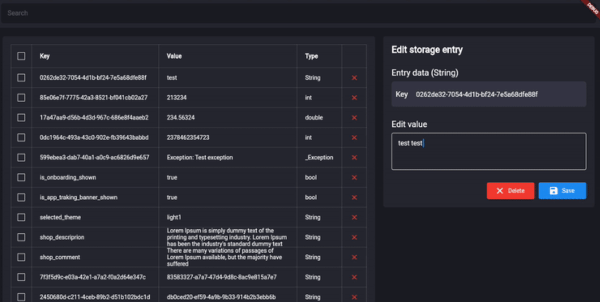
Storage View는 어떤 데이터베이스, 스토리지 시스템 또는 shared_preferences에서 오는 데이터를 시각화하고 관리하기 위해 설계된 Flutter 인스펙터 도구입니다. Android, iOS, Web, macOS, Windows, Linux 등 다양한 플랫폼에서 저장된 값을 실시간으로 탐색할 수 있는 인터페이스를 제공합니다. 디버깅 및 개발에 이상적이며, 코드 수정 없이 지속적인 데이터를 검사하고 편집하며 모니터링할 수 있습니다. 간단한 pub add 명령어로 Flutter 워크플로우에 원활하게 통합됩니다.
사용 사례
지속 데이터 문제 디버깅
shared_preferences 값 검사
개발 중 데이터베이스 상태 모니터링
실시간 데이터 시각화
스토리지 로직 테스트
다중 플랫폼에서 앱 상태 탐색
주요 기능
크로스 플랫폼 지원
실시간 데이터 검사
편집 가능한 저장 값
pub를 통한 간단한 통합
데이터베이스용 시각적 인터페이스
다양한 스토리지 유형 지원
적합한 대상
디버그 모드에서의 Flutter 개발자
팀이 지속성 로직 테스트 중
앱 유지보수 담당자가 데이터 문제 해결
빠른 데이터 확인이 필요한 프론트엔드 엔지니어
저장 메커니즘 학습을 위한 교육적 용도
고려 사항
생산 환경 사용을 위한 것이 아님
개발 모드에서 수동으로 활성화해야 합니다
잘못 사용될 경우 민감한 데이터가 노출될 수 있습니다
로컬 스토리지 검사에 제한됨
암호화 처리 없음
개발 전용으로 최적입니다
원본 README
연결된 소스 저장소의 README 원문 스냅샷입니다. 최신 내용은 저장소에서 확인하세요.
StorageView 🔎
Flutter inspector tool for any database, storage and shared_preferences. Check and modify database values from UI of application.
Show some ❤️ and star the repo to support the project!
Getting started
Follow these steps to use this package
Add dependency
dependencies:storage_view:^0.1.0-dev.5
Add import package
import'package:storage_view/storage_view.dart';
Implement driver
The package uses a driver StorageDriver to interact with the database.
In order to connect your database you should use one of available drivers:
After the driver was connected, you can use StorageView anywhere in your application.
final _mockStorageDriver = MockStorageDriver();
Scaffold(
    body: StorageView(storageDriver: _mockStorageDriver),
),
Additional information
The project is under development and ready for your pull-requests and issues 👍
Thank you for support ❤️
For help getting started with 😍 Flutter, view
online documentation, which offers tutorials,
samples, guidance on mobile development, and a full API reference.