패키지, 저장소 및 앱 카테고리 검색

패키지 상세v0.0.2

swipeable_button_view

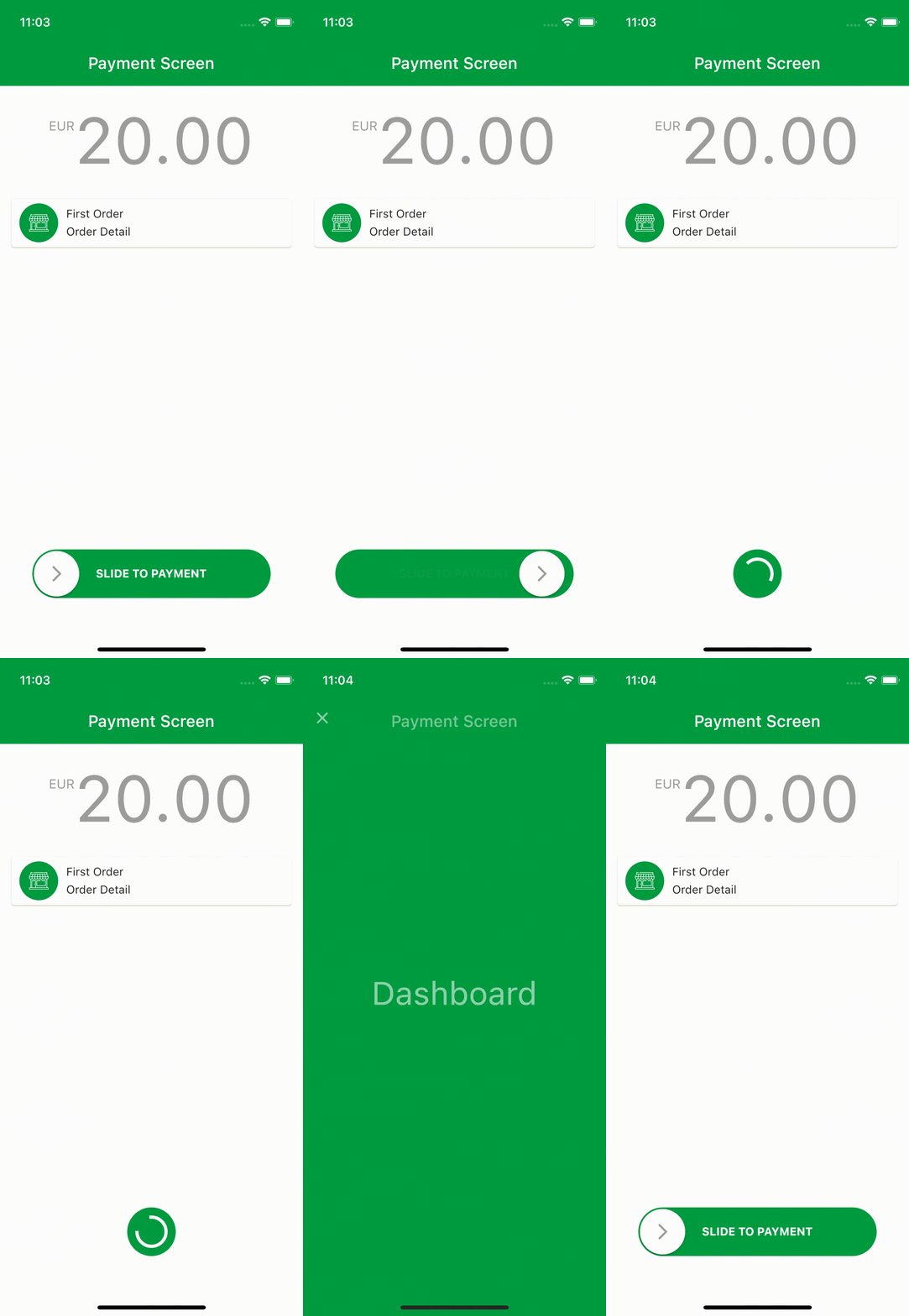
swipeable_button_view를 사용하여 리플 애니메이션 페이지를 만들 수 있습니다.

AndroidiOSWebmacOSWindowsLinux
30일 다운로드
2.7천
좋아요
114
Pub 점수
140

패키지 설치

flutter pub add swipeable_button_view

패키지 개요

공개 정보를 바탕으로 생성한 선택 가이드입니다.

SwipeableButtonView는 스와이프 제스처를 통해 상호작용적이고 리플 애니메이션 버튼 및 페이지를 생성할 수 있는 Flutter 패키지입니다. 사용자가 버튼 위에서 스와이프할 때 부드러운 애니메이션과 반응형 피드백을 제공하여 사용자 참여도를 높입니다. 손가락 제스처 기반 인터랙션을 필요로 하는 현대적인 UI에 적합하며, Android, iOS, Web, macOS, Windows, Linux 등 다양한 플랫폼을 지원합니다. Flutter 앱에 원활하게 통합되며, 사용자 정의 가능한 시각 효과와 직관적인 터치 인터랙션을 제공합니다. 개발자는 최소한의 코드로 스와이프 기반 네비게이션 또는 작업을 쉽게 구현할 수 있습니다. 가벼운 설계 덕분에 단순한 인터페이스부터 복잡한 제스처 기반 인터페이스까지 모두 활용 가능합니다.

사용 사례

  • 제스처 기반 탐색
  • 인터랙티브 버튼 애니메이션
  • 스와이프 시 리플 효과
  • 모바일 우선 UI 컴포넌트
  • 크로스 플랫폼 제스처 지원
  • 온보딩 화면 활용

주요 기능

  • 스와이프 시 리플 애니메이션
  • 다중 플랫폼 호환성
  • 사용자 정의 가능한 스와이프 동작
  • 부드러운 전환 효과
  • 경량이며 통합이 쉬움
  • 터치 및 드래그 제스처를 지원합니다

적합한 대상

  • 제스처가 풍부한 앱을 개발하는 개발자
  • 상호작용 가능한 UI 요소를 찾는 디자이너
  • 스와이프로 활성화 기능을 필요로 하는 앱
  • 크로스 플랫폼 모바일 및 웹 애플리케이션
  • UI/UX 중심의 Flutter 프로젝트

고려 사항

  • 복잡한 레이아웃을 위해 추가 스타일링이 필요할 수 있습니다
  • 저사양 기기에서의 성능 영향
  • 스와이프 기반 상호작용에 제한됨
  • 비제스처 워크플로우에는 적합하지 않음
  • 제스처 인식에서 에지 케이스를 신중하게 처리해야 합니다
  • 터치 기기용으로 가장 적합

원본 README

연결된 소스 저장소의 README 원문 스냅샷입니다. 최신 내용은 저장소에서 확인하세요.

swipeable_button_view

Pub Version License

You can create ripple animated pages with swipeable_button_view.

Install

Add swipeable_button_view: to your pubspec.yaml dependencies then run flutter pub get

dependencies:
  swipeable_button_view:

Then import the package to use

import 'package:swipeable_button_view/swipeable_button_view.dart';

Example

import 'package:swipeable_button_view/swipeable_button_view.dart';

SwipeableButtonView(
    buttonText: 'SLIDE TO PAYMENT',
    buttonWidget: Container(
        child: Icon(Icons.arrow_forward_ios_rounded,
            color: Colors.grey,
                ),),
    activeColor: Color(0xFF009C41),
    isFinished: isFinished,
    onWaitingProcess: () {
    Future.delayed(Duration(seconds: 2), () {
            setState(() {
                isFinished = true;
                      });
                    });
                  },
    onFinish: () async {
        await Navigator.push(context,
                        PageTransition(
                            type: PageTransitionType.fade,
                            child: DashboardScreen()));

                    //TODO: For reverse ripple effect animation
                    setState(() {
                      isFinished = false;
                    });
                  },
)

Screen Recording

Props

props types defaultValues isRequired
onFinish VoidCallback true
onWaitingProcess VoidCallback true
activeColor Color true
buttonWidget Widget true
buttonText String true
isFinished bool false
isActive bool true
disableColor Color Colors.grey
buttonColor Color Colors.white
buttontextstyle TextStyle TextStyle(color: Colors.white, fontWeight: FontWeight.bold)
indicatorColor Animation<Color?> AlwaysStoppedAnimation<Color>(Colors.white)})

카테고리

소스 저장소

이 패키지를 사용하는 프로젝트

아직 데이터가 없습니다.