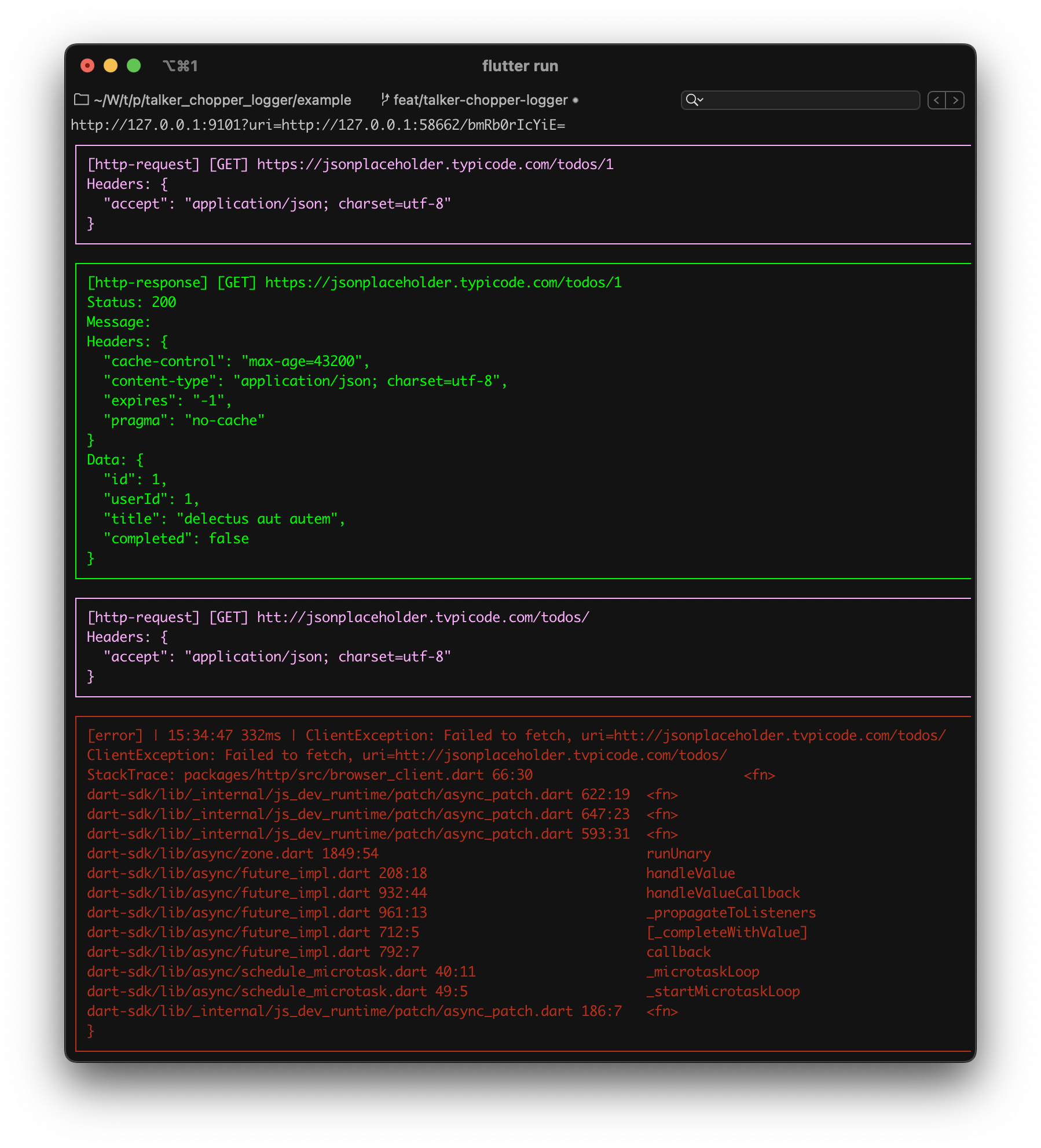
Talker Dio Logger는 Dart 및 Flutter용 Talker 프레임워크 위에 구축된 가벼우면서도 사용자 정의 가능한 HTTP 클라이언트 로거입니다. Dio와 원활하게 통합되어 HTTP 요청과 응답에 대한 상세한 로깅을 제공하며, 사용자 정의 형식, 필터링 및 출력 대상 지원 기능을 갖추고 있습니다. 디버깅 및 네트워크 활동 모니터링을 위해 설계되었으며, API 상호작용에 대한 가시성을 높이되 큰 오버헤드 없이 제공합니다. 이 로거는 Android, iOS, Web, macOS, Windows, Linux를 포함한 모든 주요 플랫폼을 지원합니다.
사용 사례
API 호출 디버깅
네트워크 성능 모니터링
요청/응답 세부 정보 기록
기존 Talker 워크플로우와의 통합
실시간 네트워크 점검
주요 기능
사용자 정의 로그 형식
특정 요청/응답 필터링
Talker 로깅 생태계와의 통합
크로스 플랫폼 지원
최소한의 성능 영향
적합한 대상
HTTP 요청에 Dio를 사용하는 개발자
세부 네트워크 로깅이 필요한 팀
디버그 친화적인 API 추적을 필요로 하는 애플리케이션
로그 기록을 위해 Talker를 활용하는 프로젝트
고려 사항
Talker를 설정해야 합니다
생산 환경에서 로그 양이 증가할 수 있습니다
고급 사용 사례를 위한 사용자 지정 구성 필요
필터링 없이 프로덕션 전용 로깅을 위한 것이 아님
원본 README
연결된 소스 저장소의 README 원문 스냅샷입니다. 최신 내용은 저장소에서 확인하세요.
Advanced error handler and logger for dart and flutter apps
Log your app actions, catch and handle exceptions and errors, show alerts and share log reports
Show some ❤️ and star the repo to support the project!
For better understanding how it works check
Web Demo page
Motivation
🚀 The main goal of the project is provide ability to understand where the error occurs in a shortest possible time
✅ Compatible with any state managements
✅ Works with any crash reporting tool (Firebase Crashlytics, Sentry, custom tools, etc.)
✅ Logs UI output of Flutter app on the screen
✅ Allows sharing and saving logs history and error crash reports
✅ Displays alerts for UI exceptions.
✅ Built-in support for dio HTTP logs
✅ Built-in support for http logs
✅ Built-in support for BLoC logs
✅ Built-in support for Riverpod logs
✅ Built-in support for Chopper HTTP logs
✅ Built-in support for GRPC calls
✅ Check all features
Packages
Talker is designed for any level of customization.
Flutter extensions for talker Colored Flutter app logs (iOS and Android), logs list screen, showing error messages at UI out of the box, route observer, etc
Follow these steps to the coolest experience in error handling
Add dependency
dependencies:talker:^5.1.20
Easy to use
You can use Talker instance everywhere in your app
Simple and concise syntax will help you with this
import'package:talker/talker.dart';
final talker = Talker();
/// Just logs
talker.warning('The pizza is over 😥');
talker.debug('Thinking about order new one 🤔');
// Handling Exception's and Error'stry {
throwException('The restaurant is closed ❌');
} catch (e, st) {
talker.handle(e, st);
}
/// Just logs
talker.info('Ordering from other restaurant...');
talker.info('Payment started...');
talker.good('Payment completed. Waiting for pizza 🍕');
Configure the error handler and logger for yourself
final talker = Talker(
settings: constTalkerSettings(
/// You can enable/disable all talker processes with this field
enabled: true,
/// You can enable/disable saving logs data in history
useHistory: true,
/// Length of history that saving logs data
maxHistoryItems: 100,
/// You can enable/disable console logs
useConsoleLogs: true,
),
/// Setup your implementation of logger
logger: TalkerLogger(),
///etc...
);
With Talker you can create your custom log message types.
And you have full customization control over them!
classYourCustomLogextendsTalkerLog{
YourCustomLog(Stringsuper.message);
/// Log title staticget getTitle => 'Custom';
/// Log key staticget getKey => 'custom_log_key';
/// Log color staticget getPen => AnsiPen()..yellow();
/// The following overrides are required because the base class expects instance getters,/// but we use static getters to allow for easy customization and reuse of colors, titles, and keys./// This approach works around limitations in the base class API, which does not support passing custom values/// directly to the constructor or as parameters, so we override the instance getters to return the static values.@overrideStringget title => getTitle;
@overrideStringget key => getKey;
@overrideAnsiPenget pen => getPen;
}
final talker = Talker();
talker.logCustom(YourCustomLog('Something like your own service message'));
Change log colors
Starting from version 4.0.0, you have the ability to fully customize all logs colors. You can set your own color for any type of logs. For example, you can choose red for HTTP responses and green for errors—whatever suits your preference 😁
The map is now structured as {String: AnsiPen}.
String Key
The String key serves as an identifier for a specific log type (e.g., HTTP, error, info, etc.).
Default log types are accessible via the key field in the TalkerLogType enum.
Developers can also define custom log pen by providing their own string keys, like 'custom_log_key'.
final talker = Talker(
settings: TalkerSettings(
colors: {
// Colors for default log types can be defined with AnsiPenTalkerLogType.httpResponse.key: AnsiPen()..red(),
TalkerLogType.error.key: AnsiPen()..green(),
TalkerLogType.info.key: AnsiPen()..blue(),
// Custom Logs can be defined// ... from the custom log's key name'custom_log_key': AnsiPen()..yellow(),
// ... or from the variableYourCustomLog.getKey: AnsiPen()..yellow(),
// ... or using the variable and the previously defined custom color for conformityYourCustomLog.getKey: YourCustomLog.getPen
},
),
);
Talker have default color scheme. You can check it in TalkerSettings class
Change log titles
Starting from version 4.0.0, you have the ability to fully customize all logs titles. You can set your own title for any type of logs.
The map is now structured as {String: AnsiPen}.
String Key
The String key serves as an identifier for a specific log type (e.g., HTTP, error, info, etc.).
Default log types are accessible via the getKey field in the TalkerLogType enum.
Developers can also define custom log title by providing their own string keys, like 'custom_log_key'.
final talker = Talker(
settings: TalkerSettings(
titles: {
// Titles for default log types can be defined with stringsTalkerLogType.exception.key: 'Whatever you want',
TalkerLogType.error.key: 'E',
TalkerLogType.info.key: 'i',
// Custom Logs can be defined// ... from the custom log's key name'custom_log_key': "new custom title!",
// ... or from the variableYourCustomLog.getKey: "new custom title!",
// ... or using the variable and the previously defined custom title for conformityYourCustomLog.getKey: YourCustomLog.getTitle
},
),
);
Talker have default titles scheme. You can check it in TalkerSettings class
TalkerObserver
TalkerObserver is a mechanism that allows observing what is happening inside Talker from the outside.
import'package:talker/talker.dart';
classExampleTalkerObserverextendsTalkerObserver{
ExampleTalkerObserver();
@overridevoidonError(TalkerError err) {
/// Send data to your error tracking system like Sentry or backendsuper.onError(err);
}
@overridevoidonException(TalkerException exception) {
/// Send Exception to your error tracking system like Sentry or backendsuper.onException(exception);
}
@overridevoidonLog(TalkerDataInterface log) {
/// Send log message to Grafana or backendsuper.onLog(log);
}
}
final observer = ExampleTalkerObserver();
final talker = Talker(observer: observer);
You can use it to transmit data about logs to external sources such as Crashlytics, Sentry, Grafana, or your own analytics service, etc.
Talker Flutter
Get Started Flutter
Talker Flutter is an extension for the Dart Talker package that adds extra functionality to make it easier for you to handle logs, errors, and exceptions in your Flutter applications.
Add dependency
dependencies:talker_flutter:^5.1.20
Setup
import'package:talker_flutter/talker_flutter.dart';
final talker = TalkerFlutter.init();
// Handle exceptions and errorstry {
// your code...
} catch (e, st) {
talker.handle(e, st, 'Exception with');
}
// Log your app info
talker.info('App is started');
talker.critical('❌ Houston, we have a problem!');
talker.error('🚨 The service is not available');
❗️ Log messages integrity
Most of flutter logging packages either cut messages in the console, or cant dope colored messages in the iOS console. But Talker is not one of them...
Talker uses the optimal method for logging depending on the Operating system on which it runs
But to do this, you need to use the initialization given in the example. Only with TalkerFlutter.init()
As result of this method you will get the same instance of Talker as when creating it through the Talker() constructor but with logging default initialization
TalkerScreen
Often you need to check what happening in the application when there is no console at hand.
There is a TalkerScreen widget from talker_flutter package for this situations.
For better understanding how it works check Web Demo page
TalkerScreen
TalkerFilter
TalkerActions
TalkerSettings
Easy to use
You can use TalkerScreen everywhere in your app
At Screen, BottomSheet, ModalDialog, etc...
Starting from version 4.0.0, you have the ability to fully customize your TalkerScreen display. You can set your own color for any type of logs. For example, you can choose red for HTTP responses and green for errors—whatever suits your preference 😁
How to set custom colors ?
To set your custom colors, you need to pass a TalkerScreenTheme object to the TalkerScreen constructor, with a Map containing the desired colors.
The Map is structured as {log type: color}. TalkerLogType is an identifier for a specific log type (e.g., HTTP, error, info, etc.), and each log type in Talker has its own field in the enum.
import'package:talker_flutter/talker_flutter.dart';
final talker = TalkerFlutter.init();
TalkerScreen(
talker: talker,
theme: constTalkerScreenTheme(
logColors: {
// Default log type colors can be overridden from the color objectTalkerLogType.httpResponse.key: Color(0xFF26FF3C),
// ... or from flutter material colorsTalkerLogType.error.key: Colors.redAccent,
// ... or from ARGB valuesTalkerLogType.info.key: Color.fromARGB(255, 0, 255, 247),
// Custom logs can override their terminal colors // ... using the key string'custom_log_key': Colors.green,
// ... or from the variableYourCustomLog.getKey: Colors.green,
// ... but they cannot use the previously defined color from the custom log object,// ... because flutter doesn't display ansi colors in widgets.// ... However, you can use material colors, the color object, or ARGB values for themYourCustomLog.getKey: Color(0xFF26FF3C)
},
)
)
TalkerScreenTheme
You can set custom backagroud, card and text colors for TalkerScreen with TalkerScreenTheme
final talker = Talker();

GoRouter(
  observers: [TalkerRouteObserver(talker)],
)
TalkerMonitor
If you want to check the status of your application in a short time TalkerMonitor will be the best solution for you
Monitor is a filtered quick information about http requests, exceptions, errors, warnings, etc... count
You will find Monitor at the TalkerScreen page
For better understanding how it works check Web Demo page
TalkerWrapper
In addition
talker_flutter is able to show default and custom error messages and another status messages via TalkerWrapper
import'package:talker_flutter/talker_flutter.dart';
final talker = TalkerFlutter.init();
TalkerWrapper(
talker: talker,
options: constTalkerWrapperOptions(
enableErrorAlerts: true,
),
child: /// Application or the screen where you need to show messages
),
Lightweight, simple and pretty solution for logging if your app use dio as http-client
This is how the logs of your http requests will look in the console
Getting started
Follow these steps to use this package
Add dependency
dependencies:talker_dio_logger:^5.1.20
Usage
Just add TalkerDioLogger to your dio instance and it will work
final dio = Dio();
dio.interceptors.add(
TalkerDioLogger(
settings: constTalkerDioLoggerSettings(
printRequestHeaders: true,
printResponseHeaders: true,
printResponseMessage: true,
),
),
);
Customization
To provide hight usage exp here are a lot of settings and customization fields in TalkerDioLoggerSettings. You can setup all wat you want. For example:
Off/on http request or reposnse logs
You can toggle reponse / request printing and headers including
final dio = Dio();
dio.interceptors.add(
TalkerDioLogger(
settings: constTalkerDioLoggerSettings(
// All http responses enabled for console logging
printResponseData: true,
// All http requests disabled for console logging
printRequestData: false,
// Reposnse logs including http - headers
printResponseHeaders: true,
// Request logs without http - headersa
printRequestHeaders: false,
),
),
);
Change http logs colors
Setup your custom http-log colors. You can set color for requests, responses and errors in TalkerDioLoggerSettings
TalkerDioLoggerSettings(
  // Blue http requests logs in console
  requestPen: AnsiPen()..blue(),
  // Green http responses logs in console
  responsePen: AnsiPen()..green(),
  // Error http logs in console
  errorPen: AnsiPen()..red(),
);
Filter http logs
For example if your app has a private functionality and you don't need to store this functionality logs in talker - you can use filters
TalkerDioLoggerSettings(
  // All http request without "/secure" in path will be printed in console
  requestFilter: (RequestOptions options) => !options.path.contains('/secure'),
  // All http responses with status codes different than 301 will be printed in console
  responseFilter: (response) => response.statusCode != 301,
)
Using with Talker
You can add your talker instance for TalkerDioLogger if your app already uses Talker.
In this case, all logs and errors will fall into your unified tracking system
final talker = Talker();
final dio = Dio();
dio.interceptors.add(TalkerDioLogger(talker: talker));
Talker BLoC Logger
Lightweight, simple and pretty solution for logging if your app use BLoC as state management
This is how the logs of your BLoC's event calling and state emits will look in the console
Getting started
Follow these steps to use this package
Add dependency
dependencies:talker_bloc_logger:^5.1.20
Usage
Just set TalkerBlocObserver as Bloc.observer field and it will work
To provide hight usage exp here are a lot of settings and customization fields in TalkerBlocLoggerSettings. You can setup all wat you want. For example:
Off/on events, transitions, changes, creation, close
import'package:talker_riverpod_logger/talker_riverpod_logger.dart';
final container = ProviderContainer(
observers: [
TalkerRiverpodObserver(),
],
);
Customization
To provide hight usage exp here are a lot of settings and customization fields in TalkerRiverpodLoggerSettings. You can setup all wat you want. For example:
To offer extensive functionality, TalkerChopperLoggerSettings provides
numerous configuration settings and customization options. You can adjust everything to suit your needs. For example:
Enable or disable HTTP request or response logs
You can toggle response / request printing and headers including
final client = ChopperClient(
/// ... other chopper settings
interceptors: [
TalkerChopperLogger(
talker: _talker,
settings: constTalkerChopperLoggerSettings(
// All HTTP responses enabled for console logging
printResponseData: true,
// All HTTP requests disabled for console logging
printRequestData: false,
// Response logs including HTTP - headers
printResponseHeaders: true,
// Request logs without HTTP - headers
printRequestHeaders: false,
),
),
],
);
Print HTTP request curl command
You can print the curl command for the HTTP request in the console.
This is useful for debugging and testing purposes.
final client = ChopperClient(
/// ... other chopper settings
interceptors: [
TalkerChopperLogger(
talker: _talker,
settings: constTalkerChopperLoggerSettings(
// Print curl command for HTTP request
printRequestCurl: true,
),
),
],
);
Hiding sensitive HTTP request headers
You can hide sensitive HTTP request headers such as Authorization or Cookie in the console logs.
This is useful for security purposes.
Customize your HTTP log colors by defining specific colors for requests, responses, and errors in
TalkerChopperLoggerSettings
TalkerChopperLoggerSettings(
  // Blue HTTP requests logs in console
  requestPen: AnsiPen()..blue(),
  // Green HTTP responses logs in console
  responsePen: AnsiPen()..green(),
  // Error HTTP logs in console
  errorPen: AnsiPen()..red(),
);
Filter HTTP logs
For instance, if your app includes private functionality that you prefer not to log with talker, you can apply filters.
TalkerChopperLoggerSettings(
  // All http request without "/secure" in path will be printed in console
  requestFilter: (Request request) => !request.url.path.contains('/secure'),
  // All http responses with status codes different than 301 will be printed in console
  responseFilter: (Response response) => response.statusCode != 301,
)
Using with existing Talker instance
If your application already uses Talker, simply inject your Talker instance into TalkerChopperLogger so that all logs
and errors integrate into your centralized tracking system.
final talker = Talker();
final client = ChopperClient(
/// ... other chopper settings
interceptors: [
TalkerChopperLogger(
talker: talker,
settings: constTalkerChopperLoggerSettings(
printRequestHeaders: true,
printResponseHeaders: true,
printResponseMessage: true,
),
),
],
);
Talker GRPC Logger
Getting started
Follow these steps to use this package
Add dependency
dependencies:talker_grpc_logger:^5.1.20
Usage
Create an interceptor and instrument your RPC client:
import'package:grpc/grpc.dart';
import'package:talker_grpc_logger/talker_grpc_logger.dart';
voidmain() {
latefinal channel = GrpcOrGrpcWebClientChannel.toSingleEndpoint(
host: 'localhost',
port: 50051,
);
// Generate your RPC client as usual, and use the interceptor to log the requests and responses.latefinal rpcClient = YourRPCClient(channel, interceptors: [
TalkerGrpcLogger()
]);
}
Using with Talker
Very similar to the section above, just pass a Talker instance to the interceptor:
import'package:grpc/grpc.dart';
import'package:talker_flutter/talker_flutter.dart';
import'package:talker_grpc_logger/talker_grpc_logger.dart';
voidmain() {
// Not mandatory, but useful to see the grpc logs in the Talker screenfinal talker = TalkerFlutter.init();
// Define port and host as you see fitvar host = 'localhost';
var port = 50051;
// transportSecure needs to be true when talking to a server through TLS.// This can be disabled for local development.// GrpcOrGrpcWebClientChannel is a channel type compatible with web and native. There// are other channel types available for each platform.latefinal channel = GrpcOrGrpcWebClientChannel.toSingleEndpoint(
host: host,
port: port,
transportSecure: host == 'localhost' ? false : true);
finalList<ClientInterceptor> interceptors = [
TalkerGrpcLogger(talker: talker)
];
// Generate your RPC client as usual, and use the interceptor to log the requests and responses.latefinal rpcClient = YourRPCClient(channel, interceptors: interceptors);
}
Token obfuscation
TalkerGrpcLogger will obfuscate bearer tokens by default. It'll look at the
metadata of the request and obfuscate the authorization header. It'll look
like Bearer [obfuscated] in the logs. It is highly recommended to keep this
option enabled. If you want to disable it, you can pass obfuscateToken: false:
✅ Customization for filtering, formatting and colors
🚧 Separation from system's and another flutter logs
🚧 Collapsible feature for huge logs
🚧 Logs grouping
✅ Errors handling
✅ Errors and Exceptions identification
✅ StackTrace
🚧 Error level identification
✅ Flutter
✅ Application logs sharing
✅ HTTP cals logging
✅ TalkerScreen - Showing logs list in Flutter app UI
✅ TalkerMonitor - A short summary of your application status. How much errors, how much warnings in Flutter app UI
✅ TalkerRouteObserver - router logging (which screen is opened, which is closed)
✅ TalkerWrapper - Showing errors and exceptions messages at UI
✅ TalkerListener - Listen logs data at application UI
✅ TalkerBuilder - UI builder to Logs List showing custom UI
✅ Android/Windows/Web application logs colors
✅ iOS/MacOS application logs colors
✅ Talker configuration chnages from TalkerFlutter
✅ Logs and errors history saving
✅ TalkerObserver - handle all logs, errors, exceptions for integrations (Sentry, Crashlytics)
Coverage
Error handling is a very important task
You need to choose carefully if you want to use a package for exceptions handling solution
Therefore, the project is 100% covered by tests
Additional information
The project is under development and ready for your pull-requests and issues 👍
Thank you for support ❤️
Contributors
Thanks to all contributors of this package
For help getting started with 😍 Flutter, view
online documentation, which offers tutorials,
samples, guidance on mobile development, and a full API reference.