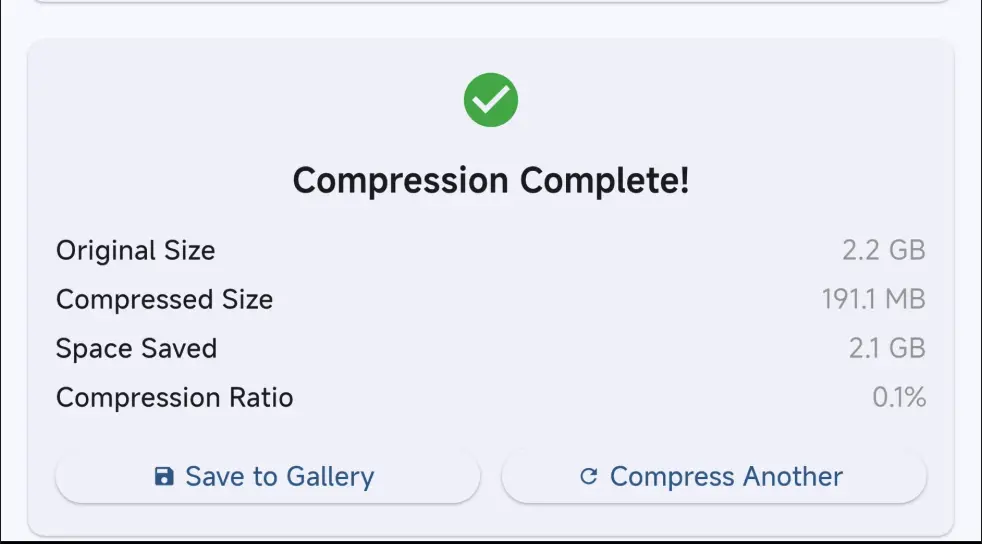
v_video_compressor는 Android 및 iOS에서 고품질 비디오 압축을 위한 전문적인 Flutter 플러그인입니다. 압축 중 실시간 진행률 추적 기능을 제공하여 사용자가 프로세스를 원활하게 모니터링할 수 있도록 합니다. 또한 압축된 비디오에서 썸네일을 생성하여 미디어 미리보기 기능을 향상시킵니다. 성능과 통합 용이성을 고려해 설계되었으며, 대용량 비디오 파일을 효율적으로 처리하면서도 시각적 품질을 유지합니다. 소셜 미디어 플랫폼, 비디오 에디터 또는 콘텐츠 공유 애플리케이션과 같은 강력한 멀티미디어 처리가 필요한 앱에 적합합니다.
사용 사례
업로드 전에 비디오 압축
비디오 미리보기용 썸네일 생성
실시간 압축 진행률 모니터링
앱 스토리지 사용량 줄이기
모바일 네트워크를 위한 비디오 전달 최적화
콘텐츠 제작 도구에 비디오 압축 통합
주요 기능
고품질 비디오 압축
실시간 진행 상황 추적
자동 썸네일 생성
크로스 플랫폼 지원 (Android 및 iOS)
간단한 API 통합
효율적인 파일 크기 축소
적합한 대상
모바일 비디오 편집 앱
소셜 미디어 플랫폼
콘텐츠 공유 애플리케이션
영상 중심의 생산성 도구
최적화된 비디오 저장이 필요한 앱
미디어 워크플로우에서 사용자 경험을 우선 고려하는 개발자
고려 사항
파일 액세스를 위해 네이티브 플랫폼 권한이 필요합니다
저사양 기기에서 성능에 영향을 줄 수 있습니다
최적의 속도를 위해 10분 미만의 비디오에 가장 적합합니다
고급 압축 설정에 대한 사용자 정의가 제한되어 있음
핵심 기능을 위해 외부 네이티브 라이브러리에 의존
플랫폼별 동작 특성으로 인해 Android 및 iOS 모두에서 테스트가 필요합니다
원본 README
연결된 소스 저장소의 README 원문 스냅샷입니다. 최신 내용은 저장소에서 확인하세요.
V Video Compressor
A professional Flutter plugin for high-quality video compression with real-time progress tracking, thumbnail generation, and comprehensive configuration options.
✨ Key Features
🎬 Professional Video Compression - 5 quality levels with native platform APIs (Media3 for Android, AVFoundation for iOS)
⛔ Cancellation Support - Cancel operations anytime with automatic cleanup
📝 Comprehensive Logging - Production-ready error tracking and debugging
🧪 Thoroughly Tested - 95%+ test coverage with complete mock implementations
⚡ No ffmpeg - Uses native APIs for optimal performance and smaller app size
🎯 Philosophy
This plugin focuses exclusively on video compression and thumbnail generation. For video selection, use established plugins like image_picker or file_picker.
📱 Platform Support
Platform
Support
Minimum Version
Notes
Android
✅ Full Support
API 21+ (Android 5.0+)
Hardware acceleration available
iOS (SwiftPM)
✅ Full Support
iOS 15.0+
Current Flutter toolchains
iOS (CocoaPods)
✅ Full Support
iOS 12.0+
Legacy Flutter toolchain metadata
The package requires Flutter 3.44 or newer and Dart 3.12 or newer. Android
apps can use either Flutter's legacy KGP compatibility mode or AGP 9 built-in
Kotlin; enabling built-in Kotlin requires Flutter 3.47 or newer.
🚀 Quick Start
1. Installation
Add to your pubspec.yaml:
dependencies:v_video_compressor:^2.2.2file_picker:^8.0.0# For video selection# ORimage_picker:^1.0.7# Alternative for video selection
2. Platform Setup
Android Setup
Add permissions to android/app/src/main/AndroidManifest.xml:
The plugin supports both CocoaPods and Swift Package Manager. Flutter selects
the configured dependency manager automatically. SwiftPM consumers must target
iOS 15.0 or newer to match Flutter's framework package. The CocoaPods metadata
retains iOS 12.0 for legacy Flutter toolchains; the effective minimum is the
highest requirement from the app, Flutter SDK, and plugin.
Add permissions to ios/Runner/Info.plist:
<key>NSPhotoLibraryUsageDescription</key><string>This app needs access to photo library to compress videos</string><key>NSPhotoLibraryAddUsageDescription</key><string>This app needs access to save compressed videos to photo library</string>
VVideoCropRect selects a real output region; it is not a preview scale or a
letterbox mask. Coordinates are normalized doubles in the inclusive 0.0..1.0
space of the correctly displayed frame after source orientation metadata and
the requested 0, 90, 180, or 270 degree rotation have been applied.
left and top are the starting edges and right and bottom are the ending
edges. Crop-aware rotation values follow video_editor_3: 90 is a left
(counter-clockwise) turn and 270 is a right (clockwise) turn.
A crop is valid only when every value is finite and:
0 <= left < right <= 1
0 <= top < bottom <= 1
Invalid values are rejected and are never clamped. (0, 0, 1, 1) is a
full-frame no-op; full-frame detection uses a 1e-6 tolerance only for
floating-point round-off.
The example app also includes a focused Crop, trim & rotate screen. It uses
video_trimmer for the video preview and draggable trim timeline, then passes
the selected millisecond range into VVideoAdvancedConfig. The example never
calls video_trimmer.saveTrimmedVideo, so trim, crop, rotation, audio handling,
and compression still happen once through v_video_compressor.
For crop-aware exports, autoAlign chooses the largest aspect-preserving,
encoder-safe output inside the quality or custom bounds. letterbox is the
only mode that intentionally centers the crop in a larger canvas with bars.
exact accepts even custom dimensions only when they preserve the selected
crop aspect within one output pixel; incompatible or sub-16x16 outputs are
rejected.
The integration suite includes deterministic quadrant fixtures and an opt-in
iOS network case. The network case downloads Flutter's public H.264/AAC
bee.mp4 sample inside the simulator, then verifies crop, trim, audio,
dimensions, and playability:
cd example
flutter test integration_test \
  -d <ios-simulator-id> \
  --dart-define=VVC_RUN_NETWORK_INTEGRATION=true \
  --plain-name "downloads a public Flutter video and exports crop on iOS"
An additional opt-in iOS audit exercises every public compression setting and
prints machine-readable PASS, FAIL, or UNSUPPORTED results after
inspecting the encoded tracks and decoded thumbnails:
cd example
flutter test integration_test/ios_compression_feature_audit_test.dart \
  -d <ios-simulator-id> \
  --dart-define=VVC_RUN_IOS_FEATURE_AUDIT=true
Guarantee an Encoded Output
By default, the plugin returns the original file when encoding saves less than
5% to avoid wasting storage. Disable that fallback when the requested codec or
container is required. The plugin automatically prohibits original-file
fallback whenever an effective crop, trim, nonzero rotation, custom size,
audio removal, or explicit codec request requires the encoded output. This
prevents a successful export from silently discarding edits.
final result = await _compressor.compressVideo(
videoPath,
constVVideoCompressionConfig.medium(
fallbackToOriginalIfNotSmaller: false,
),
);
print('Original returned: ${result?.usedOriginalFile}');
ID-Based Compression Tracking
Track compression operations with custom IDs for better monitoring:
// Compress with custom IDfinal result = await _compressor.compressVideo(
videoPath,
constVVideoCompressionConfig.medium(),
onProgress: (progress) {
print('Compression progress: ${(progress * 100).toInt()}%');
},
id: 'my-video-compression-${DateTime.now().millisecondsSinceEpoch}',
);
// Or let the plugin auto-generate an IDfinal result2 = await _compressor.compressVideo(
videoPath,
constVVideoCompressionConfig.medium(),
onProgress: (progress) {
print('Progress: ${(progress * 100).toInt()}%');
},
// No ID provided - will auto-generate one
);
Benefits of ID-based tracking:
✅ Better Logging: Each compression operation is logged with its unique ID
✅ Tracking: Monitor specific compression operations in your app
✅ Debugging: Easier to identify which compression operation failed
✅ Analytics: Track compression performance and success rates
Preset Configurations
// Maximum compression for smallest filesfinal maxCompression = VVideoAdvancedConfig.maximumCompression(
targetBitrate: 300000, // 300 kbps
keepAudio: false, // Remove audio
);
// Social media optimizedfinal socialMedia = VVideoAdvancedConfig.socialMediaOptimized();
// Mobile optimizedfinal mobile = VVideoAdvancedConfig.mobileOptimized();
final result = await _compressor.compressVideo(
videoPath,
VVideoCompressionConfig(
quality: VVideoCompressQuality.medium,
advanced: maxCompression, // Use preset
),
);
Advanced Configuration Options
The VVideoAdvancedConfig class provides fine-grained control over the compression process:
🔄 NEW: Automatic Orientation Correction
// Fix for vertical videos appearing horizontal after compressionVVideoAdvancedConfig(
autoCorrectOrientation: true, // Preserves original video orientation
videoBitrate: 1500000,
audioBitrate: 128000,
)
Key Features:
✅ Automatic Detection: Detects original video orientation metadata
✅ Vertical Video Fix: Prevents vertical videos from appearing horizontal
✅ Cross-Platform: Works on both Android and iOS
✅ No Quality Loss: Maintains video quality while preserving orientation
// These dimensions will automatically align to 16-pixel boundariesVVideoAdvancedConfig(
customWidth: 1082, // Will align to 1072 (1072 % 16 == 0)
customHeight: 1278, // Will align to 1264 (1264 % 16 == 0)
dimensionHandling: VDimensionHandling.autoAlign, // Default: smart auto-detection
)
Dimension Handling Options:
enumVDimensionHandling {
autoAlign, // ✅ Default: Smart alignment, only aligns when needed
letterbox, // Adds black bars to maintain aspect ratio during alignment
exact, // Keep exact dimensions (may cause artifacts with odd dimensions)
}
How It Works:
Input
Aligned
Notes
1920
1920
Already 16-aligned, no change
1080
1072
Rounds down to prevent padding
1082
1072
Removes edge artifacts
1278
1264
Fixes chroma padding issues
720
720
Standard width, already aligned
Key Benefits:
✅ Fixes Edge Artifacts: Eliminates colored/black smears on video edges
✅ Transparent: Auto-detects and applies only when needed
✅ Cross-Platform: Works on both Android and iOS
✅ Smart Alignment: Only adjusts dimensions not divisible by 16
✅ Logging: Logs dimension adjustments for debugging
On iOS, videoBitrate is approximated through AVFoundation's total output-size
limit and may vary slightly from the requested rate. audioBitrate is not an
independent AVAssetExportSession control; iOS chooses it as part of the export
preset.
The plugin provides comprehensive error handling and logging:
try {
final result = await _compressor.compressVideo(videoPath, config);
if (result == null) {
print('Compression failed - check logs for details');
}
} catch (e, stackTrace) {
print('Error: $e');
print('Stack trace: $stackTrace');
// The plugin automatically logs detailed error information// Check your development console for full context
}
📱 Platform-Specific Notes
Android
Minimum API: Android 5.0 (API 21)
Hardware Acceleration: Available on most devices with Media3
Permissions: Automatically handled for Android 13+
Background: Full background compression support
H.264 Level: Exports request the lowest H.264 level that covers the output resolution and frame rate, so files stay playable on decoders capped at Level 5.x (iOS, Safari)
iOS
Minimum Version: iOS 11.0
Hardware Acceleration: Available with AVFoundation
Simulator: Limited acceleration (test on devices for best results)
Background: May be limited by iOS background execution policies
🔧 Troubleshooting
Common Issues
1. Compression fails silently
Check file permissions and paths
Verify video file is not corrupted
Check device storage space
2. Progress not updating
Ensure you're calling setState() in progress callback
Check if compression is actually running with isCompressing()
3. iOS simulator issues
Hardware acceleration unavailable in simulator
Test on physical iOS devices for accurate results
4. Large file handling
Very large files (>4GB) may require more memory
Consider using lower quality settings for large files
Debug Logging
The plugin provides comprehensive logging:
// Logs are automatically output to console with tag 'VVideoCompressor'// Filter logs by tag to see only plugin-related messages
Video compression is memory-intensive. For production apps, please read our Memory Optimization Guide to avoid OutOfMemoryError issues. Key recommendations:
Always check available memory before compression
Use lower quality settings for devices with < 2GB RAM
Implement progressive quality fallback
Process videos in batches for bulk operations
🤝 Contributing
We welcome contributions! Please see the repository guidelines for
the project layout, validation commands, and pull request expectations.
Development Setup
git clone https://github.com/v-chat-sdk/v_video_compressor.git
cd v_video_compressor
flutter pub get
cd example && flutter pub get
📄 License
This project is licensed under the MIT License - see the LICENSE file for details.