패키지, 저장소 및 앱 카테고리 검색

wifi_hunter 표지
패키지 상세v1.1.1+2

wifi_hunter

주변의 모든 와이파이 AP에서 정보를 수집하는 데 사용할 수 있는 플러터 패키지입니다.

Android
30일 다운로드
18
좋아요
27
Pub 점수
150

패키지 설치

flutter pub add wifi_hunter

패키지 개요

공개 정보를 바탕으로 생성한 선택 가이드입니다.

wifi_hunter은 안드로이드 기기에서 근처의 Wi-Fi 액세스 포인트를 스캔하고 정보를 검색하기 위해 설계된 플러터 패키지입니다. 개발자가 사용 가능한 네트워크(SSID, 신호 세기, MAC 주소 포함)를 감지할 수 있게 하며 실시간 네트워크 가시성을 제공합니다. 네트워크 진단, 위치 기반 서비스 또는 보안 평가에 적합하며, 안드로이드의 Wi-Fi 스캔 API를 활용합니다. 적절한 권한이 필요하며 안드로이드 플랫폼에서만 작동합니다.

사용 사례

  • 네트워크 탐지
  • 위치 기반 서비스
  • 보안 감사
  • 장치 연결 모니터링
  • Wi-Fi 신호 분석

주요 기능

  • 실시간 Wi-Fi 스캔
  • SSID 및 MAC 주소 검색
  • 신호 강도 감지
  • 안드로이드 전용 지원
  • 간단한 API 통합

적합한 대상

  • 안드로이드 앱 개발자
  • 네트워크 진단 도구
  • 사물인터넷 장치 관리
  • 보안 연구자
  • 위치 인식 애플리케이션

고려 사항

  • Android 권한이 필요합니다
  • Android 플랫폼에 한정
  • 개인정보 민감 데이터 접근
  • 백그라운드 스캔 제한
  • iOS 지원 없음

원본 README

연결된 소스 저장소의 README 원문 스냅샷입니다. 최신 내용은 저장소에서 확인하세요.

wifi_hunter

A flutter package to hunt down info from all WiFi APs around you.

version BSD License PRs Welcome

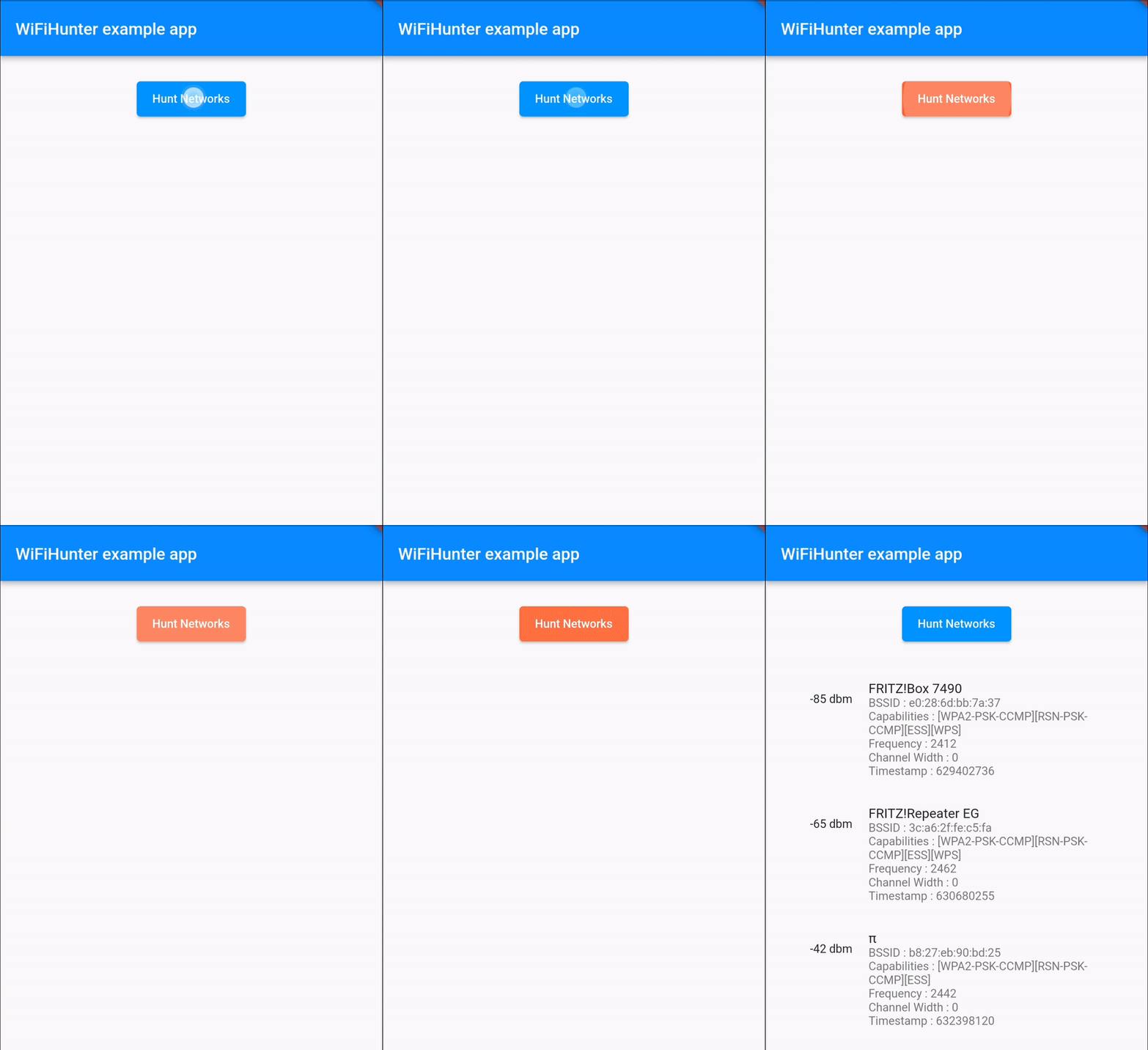
Demonstration

demo.gif

Getting Started


import 'package:flutter/material.dart';
import 'package:flutter/services.dart';
import 'dart:async';

import 'package:wifi_hunter/wifi_hunter.dart';
import 'package:wifi_hunter/wifi_hunter_result.dart';

void main() {
  runApp(const MyApp());
}

class MyApp extends StatefulWidget {
  const MyApp({Key? key}) : super(key: key);

  @override
  State<MyApp> createState() => _MyAppState();
}

class _MyAppState extends State<MyApp> {
  WiFiHunterResult wiFiHunterResult = WiFiHunterResult();
  
  Future<void> huntWiFis() async {
    try {
      wiFiHunterResult = (await WiFiHunter.huntWiFiNetworks)!;
    } on PlatformException catch (exception) {
      print(exception.toString());
    }
    
    for (var i = 0; i < wiFiHunterResult.results.length) {
      print(wiFiHunterResult.results[i].ssid);
      print(wiFiHunterResult.results[i].bssid);
      print(wiFiHunterResult.results[i].capabilities);
      print(wiFiHunterResult.results[i].frequency);
      print(wiFiHunterResult.results[i].level);
      print(wiFiHunterResult.results[i].channelWidth);
      print(wiFiHunterResult.results[i].timestamp);
    }

    if (!mounted) return;
  }

  @override
  Widget build(BuildContext context) {
    return MaterialApp(
      home: Scaffold(
      appBar: AppBar(
        title: const Text('WiFiHunter example app'),
      ),
      body: ElevatedButton(
        onPressed: () => huntWiFis(),
        child: const Text('Hunt Networks')
      )
    );
  }
}


Functionality and Features

Here is what infos you can get by using this package :

  • String[] SSIDs

  • String[] BSSIDs

  • String[] Signal strength

  • int[] Frequencies

  • int[] Capabilities

  • int[] Channel widths

  • long[] Timestamps (of information retrieval)

    ... of all WiFi APs in reach.

Running the sample

When running the sample app, make sure you've granted it the location permissions available in the system preferences, as there is currently no permission dialog implemented in the example app.
The permission settings are available under Settings > Apps > wifi_hunter_example > Permissions > Location > Allow only while using the app

Android WiFi Scan Throttling

Starting with Android 8.0 and up, the operating system severely limits the number of WiFi scans.
Please keep this limit in mind when implementing your scan issuing logic.
Find out more about these limits on developer.android.com.

Debugging

You can get a good overview of pretty much all related log entries by searching for wifi in the Logcat output.

카테고리

소스 저장소

이 패키지를 사용하는 프로젝트

아직 데이터가 없습니다.