搜尋套件、儲存庫與 APP 分類

套件詳情v2.8.0

mobx_codegen

用於 MobX 的程式碼產生器,可支援以 @observable、@computed、@action 註解您的程式碼,並建立 Store 類別。

AndroidiOSmacOSWindowsLinux
近 30 天下載
8.6萬
喜歡數
301
Pub 分數
150

安裝套件

flutter pub add mobx_codegen

套件介紹

根據套件公開資料產生的選型評估,僅供參考。

MobX CodeGen 是用於 Flutter 和 Dart 中 MobX 狀態管理庫的程式碼產生工具。它讓開發者能夠透過 @observable、@computed 和 @action 注解其類別與欄位,自動產生反應式狀態管理所需的樣板程式碼。這減少了手動工作量,並透過消除重複模式提升程式碼可讀性。該套件支援以最少設定建立 Store 類別,簡化跨平台的狀態處理。

適用情境

  • 使用自動狀態更新進行響應式 UI 開發
  • 簡化大型應用程式中的複雜狀態邏輯
  • 減少狀態管理中的樣板程式碼
  • 產生高效的可觀察儲存
  • 啟用類型安全的計算值
  • 使用 MobX 簡化依賴注入

主要特色

  • 自動代碼生成 @observable、@computed、@action
  • 支援產生 Store 類別
  • 減少狀態管理中的手動樣板程式碼
  • 與 MobX 無縫整合
  • 產生高效且類型安全的程式碼
  • 跨多個平台運行

適合對象

  • 使用 MobX 進行狀態管理的開發者
  • 尋求減少Flutter應用樣板程式碼的團隊
  • 需要反應式和高效能狀態處理的專案
  • 需要清晰分離的複雜狀態邏輯的應用程式
  • 偏好註解式狀態管理的開發者
  • 那些建構跨平台應用程式的人

使用建議

  • 需要 build_runner 進行代碼生成
  • 需要正確設定 build.yaml
  • 可能會稍微增加建構時間
  • 依賴於 MobX 核心套件
  • 不適用於僅執行時的狀態變更
  • 需要理解 MobX 概念

原始 README

以下為關聯原始碼儲存庫的 README 原文快照,最新內容請造訪原始碼儲存庫。

Language: English | Português | Chinese | Japanese | 한국어

mobx.dart


pub package pub package pub package

Build Status Publish Coverage Status Netlify Status Mutable.ai Auto Wiki

Join the chat at https://discord.gg/dNHY52k

MobX for the Dart language.

Supercharge the state-management in your Dart apps with Transparent Functional Reactive Programming (TFRP)

We are looking for maintainers. Reach out on Discord or GitHub Issues!

Introduction

MobX is a state-management library that makes it simple to connect the reactive data of your application with the UI. This wiring is completely automatic and feels very natural. As the application-developer, you focus purely on what reactive-data needs to be consumed in the UI (and elsewhere) without worrying about keeping the two in sync.

It's not really magic but it does have some smarts around what is being consumed (observables) and where (reactions), and automatically tracks it for you. When the observables change, all reactions are re-run. What's interesting is that these reactions can be anything from a simple console log, a network call to re-rendering the UI.

MobX has been a very effective library for the JavaScript apps and this port to the Dart language aims to bring the same levels of productivity.

Sponsors

We are very thankful to our sponsors to make us part of their Open Source Software (OSS) program. [Become a sponsor]

Past Sponsors
Get Started

Follow along with the Getting Started guide on the MobX.dart Website.

Go deep

For a deeper coverage of MobX, do check out MobX Quick Start Guide. Although the book uses the JavaScript version of MobX, the concepts are 100% applicable to Dart and Flutter.

Core Concepts

MobX Triad

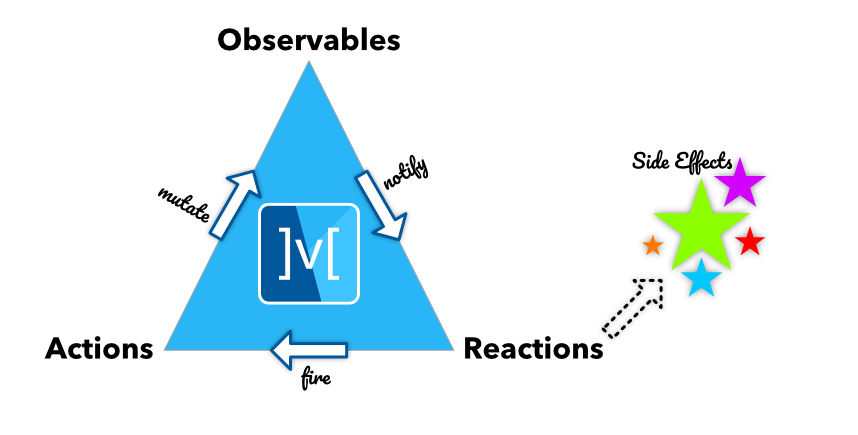
At the heart of MobX are three important concepts: Observables, Actions and Reactions.

Observables

Observables represent the reactive-state of your application. They can be simple scalars to complex object trees. By defining the state of the application as a tree of observables, you can expose a reactive-state-tree that the UI (or other observers in the app) consume.

A simple reactive-counter is represented by the following observable:

import 'package:mobx/mobx.dart';

final counter = Observable(0);

More complex observables, such as classes, can be created as well.

class Counter {
  Counter() {
    increment = Action(_increment);
  }

  final _value = Observable(0);
  int get value => _value.value;

  set value(int newValue) => _value.value = newValue;
  Action increment;

  void _increment() {
    _value.value++;
  }
}

On first sight, this does look like some boilerplate code which can quickly go out of hand! This is why we added mobx_codegen to the mix that allows you to replace the above code with the following:

import 'package:mobx/mobx.dart';

part 'counter.g.dart';

class Counter = CounterBase with _$Counter;

abstract class CounterBase with Store {
  @observable
  int value = 0;

  @action
  void increment() {
    value++;
  }
}

Note the use of annotations to mark the observable properties of the class. Yes, there is some header boilerplate here but its fixed for any class. As you build more complex classes this boilerplate will fade away and you will mostly focus on the code within the braces.

Note: Annotations are available via the mobx_codegen package.

Readonly

If you want to reduce your code you may want to swap @observable for @readonly. For every private variable it generates a public getter such that the client of your store can't change its value. Read more about it here

Computed Observables

What can be derived, should be derived. Automatically.

The state of your application consists of core-state and derived-state. The core-state is state inherent to the domain you are dealing with. For example, if you have a Contact entity, the firstName and lastName form the core-state of Contact. However, fullName is derived-state, obtained by combining firstName and lastName.

Such derived state, that depends on core-state or other derived-state is called a Computed Observable. It is automatically kept in sync when its underlying observables change.

State in MobX = Core-State + Derived-State

import 'package:mobx/mobx.dart';

part 'contact.g.dart';

class Contact = ContactBase with _$Contact;

abstract class ContactBase with Store {
  @observable
  String firstName;

  @observable
  String lastName;

  @computed
  String get fullName => '$firstName, $lastName';

}

In the example above fullName is automatically kept in sync if either firstName and/or lastName changes.

Actions

Actions are how you mutate the observables. Rather than mutating them directly, actions add a semantic meaning to the mutations. For example, instead of just doing value++, firing an increment() action carries more meaning. Besides, actions also batch up all the notifications and ensure the changes are notified only after they complete. Thus the observers are notified only upon the atomic completion of the action.

Note that actions can also be nested, in which case the notifications go out when the top-most action has completed.

final counter = Observable(0);

final increment = Action((){
  counter.value++;
});

When creating actions inside a class, you can take advantage of annotations!

import 'package:mobx/mobx.dart';

part 'counter.g.dart';

class Counter = CounterBase with _$Counter;

abstract class CounterBase with Store {
  @observable
  int value = 0;

  @action
  void increment() {
    value++;
  }
}
Asynchronous Actions

MobX.dart handles asynchronous actions automatically and does not require wrapping the code with runInAction.

@observable
String stuff = '';

@observable
bool loading = false;

@action
Future<void> loadStuff() async {
  loading = true; //This notifies observers
  stuff = await fetchStuff();
  loading = false; //This also notifies observers
}
Reactions

Reactions complete the MobX triad of observables, actions and reactions. They are the observers of the reactive-system and get notified whenever an observable they track is changed. Reactions come in few flavors as listed below. All of them return a ReactionDisposer, a function that can be called to dispose the reaction.

One striking feature of reactions is that they automatically track all the observables without any explicit wiring. The act of reading an observable within a reaction is enough to track it!

The code you write with MobX appears to be literally ceremony-free!

ReactionDisposer autorun(Function(Reaction) fn)

Runs the reaction immediately and also on any change in the observables used inside fn.

import 'package:mobx/mobx.dart';

final greeting = Observable('Hello World');

final dispose = autorun((_){
  print(greeting.value);
});

greeting.value = 'Hello MobX';

// Done with the autorun()
dispose();


// Prints:
// Hello World
// Hello MobX

ReactionDisposer reaction<T>(T Function(Reaction) predicate, void Function(T) effect)

Monitors the observables used inside the predicate() function and runs the effect() when the predicate returns a different value. Only the observables inside predicate() are tracked.

import 'package:mobx/mobx.dart';

final greeting = Observable('Hello World');

final dispose = reaction((_) => greeting.value, (msg) => print(msg));

greeting.value = 'Hello MobX'; // Cause a change

// Done with the reaction()
dispose();


// Prints:
// Hello MobX

ReactionDisposer when(bool Function(Reaction) predicate, void Function() effect)

Monitors the observables used inside predicate() and runs the effect() when it returns true. After the effect() is run, when automatically disposes itself. So you can think of when as a one-time reaction. You can also dispose when() pre-maturely.

import 'package:mobx/mobx.dart';

final greeting = Observable('Hello World');

final dispose = when((_) => greeting.value == 'Hello MobX', () => print('Someone greeted MobX'));

greeting.value = 'Hello MobX'; // Causes a change, runs effect and disposes


// Prints:
// Someone greeted MobX

Future<void> asyncWhen(bool Function(Reaction) predicate)

Similar to when but returns a Future, which is fulfilled when the predicate() returns true. This is a convenient way of waiting for the predicate() to turn true.

final completed = Observable(false);

void waitForCompletion() async {
  await asyncWhen(() => _completed.value == true);

  print('Completed');
}

Observer

One of the most visual reactions in the app is the UI. The Observer widget (which is part of the flutter_mobx package), provides a granular observer of the observables used in its builder function. Whenever these observables change, Observer rebuilds and renders.


Below is the Counter example in its entirety.

import 'package:flutter/material.dart';
import 'package:flutter_mobx/flutter_mobx.dart';
import 'package:mobx/mobx.dart';

part 'counter.g.dart';

class Counter = CounterBase with _$Counter;

abstract class CounterBase with Store {
  @observable
  int value = 0;

  @action
  void increment() {
    value++;
  }
}

class CounterExample extends StatefulWidget {
  const CounterExample({Key key}) : super(key: key);

  @override
  _CounterExampleState createState() => _CounterExampleState();
}

class _CounterExampleState extends State<CounterExample> {
  final _counter = Counter();

  @override
  Widget build(BuildContext context) => Scaffold(
        appBar: AppBar(
          title: const Text('Counter'),
        ),
        body: Center(
          child: Column(
            mainAxisAlignment: MainAxisAlignment.center,
            children: <Widget>[
              const Text(
                'You have pushed the button this many times:',
              ),
              Observer(
                  builder: (_) => Text(
                        '${_counter.value}',
                        style: const TextStyle(fontSize: 20),
                      )),
            ],
          ),
        ),
        floatingActionButton: FloatingActionButton(
          onPressed: _counter.increment,
          tooltip: 'Increment',
          child: const Icon(Icons.add),
        ),
      );
}

Contributing

If you have read up till here, then 🎉🎉🎉. There are couple of ways in which you can contribute to the growing community of MobX.dart.

  • Pick up any issue marked with "good first issue"
  • Propose any feature, enhancement
  • Report a bug
  • Fix a bug
  • Participate in a discussion and help in decision making
  • Write and improve some documentation. Documentation is super critical and its importance cannot be overstated!
  • Send in a Pull Request :-)
  • Chime in and Join the chat at https://discord.gg/dNHY52k

Contributors ✨

All Contributors

Thanks goes to these wonderful people (emoji key):

Pavan Podila
Pavan Podila

💻 📖 👀
katis
katis

💻 🤔 👀 ⚠️
Scott Hyndman
Scott Hyndman

💻 🤔 👀 ⚠️
Michael Bui
Michael Bui

💻 📖 👀 💡
Remi Rousselet
Remi Rousselet

💻 📖 👀
adiaKhaitan
adiaKhaitan

📖
Jacob Moura
Jacob Moura

💻 📖 🌍
Daniel Albuquerque
Daniel Albuquerque

🌍
Marco Scannadinari
Marco Scannadinari

📖
lsaudon
lsaudon

💻 📖
Efthymis Sarmpanis
Efthymis Sarmpanis

💻
Giri Jeedigunta
Giri Jeedigunta

📖 💡
Hebri Ramnath Nayak
Hebri Ramnath Nayak

📖
Robert Brunhage
Robert Brunhage

📖
Brady Trainor
Brady Trainor

📖
Kushagra Saxena
Kushagra Saxena

📖 💡
Pedro Massango
Pedro Massango

🌍
Peter Czibik
Peter Czibik

💻
Luan Nico
Luan Nico

📖
Kobi
Kobi

💻
Ryan
Ryan

📖
Ivan Terekhin
Ivan Terekhin

💻
Yoav Rofé
Yoav Rofé

📖
Mateusz Wojtczak
Mateusz Wojtczak

📖
Timur Artikov
Timur Artikov

💻
Saurabh Sohoni
Saurabh Sohoni

📖
renanzdm
renanzdm

📖
Rachman Chavik
Rachman Chavik

💻
Nathan Cabasso
Nathan Cabasso

🐛 💻
geisterfurz007
geisterfurz007

📖 🖋
Romuald Barbe
Romuald Barbe

💻
Alexander Mazuruk
Alexander Mazuruk

💡
Alberto Bonacina
Alberto Bonacina

📖
Roland Ibragimov
Roland Ibragimov

📖
zyzhao
zyzhao

📖
Xinhai Wang
Xinhai Wang

📖
Henry Mayer
Henry Mayer

💻 ⚠️
Sergey
Sergey

💻 ⚠️
Jason Rai
Jason Rai

📖
Joshua de Guzman
Joshua de Guzman

💡
Jan Hertlein
Jan Hertlein

📖
Evo Stamatov
Evo Stamatov

💻
Davi Eduardo
Davi Eduardo

📖
Leonardo Custodio
Leonardo Custodio

💻 📖
Prince Srivastava
Prince Srivastava

💡 💻
Muhammad Muhajir
Muhammad Muhajir

📖
D
D

📖
David Martos
David Martos

💻
Issa Nimaga
Issa Nimaga

📖
Ascênio
Ascênio

💻 📖
Alex Isaienko
Alex Isaienko

💻
Moritz Weber
Moritz Weber

💻
Carter Snook
Carter Snook

📖
Brian Robles
Brian Robles

💻 ⚠️
harrypunk
harrypunk

📖
Ikko Ashimine
Ikko Ashimine

📖
amond
amond

💻 ⚠️ 👀 📖
fzyzcjy
fzyzcjy

💻 📖 👀
Vandad Nahavandipoor

📖
Sergey Molchanovsky
Sergey Molchanovsky

💻
ko16a46
ko16a46

💻
Yatharth Chauhan
Yatharth Chauhan

📖
Parth Baraiya
Parth Baraiya

💻 🐛
Altynbek Aidarbekov
Altynbek Aidarbekov

💻
CpedniyNikon
CpedniyNikon

📖
Tirth
Tirth

📖
Joshua Wade
Joshua Wade

💻
Jonathan Landon
Jonathan Landon

💻

This project follows the all-contributors specification. Contributions of any kind welcome!

所屬分類

依賴

依賴清單 6 項

原始碼儲存庫

使用此套件的專案

所在榜單