

 v9.0.0
flex_color_scheme
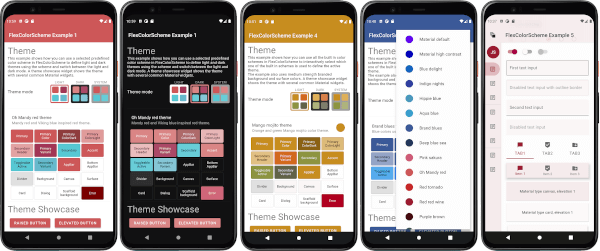
A Flutter package to use and make beautiful Material design based themes.
3.2KLikes 135K30-day downloads160Pub points
AndroidiOSWebmacOSWindowsLinux
Flutter app for managing your todos within a todo.txt file locally or via webdav (e.g. Nextcloud)

English project snapshot. Visit GitHub for the latest content.





With ntodotxt you can manage your todos in a todo.txt file (i.e. all information
is stored in a single file). You can save your todos locally on your device and/or synchronize the todo.txt file via webdav - for
example with a self-hosted nextcloud instance.
This application is under active development and will continue to be modified and improved over time.



flatpak to flathub (Linux)snap to snapcraft (Linux)Flutter SDK is required to build this project.
ntodotxt.git clone https://github.com/tmaegel/ntodotxt
dnf install sqlite-devel libsecret-devel1
Open project via Android Studio.
Click the Run button and it will be built and run automatically.
Or you can build and run from command line.
flutter pub get
flutter run
# or
flutter build
If an error occurs during the build process, please follow these steps.
ntodotxt is a free open source software that benefits from the open source community and every user can enjoy it's full functionality for free, so if you appreciate my current work, you can buy me a offee.

Thanks for all the love and support.
There are a bunch of other note taking apps with the WebDAV support. See them in awesome-webdav repository.
A Flutter package to use and make beautiful Material design based themes.
A pluggable, mockable file system abstraction for Dart. Supports local file system access, as well as in-memory file systems, record-replay file systems, and chroot file systems.
A simple WebDAV client that supports some common methods.
A tool to generate detail and better OSS license list using pubspec.yaml/lock files.
Command line utility to read lcov.info and print the coverage report to console.
Dependency list 30 items
{"sdk":"flutter"}{"sdk":"flutter"}^1.17.2^3.0.3^1.0.6^5.9.0^2.0.5^10.1.9^8.0.2^9.1.1^10.3.1^15.1.2any^1.2.0^1.9.0^2.0.11^12.0.0^0.28.0^2.3.1^3.0.0^6.2.1^1.2.2{"sdk":"flutter"}{"sdk":"flutter"}{"sdk":"flutter"}^3.2.0^7.0.0^0.14.3^6.0.0^0.2.2Start with your use case, compare repository activity, and check the original project before adopting it.
“A repository is the most basic element of GitHub.”
GitHub Docs — About repositories ↗