パッケージ、リポジトリ、アプリカテゴリを検索

animate_icons のカバー
パッケージ詳細v2.0.0

animate_icons

このプラグインを使えば、デフォルトで提供されている AnimatedIcon ウィジェットのように、任意の2つのアイコン間をアニメーションで切り替えることができます。

AndroidiOSWebmacOSWindowsLinux
30日間ダウンロード
2710
いいね数
210
Pub ポイント
140

パッケージをインストール

flutter pub add animate_icons

パッケージ概要

公開情報に基づく選定ガイドです。参考としてご利用ください。

animate_icons は、組み込みの AnimatedIcon ウィジェットに似た、任意の2つのアイコン間でスムーズなアニメーションを可能にする Flutter パッケージです。カスタムアイコンペア間での流れるような動きで遷移する柔軟な方法を提供し、ユーザーインターフェースのインタラクティビティを向上させます。このパッケージは Android、iOS、Web、macOS、Windows、Linux を含むすべての主要プラットフォームをサポートしており、クロスプラットフォームアプリケーションに最適です。最小限のセットアップで、開発者は簡単にアプリにアニメーションアイコンの遷移を統合できます。

用途

  • ボタン内のアニメーションアイコンの遷移
  • インタラクティブなUI要素
  • アイコン変更付きのローディングインジケーター
  • カスタムトグルアニメーション
  • アプリのフィードバックを強化する
  • オンボーディング画面

主な機能

  • 任意の2つのアイコン間でのスムーズなアニメーション
  • クロスプラットフォーム対応
  • シンプルな API インテグレーション
  • カスタマイズ可能なアニメーション期間
  • Material および Cupertino イコンをサポート
  • カスタムアイコンセット用に拡張可能

適している対象

  • ダイナミックなインタラクションを求めるUI/UXデザイナー
  • インタラクティブなフォームを構築する開発者
  • 視覚的フィードバックが必要なアプリ
  • クロスプラットフォームのモバイルおよびウェブアプリ
  • アニメーションインターフェースのプロトタイピング

注意事項

  • Flutter のアニメーションに関する基礎知識が必要です
  • 過剰に使用するとパフォーマンスに影響を与える可能性があります
  • アイコン間の遷移に限定
  • 複雑なアニメーションには適していません
  • 最良のUXを得るために、適度に使用すること

元の README

関連するソースリポジトリの README 原文のスナップショットです。最新の内容はリポジトリをご覧ください。

Animate Any two icons with this plugin

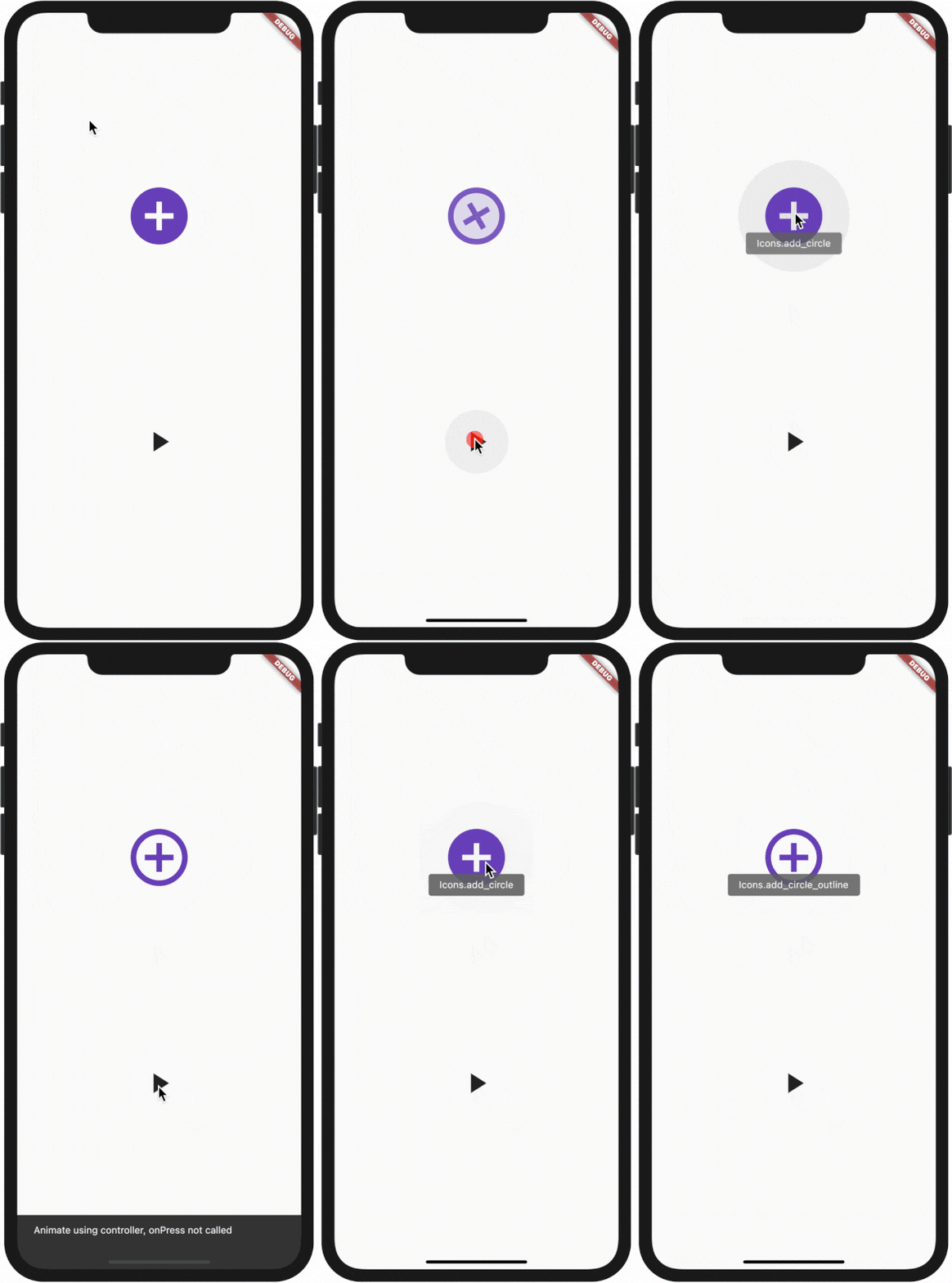
Demo:
How to use:

All plugin in your pubspec.yaml

animate_icons:

Make the import:

import 'package:animate_icons/animate_icons.dart';

Use the following widget:

AnimateIcons(
    startIcon: Icons.add_circle,
    endIcon: Icons.add_circle_outline,
    size: 100.0,
    controller: controller,
    // add this tooltip for the start icon
    startTooltip: 'Icons.add_circle',
    // add this tooltip for the end icon
    endTooltip: 'Icons.add_circle_outline',
    size: 60.0,
    onStartIconPress: () {
        print("Clicked on Add Icon");
        return true;
    },
    onEndIconPress: () {
        print("Clicked on Close Icon");
        return true;
    },
    duration: Duration(milliseconds: 500),
    startIconColor: Colors.deepPurple,
    endIconColor: Colors.deepOrange,
    clockwise: false,
),

Use AnimateIconController

Define AnimateIconController to animate b/w start and end icons without onIco press, check which icon is there on top - start or end.

Define AnimateIconController

AnimateIconController controller;

Initialize controller

controller = AnimateIconController();

Pass controller to widget
AnimateIcons(
    startIcon: Icons.add,
    endIcon: Icons.close,
    controller: controller, 
    size: 60.0,
    onStartIconPress: () {
        print("Clicked on Add Icon");
        return true;
    },
    onEndIconPress: () {
        print("Clicked on Close Icon");
        return true;
    },
    duration: Duration(milliseconds: 500),
    startIconColor: Colors.deepPurple,
    endIconColor: Colors.deepOrange,
    clockwise: false,
),
Use controller functions
if (controller.isStart()) {
    controller.animateToEnd();
} else if (controller.isEnd()) {
    controller.animateToStart();
}

カテゴリー

ソースリポジトリ

このパッケージを使用しているプロジェクト