パッケージ、リポジトリ、アプリカテゴリを検索

パッケージ詳細v0.0.2

animated_floating_buttons

折りたたみ可能なフローティングボタンのリストを作成できます。アグン・スリヤのチュートリアルに基づいています。

AndroidiOSWebmacOSWindowsLinux
30日間ダウンロード
1190
いいね数
118
Pub ポイント
145

パッケージをインストール

flutter pub add animated_floating_buttons

パッケージ概要

公開情報に基づく選定ガイドです。参考としてご利用ください。

Agung Suryaのチュートリアルにインスパイアされた折りたたみ可能なフローティングアクションボタンの作成を可能にするFlutterパッケージです。グループ内のフローティングボタンの展開および収縮に滑らかなアニメーションを提供し、モバイルおよびWebアプリケーションにおけるユーザーインタラクションを向上させます。Android、iOS、Web、macOS、Windows、Linuxなど複数のプラットフォームをサポートしており、クロスプラットフォーム開発に適しています。最小限のセットアップで、開発者はUIにアニメーション付きボタングループを簡単に統合できます。

用途

  • 拡張可能なアクションを備えたインタラクティブなボトムナビゲーションの作成
  • アニメーション付きのフローティングボタンでアプリUIを強化
  • ジェスチャーに基づくインターフェースの設計
  • ダッシュボードに動的アクションメニューを追加する

主な機能

  • スムーズな展開/折りたたみアニメーション
  • 複数のフローティングボタンのサポート
  • クロスプラットフォーム互換性
  • 既存のFlutterプロジェクトとの簡単な統合
  • カスタマイズ可能なボタンレイアウト

適している対象

  • モバイルおよびウェブアプリ開発者
  • インタラクティブ要素を求めるUIデザイナー
  • ジェスチャー駆動のアクションパネルを必要とするプロジェクト
  • マルチプラットフォームアプリ用にFlutterを使用する開発者

注意事項

  • 多数のボタンがあるとパフォーマンスに影響する可能性があります
  • 慎重なレイアウト計画が必要です
  • 基本的なアニメーションを超えるカスタマイズは限定的
  • シンプルで焦点を絞った操作グループに最適

元の README

関連するソースリポジトリの README 原文のスナップショットです。最新の内容はリポジトリをご覧ください。

animated_floating_buttons

This package is based on Agung Surya's tutorial. You can visit his post for more technical information about the package. https://medium.com/@agungsurya/create-a-simple-animated-floatingactionbutton-in-flutter-2d24f37cfbcc

Getting Started

This project is a starting point for a Dart package, a library module containing code that can be shared easily across multiple Flutter or Dart projects.

For help getting started with Flutter, view our online documentation, which offers tutorials, samples, guidance on mobile development, and a full API reference.

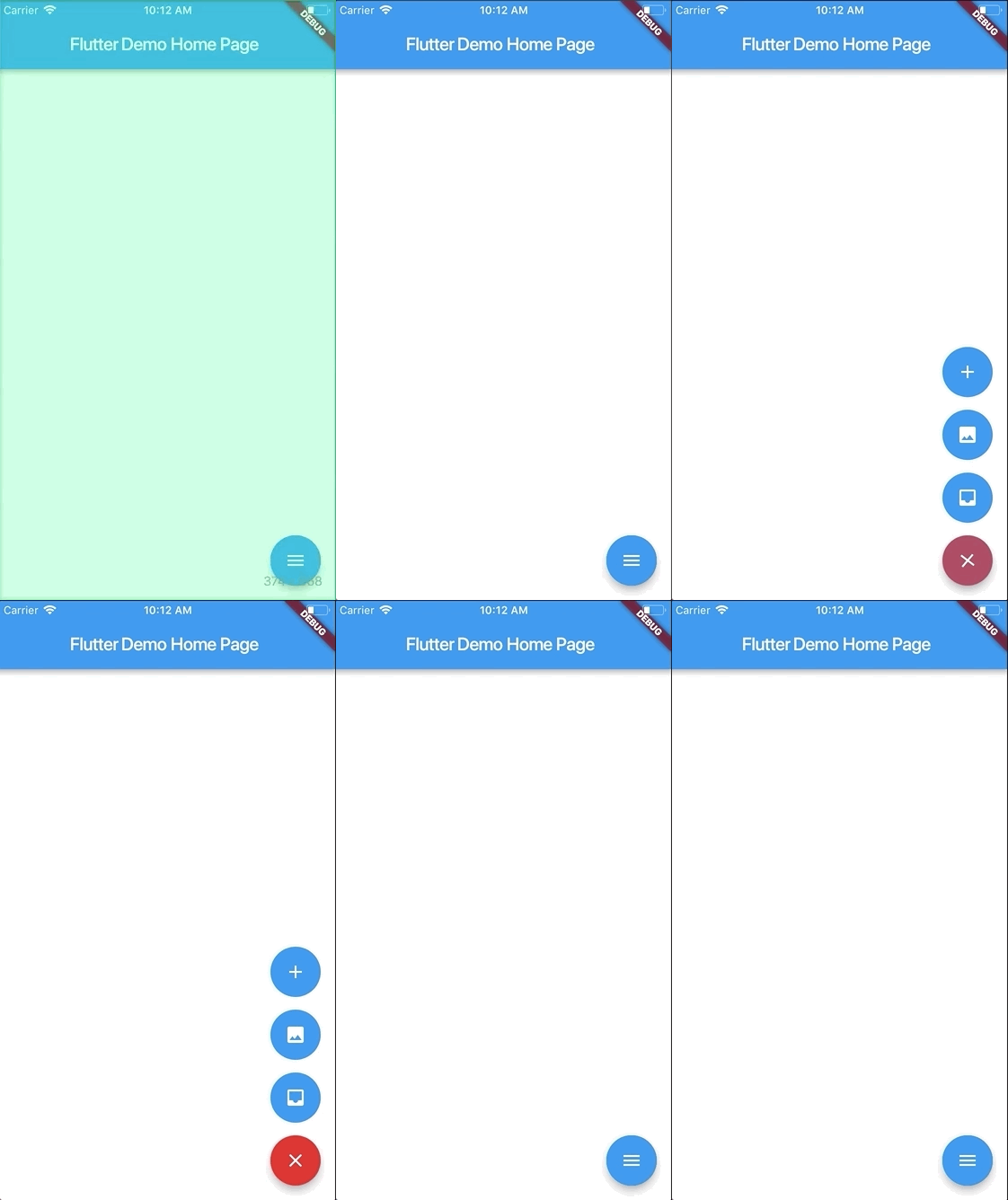
Screenshots

Usage

To use this plugin:

In your flutter project add the dependency:

dependencies:
    ...
    animated_floating_buttons: ^0.0.1

Example

//Import package
import 'package:animated_floating_buttons/animated_floating_buttons.dart';
...
      /// when you want to close the menu you have to create 
      final GlobalKey<AnimatedFloatingActionButtonState> key =GlobalKey<AnimatedFloatingActionButtonState>();
      /// and then assign it to the our widget library
Widget float1() {
    return Container(
      child: FloatingActionButton(
        onPressed: null,
        heroTag: "btn1",
        tooltip: 'First button',
        child: Icon(Icons.add),
      ),
    );
}

Widget float2() {
    return Container(
      child: FloatingActionButton(
        onPressed: null,
        heroTag: "btn2",
        tooltip: 'Second button',
        child: Icon(Icons.add),
      ),
    );
}
...
Scaffold(
    floatingActionButton: AnimatedFloatingActionButton(
        //Fab list
        fabButtons: <Widget>[
            float1(), float2()
        ],
        key : key,
        colorStartAnimation: Colors.blue,
        colorEndAnimation: Colors.red,
        animatedIconData: AnimatedIcons.menu_close //To principal button
    ),
)

Complete example here

Issues

Be aware that you have to pass heroTag parameter to every new fab you create 
Otherwise you will get an exciption.

カテゴリー

ソースリポジトリ

このパッケージを使用しているプロジェクト

データはまだありません。