パッケージ、リポジトリ、アプリカテゴリを検索

animated_switcher_plus のカバー
パッケージ詳細v1.5.1

animated_switcher_plus

AnimatedSwitcher の事前構築されたトランジション、たとえばフリップ、ズーム、およびトランスレーション

AndroidiOSWebmacOSWindowsLinux
30日間ダウンロード
2000
いいね数
58
Pub ポイント
160

パッケージをインストール

flutter pub add animated_switcher_plus

パッケージ概要

公開情報に基づく選定ガイドです。参考としてご利用ください。

AnimatedSwitcherPlus は、Flutter の AnimatedSwitcher 用に事前構築された遷移効果を提供しており、フリップ、ズーム、トランジションアニメーションを含みます。ウィジェットツリー内のウィジェットを置き換える際のスムーズな視覚的遷移の実装を簡素化します。最小限のコードでユーザー体験を向上させるように設計されており、一般的なUI変更をプラットフォーム間で効率的に処理できる準備済みのアニメーションで AnimatedSwitcher を拡張しています。視覚フィードバックが重要な動的なインターフェースに最適です。

用途

  • UI要素の置き換えのアニメーション
  • 動的リストでのスムーズな遷移の作成
  • ナビゲーションまたは状態の変更を強化する
  • インタラクティブコンポーネントにおける視覚フィードバックの改善
  • 変化するコンテンツで応答性のあるダッシュボードを構築する

主な機能

  • 事前構築されたフリップ遷移
  • ズームイン/アウトアニメーション
  • 翻訳ベースの遷移
  • AnimatedSwitcher との簡単な統合
  • クロスプラットフォーム対応(Android、iOS、Web、macOS、Windows、Linux)

適している対象

  • 迅速な遷移効果を求める開発者
  • アニメーションインターフェースを実装するUI/UXデザイナー
  • 動的コンテンツの更新を必要とするアプリ
  • 洗練されたビジュアルインタラクションに焦点を当てたプロジェクト
  • Flutter初心者がアニメーションを探求しています

注意事項

  • 事前に定義された遷移に限定される
  • 複雑なレイアウトには追加のスタイル設定が必要になる場合があります
  • 高度にカスタマイズされたアニメーションロジックには適していません
  • パフォーマンスは遷移の複雑さに依存します
  • 安定したウィジェット状態と併用するのが最適です

元の README

関連するソースリポジトリの README 原文のスナップショットです。最新の内容はリポジトリをご覧ください。

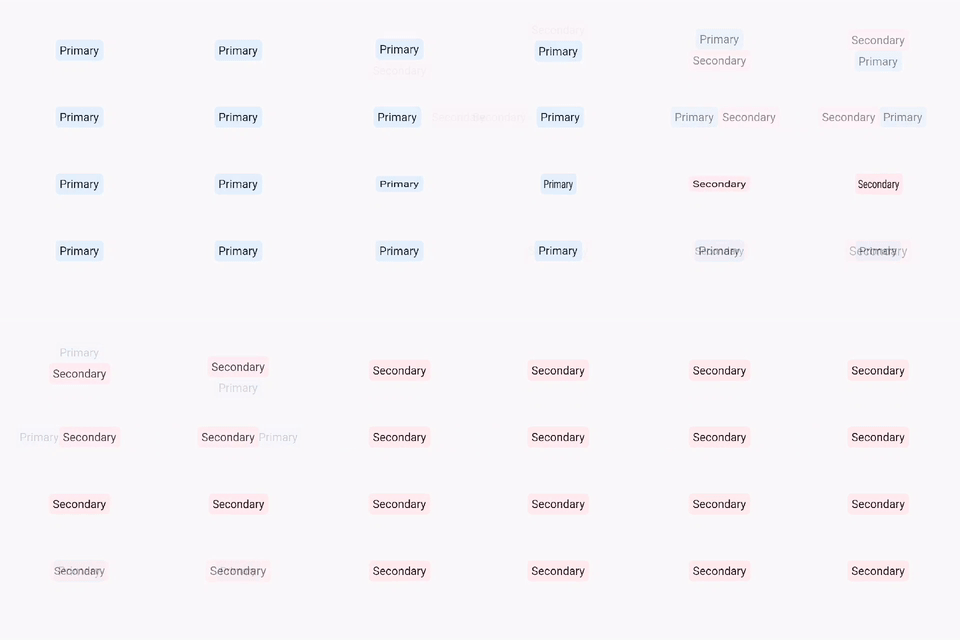
Prebuilt transitions for Animated Switcher such as flip, zoom and translation.

AnimatedSwitcherPlus

Features

  • Easily animate between two widgets
  • No need to provide both the first and second child simultaneously, unlike similar packages

Transitions

  • AnimatedSwitcherPlus.blur
  • AnimatedSwitcherPlus.flipX
  • AnimatedSwitcherPlus.flipY
  • AnimatedSwitcherPlus.zoomIn
  • AnimatedSwitcherPlus.zoomOut
  • AnimatedSwitcherPlus.translationLeft
  • AnimatedSwitcherPlus.translationRight
  • AnimatedSwitcherPlus.translationTop
  • AnimatedSwitcherPlus.translationBottom
  • AnimatedSwitcherPlus.wipeX ( Suitable for same-size widgets )
  • AnimatedSwitcherPlus.wipeY ( Suitable for same-size widgets )
  • AnimatedSwitcherPlus.revealX
  • AnimatedSwitcherPlus.revealY
  • AnimatedSwitcherPlus.revealCircular
  • AnimatedSwitcherPlus.wiggleRadial

Usage

AnimatedSwitcherPlus.flipX(  
 duration: const Duration(milliseconds: 1500),
 child: _showFirstChild ?
  const Text('Primary Text', key: ValueKey(0)) :
  const Text('Secondary Text', key: ValueKey(1)),
);  

Note: If you are using the same type of widget, change the child key to notify the AnimatedSwitcher that the child has changed. Otherwise, the transition will not occur

カテゴリー

ソースリポジトリ

このパッケージを使用しているプロジェクト