
パッケージ、リポジトリ、アプリカテゴリを検索

any_link_preview のカバー
パッケージ詳細v3.0.3

any_link_preview

任意のリンクのプレビューを支援するDartパッケージ。完全にカスタマイズ可能で、キャッシュされたデータからレンダリングする機能も備えています。チャット機能を持つアプリに役立ちます。

AndroidiOSWebmacOSWindowsLinux
30日間ダウンロード
4.4万
いいね数
484
Pub ポイント
150

パッケージをインストール

flutter pub add any_link_preview

パッケージ概要

公開情報に基づく選定ガイドです。参考としてご利用ください。

任意のURLに対して豊富なプレビューを生成するFlutter/Dartパッケージで、カスタマイズおよびキャッシュされたデータレンダリングをサポートしています。チャットアプリに最適です。リンクからメタデータを取得してサムネイル、タイトル、説明を表示します。Android、iOS、Web、macOS、Windows、Linuxなどすべての主要プラットフォームで動作し、一貫したパフォーマンスを確保します。使いやすさと柔軟性に重点を置き、アプリデザインに合わせてプレビューの外観や挙動をカスタマイズできます。最小限の設定で簡単に統合可能です。

用途

  • チャットアプリケーション
  • ソーシャルメディアフィード
  • コンテンツ共有機能
  • ダイナミックリンクプレビュー
  • オフラインコンテンツのレンダリング
  • リッチメッセージの表示

主な機能

  • 完全にカスタマイズ可能なプレビューUI
  • キャッシュされたデータのレンダリング
  • クロスプラットフォーム対応
  • 自動メタデータ抽出
  • 軽量で高速
  • 既存のコードとの簡単な統合

適している対象

  • チャットアプリを開発する開発者
  • 豊富なリンクプレビューを必要とするアプリ
  • オフラインプレビュー機能を必要とするプロジェクト
  • ユーザー体験に焦点を当てるチーム
  • 複数のプラットフォームをターゲットにするFlutterアプリ

注意事項

  • 最新のメタデータを取得するにはインターネット接続が必要です
  • カスタムスタイルには、追加のCSS/Flutterの知識が必要になる場合があります
  • キャッシュ管理は手動で処理する必要があります
  • 多数の同時プレビューがあるとパフォーマンスに影響する可能性があります
  • 無効なURLに対する組み込みエラー処理が限られている

元の README

関連するソースリポジトリの README 原文のスナップショットです。最新の内容はリポジトリをご覧ください。

AnyLinkPreview

Pub Build Status License Donate

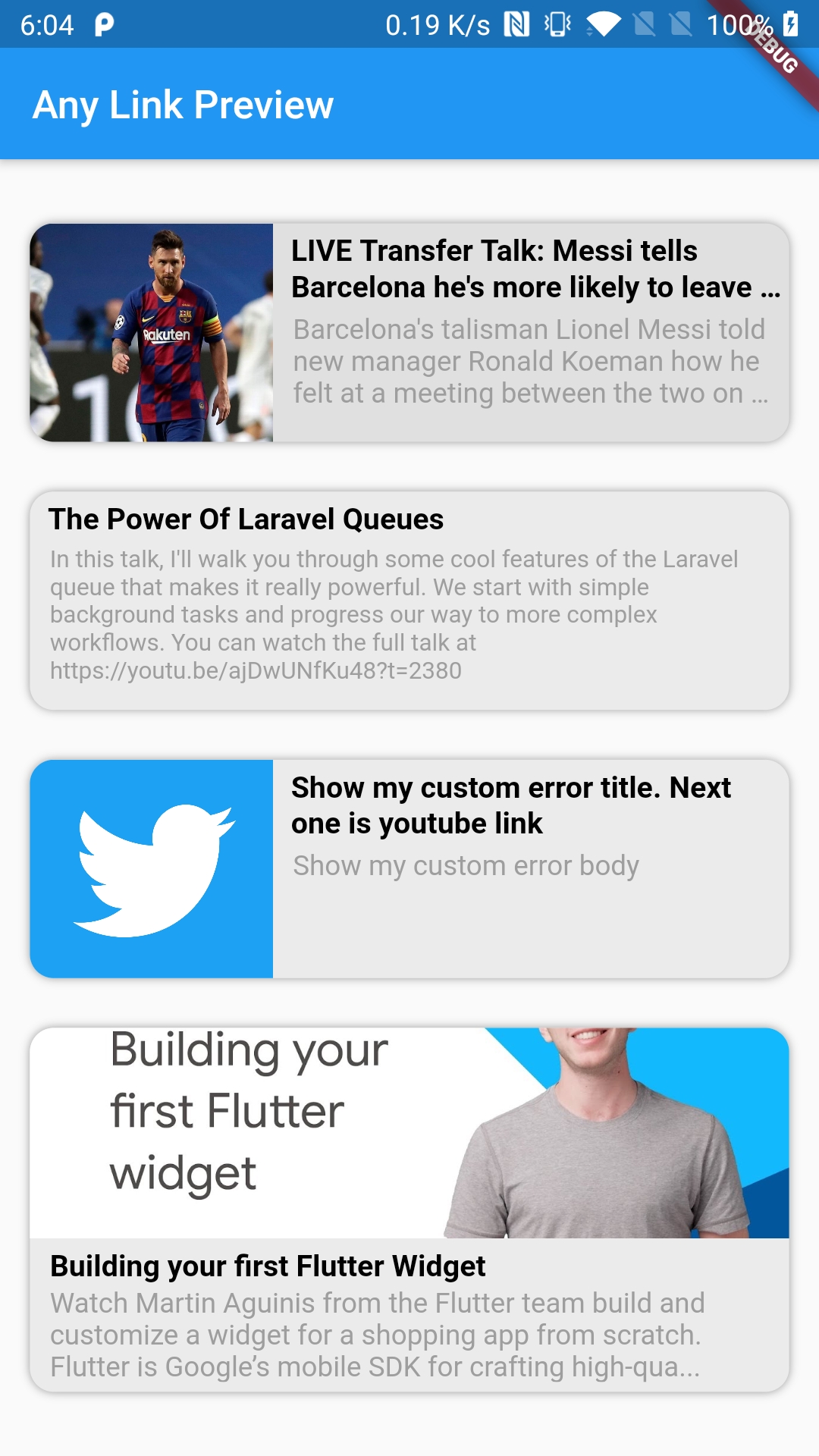
A Flutter package for beautifully displaying web URL previews with full customization options, perfect for enhancing chat applications. 🤓🤓

Features 💚

  • Utilizes four distinct parsers (HTML, JSON LD, Open Graph, and Twitter Cards) to fetch metadata, with more enhancements planned.
  • Offers extensive customization to seamlessly integrate with your app's design.
  • Includes a placeholder widget for loading states and an error widget for handling errors, both fully customizable.
  • Supports opting in or out of displaying media (images, icons, etc.) in the preview.
  • Supports multiple display orientations (Horizontal and Vertical).
  • Caches URL metadata for faster subsequent loads.
  • Includes an example app to demonstrate usage.

Note: If results are not accurate then make sure to change userAgent value and give a try. In most of the cases it's either userAgent issue or proxyURL issue if it's web.

Getting Started ⚡️

Demo
Notes

  • Open for suggestions and collaborations. Contact me here.
  • If you find this package useful and it saves you development time, consider buying me a coffee.
  • Contributions are welcome!
  • Can be utilized both as a Widget and as a Method (function).
  • Use AnyLinkPreview.isValidLink() to validate URLs before usage.
⭐ Don't forget to star the repo

How to Contribute?

  1. Fork the repository.
  2. Create your feature or fix branch (git checkout -b my-new-feature).
  3. Commit your changes (git commit -am 'Add some feature').
  4. Push to the branch (git push origin my-new-feature).
  5. Submit a Pull Request.

Properties 🔖

  /// Display direction. Either [UIDirection.uiDirectionVertical] or
  /// [UIDirection.uiDirectionHorizontal]. Defaults to vertical direction.
  final UIDirection displayDirection;

  /// Represents the mechanism used to open URLs via [launchUrl]. Defaults to
  /// [LaunchMode.platformDefault]
  final LaunchMode urlLaunchMode;

  /// URL represented in string. For IOS & Web, only HTTP and HTTPS are
  /// supported. For Android, all URLs are supported.
  final String link;

  /// Customize background color. Defaults to `Color.fromRGBO(235, 235, 235, 1)`
  final Color? backgroundColor;

  /// Placeholder widget that is shown while the metadata request is pending.
  /// If not present, the default loading widget will be shown.
  final Widget? placeholderWidget;

  /// Error widget that will be shown in case of an error. Defaults to a plain
  /// [Container] with a given [backgroundColor]. If the issue is known, i.e.
  /// either a title or a description of the error is present, [errorTitle] and
  /// [errorBody] are used instead, with fallback to their default values.
  final Widget? errorWidget;

  /// Error title message that will be shown in case of an error. Defaults to
  /// "Something went wrong!".
  final String? errorTitle;

  /// Error body message that will be shown in case of an error. Defaults to
  /// "Oops! Unable to parse the url. We have sent feedback to our developers &
  /// we will try to fix this in our next release. Thanks!"
  final String? errorBody;

  /// Image that will be shown in case of an error when [showMultimedia] is set
  /// to `true` and no metadata could be parsed. Defaults to
  /// "A semi-soccer ball image that looks like crying".
  final String? errorImage;

  /// Sets the overflow type for body text (description) of the link.
  /// Defaults to [TextOverflow.ellipsis].
  final TextOverflow bodyTextOverflow;

  /// Sets the limit to body text (description) of the link. Defaults to `3`.
  final int bodyMaxLines;

  /// TTL of metadata cache. Defaults to 1 day. Pass `null` to disable caching
  /// and always make a request for latest metadata.
  final Duration cache;

  /// Customize title [TextStyle].
  final TextStyle? titleStyle;

  /// Customize body [TextStyle].
  final TextStyle? bodyStyle;

  /// Whether to show metadata image if it's present. Defaults to `true`.
  final bool showMultimedia;

  /// [BorderRadius] for the card. Defaults to `12`.
  final double? borderRadius;

  /// If set to true, removes card widget's elevation. Defaults to `false`.
  final bool removeElevation;

  /// Box shadow for the card. Defaults to
  /// `[BoxShadow(blurRadius: 3, color: Colors.grey)]`.
  final List<BoxShadow>? boxShadow;

  /// Proxy URL that is used to resolve CORS issues on web.
  /// For example, `https://cors-anywhere.herokuapp.com/` .
  final String? proxyUrl;

  /// Headers to be added in the HTTP request to the link
  final Map<String, String>? headers;

  /// Function that is called on card tap. If not provided, then [launchUrl]
  /// will be used with the provided link. To disable calling [launchUrl] and
  /// instead do nothing on tap, pass an empty function: `() {}`.
  final VoidCallback? onTap;

  /// Height of the preview card. Defaults to
  /// `(MediaQuery.sizeOf(context).height) * 0.15` for the horizontal preview
  /// and `(MediaQuery.sizeOf(context).height) * 0.25` for the vertical preview.
  final double? previewHeight;

  /// Builder function that is used only in [AnyLinkPreview.builder] and
  /// allows building a custom [Widget] from the [Metadata], with either of
  /// the optional [ImageProvider] or [SvgPicture] fetched.
  final Widget Function(BuildContext, Metadata, ImageProvider?, SvgPicture?)?
      itemBuilder;
  
  /// User-Agent to be used in the HTTP request to the link
  /// Default: 'Mozilla/5.0 (Windows NT 10.0; Win64; x64) AppleWebKit/537.36 (KHTML, like Gecko) Chrome/58.0.3029.110 Safari/537.3'
  final String? userAgent;

Example of AnyLinkPreview widget:

  AnyLinkPreview(
    link: "https://vardaan.app/",
    displayDirection: UIDirection.uiDirectionHorizontal,
    showMultimedia: false,
    bodyMaxLines: 5,
    bodyTextOverflow: TextOverflow.ellipsis,
    titleStyle: TextStyle(
        color: Colors.black,
        fontWeight: FontWeight.bold,
        fontSize: 15,
    ),
    bodyStyle: TextStyle(color: Colors.grey, fontSize: 12),
    errorBody: 'Show my custom error body',
    errorTitle: 'Show my custom error title',
    errorWidget: Container(
        color: Colors.grey[300],
        child: Text('Oops!'),
    ),
    errorImage: "https://google.com/",
    cache: Duration(days: 7),
    backgroundColor: Colors.grey[300],
    borderRadius: 12,
    removeElevation: false,
    userAgent: 'WhatsApp/2.21.12.21 A',
    boxShadow: [BoxShadow(blurRadius: 3, color: Colors.grey)],
    onTap: () {}, // This disables tap event
  )

Example of using AnyLinkPreview as a method/function:

// We will use this to build our own custom UI
Metadata? _metadata = await AnyLinkPreview.getMetadata(
  link: "https://google.com/",
  cache: const Duration(days: 7),
  proxyUrl: "https://corsproxy.org/", // Need for web
  userAgent: 'WhatsApp/2.21.12.21 A', // Change when results are wrong
);
print(_metadata?.title);

Example of using AnyLinkPreview's validation method/function:


  // Method to check if the url is valid or not before passing to the previewer
  final bool _isUrlValid = AnyLinkPreview.isValidLink(
    "https://google.com/",
    protocols: ['http', 'https'],
    hostWhitelist: ['https://youtube.com/'],
    hostBlacklist: ['https://facebook.com/'],
  );
  print('_isUrlValid => $_isUrlValid');

Display Direction can be among these 2 types:


enum UIDirection { uiDirectionVertical, uiDirectionHorizontal }

Special Thanks ✨

Thanks to all the contributors


License

Copyright (c) 2020-2025 Konakanchi Venkata Suresh Babu

Permission is hereby granted, free of charge, to any person obtaining a copy
of this software and associated documentation files (the "Software"), to deal
in the Software without restriction, including without limitation the rights
to use, copy, modify, merge, publish, distribute, sublicense, and/or sell
copies of the Software, and to permit persons to whom the Software is
furnished to do so, subject to the following conditions:

The above copyright notice and this permission notice shall be included in all
copies or substantial portions of the Software.

THE SOFTWARE IS PROVIDED "AS IS", WITHOUT WARRANTY OF ANY KIND, EXPRESS OR
IMPLIED, INCLUDING BUT NOT LIMITED TO THE WARRANTIES OF MERCHANTABILITY,
FITNESS FOR A PARTICULAR PURPOSE AND NONINFRINGEMENT. IN NO EVENT SHALL THE
AUTHORS OR COPYRIGHT HOLDERS BE LIABLE FOR ANY CLAIM, DAMAGES OR OTHER
LIABILITY, WHETHER IN AN ACTION OF CONTRACT, TORT OR OTHERWISE, ARISING FROM,
OUT OF OR IN CONNECTION WITH THE SOFTWARE OR THE USE OR OTHER DEALINGS IN THE
SOFTWARE.

カテゴリー

依存関係

依存関係一覧 7 件

ソースリポジトリ

このパッケージを使用しているプロジェクト

ランキング