パッケージ、リポジトリ、アプリカテゴリを検索

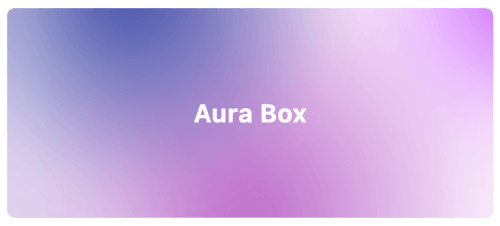
aura_box のカバー
パッケージ詳細v1.0.2

aura_box

複数のラジアルグラデーションとぼかし効果を組み合わせた Flutter ウィジェット。

AndroidiOSWebmacOSWindowsLinux
30日間ダウンロード
416
いいね数
74
Pub ポイント
160

パッケージをインストール

flutter pub add aura_box

パッケージ概要

公開情報に基づく選定ガイドです。参考としてご利用ください。

Aura Box は、複数のラジアルグラデーションとブラー重ね合わせを組み合わせることで、視覚的にインパクトのある背景効果を作成する Flutter ウィジェットです。現代的なアプリインターフェースに最適で、重いパフォーマンスコストなしに視覚的な奥行きと洗練された美しさを高めます。滑らかなアニメーションおよびカスタマイズ可能なグラデーションカラー、強度、ブラーレベルをサポートしています。Android、iOS、Web、macOS、Windows、Linux などすべての主要プラットフォームで動作し、クロスプラットフォーム開発に非常に便利です。起動画面、ログインページ、没入型UIに最適です。

用途

  • スプラッシュスクリーン
  • ログインおよびオンボーディング画面
  • 没入型ダッシュボードの背景
  • アプリテーマのカスタマイズ
  • アニメーション付きUIトランジション

主な機能

  • 複数のラジアルグラデーション
  • ブラー効果の統合
  • クロスプラットフォーム互換性
  • カスタマイズ可能なグラデーションカラー
  • スムーズなアニメーション対応
  • 軽量なパフォーマンス

適している対象

  • デザイン重視のFlutterアプリ
  • モダンなUI/UXの実装
  • モバイルおよびWebアプリケーションにおける背景の強化
  • 視覚的な洗練を求める開発者
  • クリエイティブなアプリプロトタイプ

注意事項

  • 低性能デバイスでのパフォーマンスに影響を与える可能性があります
  • 視覚的な混雑を避けるために、色の選択に注意が必要です
  • コンテンツが豊富なレイアウトには適していない
  • 背景として使用するのが最適であり、主なコンテンツコンテナとしては使わない
  • 標準では限定的な相互作用

元の README

関連するソースリポジトリの README 原文のスナップショットです。最新の内容はリポジトリをご覧ください。

Aura Box

style: very good analysis patrol_finders on pub.dev License: MIT

Flutter widget that combines multiple radial gradients and blur effect.

Aura box banner image

Installation

Add this line into the project pubspec.yaml file.

dependencies:
    aura_box: ^1.0.4

Then in your files you can import it:

import 'package:aura_box/aura_box.dart';

Usage

The package exposes two widgets.

  • AuraBox acts as a container which can receive a child, a decoration and a list of AuraSpot.
  • AuraSpot represent the point where the radiant gradients are generated.
AuraBox(
    spots: [
        // Places one blue spot in the center
        AuraSpot(
            color: Colors.blue,
            radius: 100.0,
            alignment: Alignment.center,
            blurRadius: 5.0,
            stops: const [0.0, 0.5],
        ),
        // Places one red spot in the bottom right
        AuraSpot(
            color: Colors.red,
            radius: 150.0,
            alignment: Alignment.bottomRight,
            blurRadius: 10.0,
            stops: const [0.0, 0.7],
        ),
    ],
    decoration: BoxDecoration(
        color: Colors.transparent,
        shape: BoxShape.rectangle,
        borderRadius: BorderRadius.circular(10.0),
    ),
    child: const SizedBox(
        height: 100,
        width: 100,
    ),
)

Alignment

The single spots are positioned inside a stack widget. This gives control over their position using the alignment property.

For further details you can refer to the Alignment class documentation.

Example

An example project is available within the project:

example

カテゴリー

ソースリポジトリ

このパッケージを使用しているプロジェクト