Auto Store Translate は、Flutter/Dart パッケージであり、Apple App Store および Google Play Store 用のアプリメタデータ(タイトル、説明、キーワードなど)の翻訳と登録を自動化します。翻訳サービスとの統合により、複数言語でのメタデータ更新を管理し、ローカライゼーションワークフローを簡素化します。グローバル市場に効率的にアプリをリリースしたい開発者向けに設計されており、手作業を減らし、多言語アプリリストにおける誤りを最小限に抑えます。このパッケージは Android、iOS、macOS、Windows、Linux プラットフォームをサポートしています。
A library that automates translation/registration of metadata (title, description, etc.) in the App Store/Play Store.
playstore & appstore translated screenshot
How to Use?
1. Setup the config file
dependencies:auto_store_translate:
2. Create a dart file in your project and paste the code below.
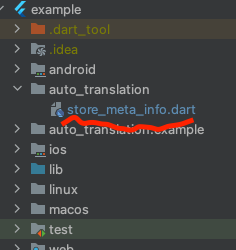
create dart file in your project
project path > auto_translation > store_meta_info.dart please fill in all the information below.
import'package:auto_store_translate/auto_store_translate.dart';
/// write your store info here.MyStoreInfo myStoreInfo = MyStoreInfo(
// Play Store Title 30 characters or less
playStoreTitle: "",
// Play Store Short Description 80 characters or less
playStoreShortDescription: "",
// Play Store Long Description 4000 characters or less
playStoreFullDescription: '''
''',
// Play Store Translation Start Language
playStoreStartLanguage: "en",
// Play Store Title Translation
translatePlayStoreName: true,
// App Store Title 30 characters or less
appStoreTitle: "",
// App Store Subtitle 30 characters or less
appStoreSubTitle: "",
// App Store Description 4000 characters or less
appStringDescription: '''
''',
// App Store Keywords 100 characters or less , separated by commas, SEO
appStoreKeywords: "",
// App Store Translation Start Language
appStoreStartLanguage: "en",
// App Store Title Translation
translateAppStoreName: true,
// Whether to display the first letter of the App Store title in uppercase
onlyFirstCharacterUpperAppName: true,
// App Store Update Notes
releaseNote: "fix small bug :)",
// Home Page URL
homepageLink: "",
// Privacy Policy URL
policyPageLink: "",
);
main() {
AutoStoreTranslate.translateStoreInfo(
myStoreInfo: myStoreInfo,
// google translate api key
googleTranslateApiKey: "INPUT_YOUR_GOOGLE_TRANSLATE_API_KEY",
// true: translate only title, false: translate title + all
onlyAppNameTranslate: false);
}
It works even if you don't put the Google Translate api key, but you will soon reach the free limit.
For a guide to getting the Google Translate api key, please refer to this document.
3. Run the code above and wait for the translation to complete.
4. you will see the translated folder in the project.
5. Set up fastlane for each android/ios and register the information in the play store/app store.


 playstore & appstore translated screenshot