パッケージ、リポジトリ、アプリカテゴリを検索

パッケージ詳細v0.4.0

background_task

アプリケーションがバックグラウンドに移行した後、位置情報の更新を使用して処理できます。

AndroidiOS
30日間ダウンロード
97
いいね数
40
Pub ポイント
160

パッケージをインストール

flutter pub add background_task

パッケージ概要

公開情報に基づく選定ガイドです。参考としてご利用ください。

background_task パッケージは、Flutter アプリがバックグラウンドでも操作(特に位置情報の更新)を実行できるようにします。Android および iOS 向けに設計されており、ユーザーの移動を途切れなく追跡するなど、継続的な機能を維持できるようにしています。ネイティブプラットフォーム機能と統合することで、バックグラウンド状態での信頼性の高い実行を確保しています。リアルタイムの位置監視や定期的なデータ収集が必要なアプリに特に役立ちます。このソリューションは最小限のオーバーヘッドで構築されており、両方のプラットフォームに対応する専用のネイティブ実装を採用しています。

用途

  • リアルタイムでの位置追跡
  • 定期的なデータ同期
  • バックグラウンドジオフェンシング
  • 長時間実行タスクの実行
  • バッテリー効率の良いバックグラウンド処理

主な機能

  • Android および iOS をサポート
  • バックグラウンドでの位置更新を処理する
  • バッテリーへの影響を最小限に抑える
  • ネイティブプラットフォームの統合
  • タスクスケジューリングのためのシンプルな API

適している対象

  • フィットネスおよびナビゲーションアプリ
  • 物流および配達状況の追跡
  • 現場サービス管理
  • 継続的なバックグラウンドアクティビティを必要とするアプリ
  • 位置ベースのサービス

注意事項

  • 両方のプラットフォームで適切な権限が必要です
  • OSの電力節約モードによって制限される可能性があります
  • 実機でのテストが必要です
  • バックグラウンド実行の制限は、OSバージョンによって異なります
  • ユーザーは場所のアクセス許可を付与する必要があります

元の README

関連するソースリポジトリの README 原文のスナップショットです。最新の内容はリポジトリをご覧ください。

background_task

never-light-log

Developed with 💙 by Never inc.


Motivation

Enable developers to continue processing even when the application transitions to the background, we have created a package that allows processing to continue using location updates.This package was created with reference to background_location.

Can be used when you want to run the program periodically in the background.

  • Monitor and notify the distance walked and steps.
  • Notification of destination arrival.
  • Tracking location information (sending it to a server).

Usage

// Monitor notifications of background processes.
// However, Cannot be used while the app is in task kill.
BackgroundTask.instance.stream.listen((event) {
  // Implement the process you want to run in the background.
  // ex) Check health data.
});

// Start background processing with location updates.
await BackgroundTask.instance.start();

// Stop background processing and location updates.
await BackgroundTask.instance.stop();

This is an implementation for receiving updates even when the task is task-killed. In this package, iOS uses startMonitoringSignificantLocationChanges and Android uses ForegroundService.

// Define callback handler at the top level.
@pragma('vm:entry-point')
void backgroundHandler(Location data) {
  // Implement the process you want to run in the background.
  // ex) Check health data.
}

void main() {
  WidgetsFlutterBinding.ensureInitialized();
  BackgroundTask.instance.setBackgroundHandler(backgroundHandler); // 👈 Set callback handler.
  runApp(const MyApp());
}

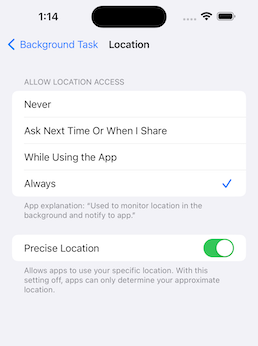
To get the latest location information in a task-killed status, set the app to Always.

ios android

This is an implementation for when you want to stop using the application when it is killed.

await BackgroundTask.instance.start(
  isEnabledEvenIfKilled: false,
);

Recommended to use with permission_handler.

final status = await Permission.location.request();
final statusAlways = await Permission.locationAlways.request();

if (status.isGranted && statusAlways.isGranted) {
  await BackgroundTask.instance.start();
}
Setup

pubspec.yaml

dependencies:
  background_task:

iOS: Info.plist

<key>NSLocationAlwaysAndWhenInUseUsageDescription</key>
<string>Used to monitor location in the background and notify to app.</string>
<key>NSLocationAlwaysUsageDescription</key>
<string>Used to monitor location in the background and notify to app.</string>
<key>NSLocationWhenInUseUsageDescription</key>
<string>Used to monitor location in the background and notify to app.</string>
<key>UIBackgroundModes</key>
<array>
    <string>fetch</string>
    <string>location</string>
</array>

To use an external package (shared_preference etc..) in callback handler, register DispatchEngine in AppDelegate.

iOS: AppDelegate.swift

import UIKit
import Flutter
import background_task // 👈 Add

@main
@objc class AppDelegate: FlutterAppDelegate, FlutterImplicitEngineDelegate {
  override func application(
    _ application: UIApplication,
    didFinishLaunchingWithOptions launchOptions: [UIApplication.LaunchOptionsKey: Any]?
  ) -> Bool {
      GeneratedPluginRegistrant.register(with: self)
      // 👇 Add
      BackgroundTaskPlugin.onRegisterDispatchEngine = {
          GeneratedPluginRegistrant.register(with: BackgroundTaskPlugin.dispatchEngine)
      }
      return super.application(application, didFinishLaunchingWithOptions: launchOptions)
  }

  func didInitializeImplicitFlutterEngine(_ engineBridge: FlutterImplicitEngineBridge) {
    GeneratedPluginRegistrant.register(with: engineBridge.pluginRegistry)
  }
}

Android: AndroidManifest.xml

<uses-permission android:name="android.permission.ACCESS_COARSE_LOCATION" />
<uses-permission android:name="android.permission.ACCESS_FINE_LOCATION" />
<uses-permission android:name="android.permission.ACCESS_BACKGROUND_LOCATION"/>
<uses-permission android:name="android.permission.POST_NOTIFICATIONS"/>

References

カテゴリー

ソースリポジトリ

このパッケージを使用しているプロジェクト

データはまだありません。