パッケージ、リポジトリ、アプリカテゴリを検索

barras のカバー
パッケージ詳細v0.2.1

barras

Android および iOS 向けのシンプルでカスタマイズ可能なバーコードスキャンパッケージです。iOS では AVCaptureSession を、Android では ZXing を使用しています。

AndroidiOS
30日間ダウンロード
77
いいね数
32
Pub ポイント
150

パッケージをインストール

flutter pub add barras

パッケージ概要

公開情報に基づく選定ガイドです。参考としてご利用ください。

Barras は、Android および iOS 向けの軽量でカスタマイズ可能なバーコードスキャンパッケージであり、Flutter アプリケーションへのシームレスな統合を目的としています。iOS では AVCaptureSession を、Android では ZXing を活用して、信頼性の高いスキャンパフォーマンスを実現しています。さまざまなバーコード形式をサポートし、最小限の構成で簡単なセットアップが可能です。迅速かつ正確なバーコードまたは QR コード読み取りが必要なアプリに最適で、プラットフォーム間でネイティブ体験を提供します。

用途

  • モバイル在庫管理
  • 小売製品のスキャン
  • イベントチケットの検証
  • アセットトラッキング
  • QRコードを用いたユーザー認証

主な機能

  • クロスプラットフォーム対応(Android および iOS)
  • ネイティブスキャンエンジン(AVCaptureSession、ZXing)を使用
  • 非常にカスタマイズ可能なUI
  • 複数のバーコード形式をサポートしています
  • Flutter とのシンプルな統合

適している対象

  • 小売または物流アプリを開発する開発者
  • 高速のバーコードスキャンが必要なアプリ
  • ネイティブパフォーマンスを必要とするプロジェクト
  • 軽量なソリューションを求めるスタートアップ
  • 両方のモバイルプラットフォームをターゲットとするFlutter開発者

注意事項

  • 両方のプラットフォームでカメラ権限が必要です
  • バーコード/QRコードのスキャンのみに制限
  • 組み込みの画像処理機能なし
  • カスタムUIのための追加のスタイル設定が必要になる場合があります
  • コア機能のための外部ネイティブライブラリに依存しています

元の README

関連するソースリポジトリの README 原文のスナップショットです。最新の内容はリポジトリをご覧ください。

Barras

This document is also available in: English | Português


Barras is a simple and customizable barcode scanning Flutter package for Android and iOS. It uses AVCaptureSession in iOS and ZXing in Android.

Please bear in mind that Barras is experimental, in early development stage.

Getting Started

Requirements

Barras requires camera usage permission, on both iOS and Android. This must be implemented by you, considering any alternatives that you may be already using for user permission requests.

If you are not handling permissions yet, there are good plugins to do it, like permission_handler.

Besides that, Barras depends on the following:

  • Flutter 2.10.5 or higher
  • Android API 26 (Marshmallow) or newer
  • iOS 9.0 or newer
Import and use in your code

Add Barras dependency to the pubspec.yaml file:

dependencies:
  barras: ^0.2.1

Import it in your code:

import 'package:barras/barras.dart';

Simply call the scan method, and we are good to go:

// Open the barcode reading page. Returned data will be null if
// Cancel button is pressed, or if user navigates back
final data = await Barras.scan(context);

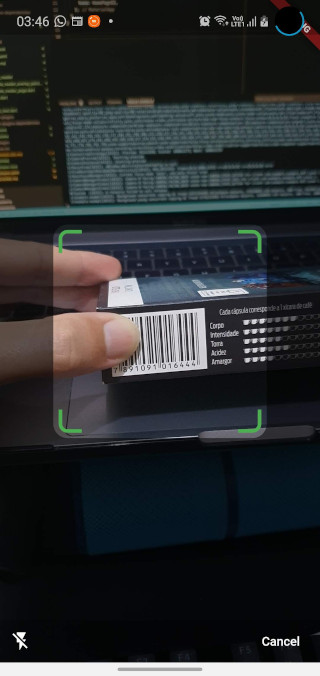
Default barcode capture page

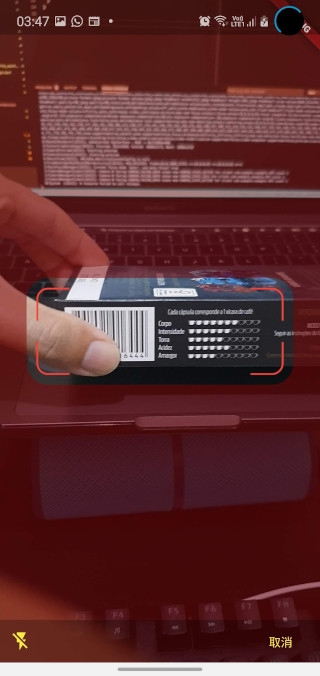
You can also customize the appearance of the barcode capture page:

// Open the barcode reading page. Customize the appearance, changing the
// viewfinder color, size and blinking speed. Returned data will be null
// if Cancel button is pressed, or if user navigates back
final data = await Barras.scan(
  context,
  viewfinderHeight: 120,
  viewfinderWidth: 300,
  scrimColor: Color.fromRGBO(128, 0, 0, 0.5),
  borderColor: Colors.red,
  borderRadius: 24,
  borderStrokeWidth: 2,
  buttonColor: Colors.yellow,
  borderFlashDuration: 250,
  cancelButtonText: "取消",
  successBeep: false,
);

Customized barcode capture page

You can check a working example app in the example folder.

カテゴリー

依存関係

依存関係一覧 3 件

ソースリポジトリ

このパッケージを使用しているプロジェクト

データはまだありません。