パッケージ、リポジトリ、アプリカテゴリを検索

calendar_viewer のカバー
パッケージ詳細v1.1.0

calendar_viewer

予約、イベント、多言語対応を目的とした、非常にカスタマイズ可能なカレンダーウィジェットです。

AndroidiOSWebmacOSWindowsLinux
30日間ダウンロード
81
いいね数
11
Pub ポイント
160

パッケージをインストール

flutter pub add calendar_viewer

パッケージ概要

公開情報に基づく選定ガイドです。参考としてご利用ください。

Flutter用の高度にカスタマイズ可能なカレンダーウィジェットで、予約、イベント、多言語表示をサポートしています。柔軟なスタイル設定、イベント統合、およびAndroid、iOS、Web、macOS、Windows、Linux間でのシームレスなクロスプラットフォーム互換性を提供します。開発者向けに設計されており、日付、ヘッダー、UIコンポーネントを簡単にカスタマイズしながらパフォーマンスと応答性を維持できます。動的な日付選択と国際化が必要なアプリに最適です。

用途

  • イベントスケジューリング
  • 予約システム
  • 多言語カレンダー
  • 日付ピッカーの統合
  • タイムマネジメントアプリ
  • 旅行予約インターフェース

主な機能

  • カスタマイズ可能な UI テーマ
  • 多言語対応
  • イベントのハイライト
  • クロスプラットフォーム互換性
  • レスポンシブデザイン
  • 設定可能な日付範囲

適している対象

  • 予約アプリを開発する開発者
  • 国際化されたカレンダーが必要なチーム
  • 複雑な日付操作を持つアプリ
  • UI中心のカレンダ実装
  • 軽量なカレンダーウィジェットを必要とするプロジェクト

注意事項

  • 手動でのイベントデータ処理が必要です
  • 制限された組み込みタイムゾーンサポート
  • ネイティブな繰り返しイベントロジックなし
  • スタイリングには高度なカスタマイズが必要になる場合があります
  • 完全な i18n を実現するため、外部のローカリゼーションパッケージに依存しています

元の README

関連するソースリポジトリの README 原文のスナップショットです。最新の内容はリポジトリをご覧ください。

pub package github linkedin

Calendar Viewer

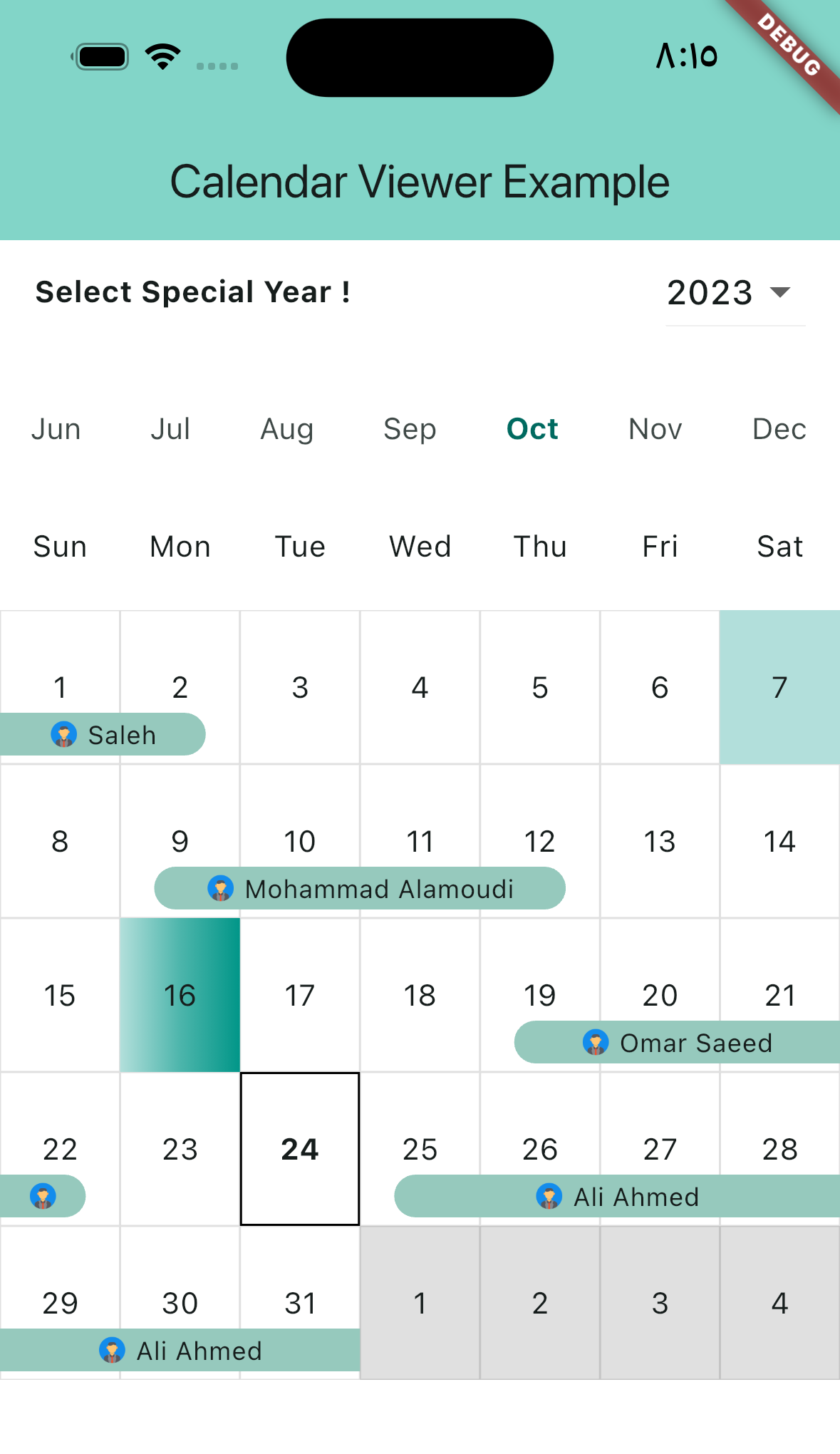
A highly customizable calendar widget designed for reservations, events, and multi-language support.

Calendar

Table of Contents

  1. Installing
  2. Features
  3. Usage
  4. Example Project
  5. Properties
  6. Events
  7. Contributors

🖥 Installing

Add Dependency
dependencies:
  calendar_viewer: ^1.1.0 # Use the latest version
Import Package
import 'package:calendar_viewer/calendar_viewer.dart';

✨ Features

  • Customizable month tabs and week bars.
  • Multi-language support for month and weekday names.
  • Add reservations spanning multiple dates.
  • Customizable styles for dates, weekdays, and reservations.
  • Support for event handling like taps and long presses on dates.

📖 Usage

Basic Example:
/// Use [CalendarPageViewer] if you want to show only one month at a time.
/// with no tab bar.
///
/// Use [CalendarListViewer] if you want to show all months at a time.
/// with a scrollable list.
CalendarTabBarViewer(
  initialDate: DateTime.now(),
  months: ['Jan', 'Feb', ...], // List of 12 months
  weekdays: ['Mon', 'Tue', ...], // List of 7 weekdays
  outsideDateConfig: CalendarDateConfig(
      decoration: BoxDecoration(
        color: Colors.black12,
        border: Border.all(color: Colors.black12, width: 0.5),
      ),
    ),
);
Advanced Configuration:
/// Use [CalendarPageViewer] if you want to show only one month at a time.
/// with no tab bar.
///
/// Use [CalendarListViewer] if you want to show all months at a time.
/// with a scrollable list.
CalendarTabBarViewer(
  key: Key(_selectedDate.toString()),
  initialDate: _selectedDate,
  months: ['January', 'February', ...],
  weekdays: ['Monday', 'Tuesday', ...],
  dateConfigBuilder: (date) {
    if (date.isAtSameMomentAs(DateTime(_now.year, _now.month, _now.day))) {
      return CalendarDateConfig(
        decoration: BoxDecoration(
          color: Colors.teal.withValues(alpha: .6),
          borderRadius: BorderRadius.circular(5),
        ),
      );
    } else if(date.isAtSameMomentAs(_selectedDate)) {
      return CalendarDateConfig(
        decoration: BoxDecoration(
          color: Colors.blue.withValues(alpha: .6),
          borderRadius: BorderRadius.circular(5),
        ),
      );
    }
    return null;
  },
  reservations: [
    CalendarViewerReservation(
      from: DateTime(2023, 10, 9),
      to: DateTime(2023, 10, 13),
      user: const CalendarReservationUser(
        name: 'Mohammad Alamoudi',
        netImage:
            'https://cdn-icons-png.flaticon.com/512/9203/9203764.png',
      ),
    ),
  ],
  reservation: CalenderReservationConfig(
    style: CalendarReservationStyle(
      color: Colors.teal.withValues(alpha: .6),
    ),
  ),
  outsideDateConfig: CalendarDateConfig(
      decoration: BoxDecoration(
        color: Colors.black12,
        border: Border.all(color: Colors.black12, width: 0.5),
      ),
    ),
);

📱 Example Project

  • Pub Example: Available on pub.dev.
  • GitHub Example Project: Available on GitHub.

📋 Properties

Property Description
initialDate The initial date used to calculate the selected month/year.
months List of 12 month names in your app's locale.
weekdays List of 7 weekday names in your app's locale.
reservation Configures reservations (e.g., style, data).
dateConfig Default configuration for calendar dates.
dateConfigBuilder Function to customize the style of specific dates.
onWeekdayTap Callback triggered on weekday tap with weekday and month as arguments.
customWeekdayStyle Map of styles for specific weekdays (e.g., weekends).
monthsTabBarConfig Configuration for the months tab bar.
outsideDateConfig Secondary default configuration for out-of-bounds dates.
outsideDateConfigBuilder Function to dynamically customize specific dates outside the active month.
startWeekday Target integer (1 = Monday, 7 = Sunday) to set fixed start alignment.
alwaysShowFullRows Locks view to perfectly output 6 rows or 5 rows maintaining aspect ratio.
showOutsideDays Whether to display padded days extending into previous/next calendar month.

🎯 Events

Event Description
onWeekdayTap Triggered when a weekday is tapped. Passes weekday and month.
onTap (in dates) Triggered when a specific date is tapped.
onLongPress (in dates) Triggered when a specific date is long-pressed.

👨🏻‍💻 Contributors

Feel free to contribute by submitting issues or feature requests on GitHub! 😊

カテゴリー

ソースリポジトリ

このパッケージを使用しているプロジェクト

データはまだありません。