camera_deep_ar
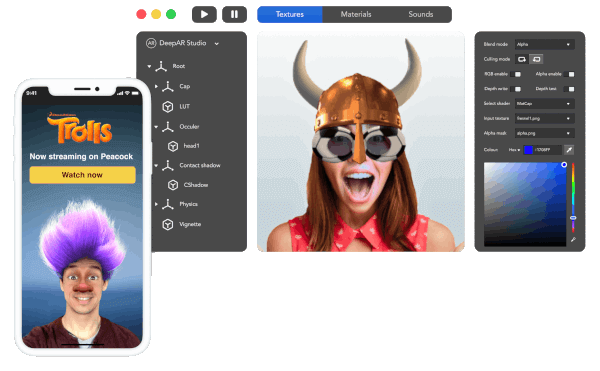
A new Flutter plugin for Camera video and Photo Augmented reality recording. This plug-in requires Android SDK 19+ and iOS 10+
Getting Started
Please follow the example on the dev channel https://github.com/mtellect/CameraDeepAR/tree/dev as the dev channel has the recent code updates
Get your ApiKeys from DeepAr a link
Simply follow the example main.dart. More documentations to come in as time permits
import 'package:camera_deep_ar/camera_deep_ar.dart' ;
class MyApp extends StatefulWidget @override
_MyAppState createState () => _MyAppState ();
}
class _MyAppState extends State <MyApp > String _platformVersion = 'Unknown' ;
CameraDeepArController cameraDeepArController;
int currentPage = 0 ;
final vp = PageController (viewportFraction: .24 );
Effects currentEffect = Effects .none;
Filters currentFilter = Filters .none;
Masks currentMask = Masks .none;
bool isRecording = false ;
@override
void initState () {
super .initState ();
}
@override
Widget build (BuildContext context) {
return MaterialApp (
home: Scaffold (
backgroundColor: Colors .black,
appBar: AppBar (
title: const Text ('DeepAR Camera Example' ),
),
body: Stack (
children: [
CameraDeepAr (
onCameraReady: (isReady) {
_platformVersion = "Camera status $isReady " ;
setState (() {});
},
onImageCaptured: (path) {
_platformVersion = "Image Taken @ $path " ;
setState (() {});
},
onVideoRecorded: (path) {
_platformVersion = "Video Recorded @ $path " ;
isRecording = false ;
setState (() {});
},
androidLicenceKey:
"3b58c448bd650192e7c53d965cfe5dc1c341d2568b663a3962b7517c4ac6eeed0ba1fb2afe491a4b" ,
iosLicenceKey:
"53618212114fc16bbd7499c0c04c2ca11a4eed188dc20ed62a7f7eec02b41cb34d638e72945a6bf6" ,
cameraDeepArCallback: (c) async {
cameraDeepArController = c;
setState (() {});
}),
Align (
alignment: Alignment .bottomCenter,
child: Container (
padding: EdgeInsets .all (20 ),
child: Column (
mainAxisSize: MainAxisSize .min,
mainAxisAlignment: MainAxisAlignment .end,
children: [
Text (
'Response >>> : $_platformVersion \n' ,
textAlign: TextAlign .center,
style: TextStyle (fontSize: 14 , color: Colors .white),
),
SizedBox (
height: 20 ,
),
Row (
children: [
Expanded (
child: FlatButton (
onPressed: () {
if (null == cameraDeepArController) return ;
if (isRecording) return ;
cameraDeepArController.snapPhoto ();
},
child: Icon (Icons .camera_enhance_outlined),
color: Colors .white,
padding: EdgeInsets .all (15 ),
),
),
if (isRecording)
Expanded (
child: FlatButton (
onPressed: () {
if (null == cameraDeepArController) return ;
cameraDeepArController.stopVideoRecording ();
isRecording = false ;
setState (() {});
},
child: Icon (Icons .videocam_off),
color: Colors .red,
padding: EdgeInsets .all (15 ),
),
)
else
Expanded (
child: FlatButton (
onPressed: () {
if (null == cameraDeepArController) return ;
cameraDeepArController.startVideoRecording ();
isRecording = true ;
setState (() {});
},
child: Icon (Icons .videocam),
color: Colors .green,
padding: EdgeInsets .all (15 ),
),
),
],
),
SingleChildScrollView (
padding: EdgeInsets .all (15 ),
scrollDirection: Axis .horizontal,
child: Row (
children: List .generate (Masks .values.length, (p) {
bool active = currentPage == p;
return GestureDetector (
onTap: () {
currentPage = p;
cameraDeepArController.changeMask (p);
setState (() {});
},
child: Container (
margin: EdgeInsets .all (5 ),
padding: EdgeInsets .all (12 ),
width: active ? 100 : 80 ,
height: active ? 100 : 80 ,
alignment: Alignment .center,
decoration: BoxDecoration (
color:
active ? Colors .orange : Colors .white,
shape: BoxShape .circle),
child: Text (
"$p " ,
textAlign: TextAlign .center,
style: TextStyle (
fontSize: active ? 16 : 14 ,
color: Colors .black),
)),
);
}),
),
)
],
),
),
)
],
),
),
);
}
}
To snap a photo
cameraDeepArController.snapPhoto ();
To record a video
cameraDeepArController.startVideoRecording ();
To stop video recording
cameraDeepArController.stopVideoRecording ();
To stop video recording
cameraDeepArController.stopVideoRecording ();
To change a mask
cameraDeepArController.changeMask (p);
More to come....
Android
You can use Permission_handler , a permissions plugin for Flutter.
Require and add the following permissions in your manifest:
Add this to the proguard-rules.pro
-keepclassmembers class ai .deepar .ar .DeepAR for release mode modify and add to your BuildType in your build.gradle
buildTypes {
release {
signingConfig signingConfigs.debug
proguardFiles getDefaultProguardFile ('proguard-android.txt' ), 'proguard-rules.pro'
}
}
    <uses-permission android:name="android.permission.FLASHLIGHT" />
    <uses-permission android:name="android.permission.WAKE_LOCK" />
    <uses-permission android:name="android.permission.READ_EXTERNAL_STORAGE" />
    <uses-permission android:name="android.permission.WRITE_EXTERNAL_STORAGE" />
    <uses-permission android:name="android.permission.ACCESS_COARSE_LOCATION" />
    <uses-permission android:name="android.permission.ACCESS_FINE_LOCATION" />
    <uses-permission android:name="android.permission.RECORD_AUDIO" />
    <uses-permission android:name="android.permission.SYSTEM_ALERT_WINDOW" />
    <uses-permission android:name="android.permission.CAMERA" />
    <uses-feature android:name="android.hardware.camera.front" />
    <uses-feature android:name="android.hardware.microphone" />
    <uses-feature android:name="android.hardware.camera2" />
    <uses-feature
        android:name="android.hardware.camera.autofocus"
        android:required="true" />
    <uses-feature android:name="android.hardware.camera.flash" />
    <uses-permission android:name="android.permission.READ_PHONE_STATE" />
iOS
You only need add the permission message on the Info.plist
    <key>NSCameraUsageDescription</key>
    <string>Allows you to capture your best moment</string>
	<key>io.flutter.embedded_views_preview</key>
	<true/>
    <key>NSPhotoLibraryAddUsageDescription</key>
    <string>Allows you to capture your best moment</string>
    <key>NSMicrophoneUsageDescription</key>
    <string>Needs access to your mic to help your record voice notes on chat/message conversations</string>