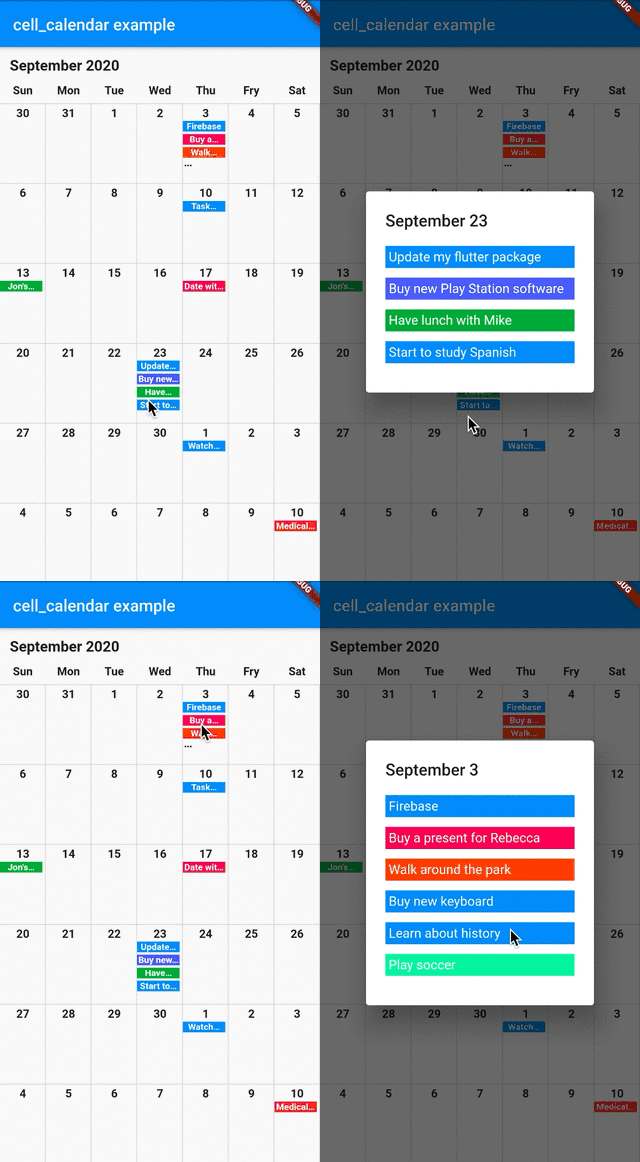
Google CalendarのUIを参考にした現代的でカスタマイズ可能なカレンダーウィジェットです。最小限の設定で視覚的に魅力的なカレンダーを迅速に開発できます。複数のプラットフォームをサポートし、日付選択、ナビゲーション、イベント統合などの直感的な機能を備えています。大規模なカスタムコーディングなしに洗練されたレスポンシブなカレンダーソリューションを求める開発者向けに設計されています。洗練された見た目を備えた日付管理が必要なアプリに最適です。
If you need to customize the calendar more, the additional parameters like eventBackGroundColor, eventTextColor and eventID are helpful.
onPageChanged
The callback onPageChanged is literally called when the current page is changed.
    CellCalendar(
      onPageChanged: (firstDate, lastDate) {
        print("This is the first date of the new page: $firstDate");
        print("This is the last date of the new page: $lastDate");
      }
    );
In this sample code, firstDate is the date in the very first cell of the new page, and its logic is same as lastDate.
onCellTapped
The callback onCellTapped is called when user tapped a cell.
    CellCalendar(
      onCellTapped: (date) {
        print("$date is tapped !");
      }
    );
It is called with tapped DateTime, so you can get the events on the date if you want.
    CellCalendar(
      onCellTapped: (date){
        print("$date is tapped !");
        final eventsOnTheDate = sampleEvents().where((event) {
          final eventDate = event.eventDate;
          return eventDate.year == date.year &&
              eventDate.month == date.month &&
              eventDate.day == date.day;
        }).toList();
        /// ex) Show dialog or navigate to new page with [eventsOnTheDate]
      }
    );
daysOfTheWeekBuilder and monthYearLabelBuilder
If you don't want to use default labels on the calendar, you can use callbacks for customization.