パッケージ、リポジトリ、アプリカテゴリを検索

circular_clip_route のカバー
パッケージ詳細v0.2.0+3

circular_clip_route

アノテーションウィジェットから円形のクリッピングを拡張してページを表示するページルートです。

AndroidiOSWebmacOSWindowsLinux
30日間ダウンロード
20
いいね数
131
Pub ポイント
160

パッケージをインストール

flutter pub add circular_clip_route

パッケージ概要

公開情報に基づく選定ガイドです。参考としてご利用ください。

CircularClipRoute は、指定されたアンカー・ウィジェットから拡張する円形クリップを通じて新しい画面を表示することで、滑らかでアニメーション付きのページ遷移を可能にするFlutterパッケージです。これは、ラプスやズームインアニメーションに似た視覚的な効果を生み出し、ナビゲーションにおけるユーザー体験を向上させます。微細でダイナミックな遷移がインターフェースの流れと視覚的魅力を高めるアプリに最適です。このルートはAndroid、iOS、Web、macOS、Windows、Linuxなどすべての主要プラットフォームで動作し、一貫した挙動を保証します。Dartで構築されており、既存のFlutterプロジェクトにシームレスに統合できます。

用途

  • アニメーション付きオンボーディング画面
  • ページ間のインタラクティブなナビゲーション
  • 状態変更時の視覚フィードバック
  • アプリ起動体験の向上
  • 魅力的なスプラッシュ画面を作成する

主な機能

  • 円形拡張アニメーション
  • カスタマイズ可能なアンカー・ウィジェット
  • クロスプラットフォーム互換性
  • スムーズなトランジション効果
  • Navigator との簡単な統合

適している対象

  • 魅力的な遷移を求めるアプリ開発者
  • マイクロインタラクションに注力するデザイナー
  • インタラクティブなUI要素を備えたプロジェクト
  • モバイルおよびWebアプリケーション
  • 視覚的なストーリーテリングに重点を置くアプリ

注意事項

  • 低性能デバイスでのパフォーマンスに影響を与える可能性があります
  • アンカー・ウィジェットの配置に注意が必要です
  • シンプルで高速なナビゲーションには適していない
  • 基本パラメータを超えるカスタマイズは限定的です
  • 注意を散漫にしないように、控えめに使用するべきです

元の README

関連するソースリポジトリの README 原文のスナップショットです。最新の内容はリポジトリをご覧ください。

pub.dev package page GitHub Stars

A page route, which reveals its page by expanding a circular clip from an anchor widget.


If you're looking for a database solution, check out cbl, another project of mine. It brings Couchbase Lite to standalone Dart and Flutter, with support for:

  • Full-Text Search,
  • Expressive Queries,
  • Data Sync,
  • Change Notifications

and more.


Getting started

To use the CircularClipRoute, provide it the context from which the animation should expand and push it onto the navigation stack. One way to get the right context is to use a Builder, which wraps the widget from which the route should expand:

final navigationTrigger = Builder(
    builder: (context) {
      return IconButton(
          icon: Icon(Icons.favorite),
          onPressed: () {
            Navigator.push(context, CircularClipRoute<void>(
              // This context will be used to determine the location and size of
              // the expanding clip. Here this will resolve to the `IconButton`.
              expandFrom: context,
              builder: (_) => MyRoute(),
            ));
          }
      );
    }
);

Also, take a look at the API docs for customizing the animation.

Example

The example implements the demo at the top.

References

Inspired by this shot.

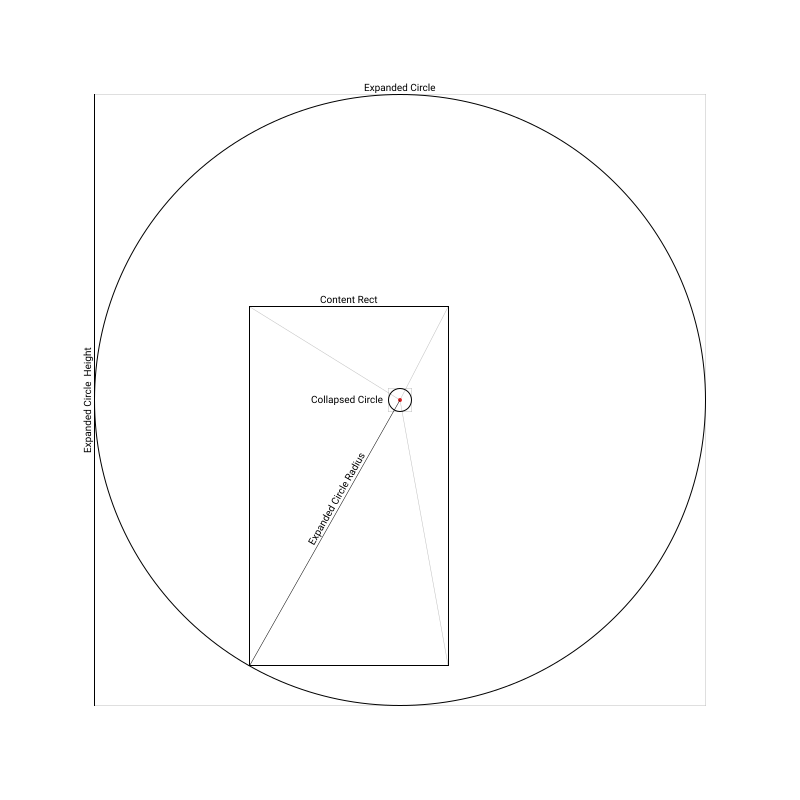
This drawing visualizes the geometry involved in creating the route transition:

Illustration of the geometry of the transition

The Anchored Custom Routes article explains how to implement routes, that are anchored to a widget, generally.


Gabriel Terwesten • GitHub @blaugold • Twitter @GTerwesten • Medium @gabriel.terwesten

カテゴリー

ソースリポジトリ

このパッケージを使用しているプロジェクト

データはまだありません。