パッケージ、リポジトリ、アプリカテゴリを検索

パッケージ詳細v0.6.3

contacts_service

Android および iOS デバイス上の連絡先を取得および管理するための Flutter プラグイン。

AndroidiOS
30日間ダウンロード
2880
いいね数
599
Pub ポイント
140

パッケージをインストール

flutter pub add contacts_service

パッケージ概要

公開情報に基づく選定ガイドです。参考としてご利用ください。

contacts_service パッケージは、Android および iOS プラットフォームのデバイス連絡先にアクセスして管理できるようにする Flutter プラグインです。連絡先リストを取得し、名前、電話番号、メールアドレスなどの連絡先情報を読み取り、フィルタリングや検索などの基本的な操作をサポートする一貫した API を提供します。クロスプラットフォーム互換性を考慮して設計されており、プラットフォーム固有のコードを書かずにネイティブ連絡先システムと統合できます。連絡先の照会やインポート機能が必要なアプリに最適です。

用途

  • 連絡先リストの取得
  • 連絡先の検索とフィルタリング
  • アプリへの連絡先のインポート
  • 連絡先をアプリデータと同期する
  • UIに連絡先の詳細を表示する

主な機能

  • クロスプラットフォーム対応(Android および iOS)
  • 連絡先アクセスのためのシンプルな API
  • 名前、電話番号、メールアドレスなどの連絡先フィールドをサポート
  • 検索およびフィルタリング機能
  • ネイティブコードは不要です

適している対象

  • 連絡先アクセスが必要なアプリ
  • ユーザープロファイルインポートツール
  • 通信アプリ
  • CRM統合
  • 連絡先ピッカー・ウィジェット

注意事項

  • Android および iOS で実行時権限が必要です
  • 基本的な連絡先操作に限定
  • プライバシー準拠が必要です
  • アクセスにユーザーの同意が必要になる場合があります
  • パフォーマンスはデバイスの連絡先データベースのサイズに依存します

元の README

関連するソースリポジトリの README 原文のスナップショットです。最新の内容はリポジトリをご覧ください。

contacts_service

pub package Build Status Coverage Status

A Flutter plugin to access and manage the device's contacts.

Usage

To use this plugin, add contacts_service as a dependency in your pubspec.yaml file.
For example:

dependencies:  
    contacts_service: ^0.6.3

Permissions

Android

Add the following permissions to your AndroidManifest.xml:

<uses-permission android:name="android.permission.READ_CONTACTS" />  
<uses-permission android:name="android.permission.WRITE_CONTACTS" />  
iOS

Set the NSContactsUsageDescription in your Info.plist file

<key>NSContactsUsageDescription</key>  
<string>This app requires contacts access to function properly.</string>  

Note
contacts_service does not handle the process of asking and checking for permissions. To check and request user permission to access contacts, try using the following plugins: flutter_simple_permissions or permission_handler.

If you do not request user permission or have it granted, the application will fail. For testing purposes, you can manually set the permissions for your test app in Settings for your app on the device that you are using. For Android, go to "Settings" - "Apps" - select your test app - "Permissions" - then turn "on" the slider for contacts.

Example

// Import package  
import 'package:contacts_service/contacts_service.dart';  
  
// Get all contacts on device
List<Contact> contacts = await ContactsService.getContacts();  

// Get all contacts without thumbnail (faster)
List<Contact> contacts = await ContactsService.getContacts(withThumbnails: false);

// Android only: Get thumbnail for an avatar afterwards (only necessary if `withThumbnails: false` is used)
Uint8List avatar = await ContactsService.getAvatar(contact);
  
// Get contacts matching a string
List<Contact> johns = await ContactsService.getContacts(query : "john");

// Add a contact  
// The contact must have a firstName / lastName to be successfully added  
await ContactsService.addContact(newContact);  
  
// Delete a contact
// The contact must have a valid identifier
await ContactsService.deleteContact(contact);  

// Update a contact
// The contact must have a valid identifier
await ContactsService.updateContact(contact);

// Usage of the native device form for creating a Contact
// Throws a error if the Form could not be open or the Operation is canceled by the User
await ContactsService.openContactForm();

// Usage of the native device form for editing a Contact
// The contact must have a valid identifier
// Throws a error if the Form could not be open or the Operation is canceled by the User
await ContactsService.openExistingContact(contact);

Contact Model

// Name
String displayName, givenName, middleName, prefix, suffix, familyName;

// Company
String company, jobTitle;

// Email addresses
List<Item> emails = [];

// Phone numbers
List<Item> phones = [];

// Post addresses
List<PostalAddress> postalAddresses = [];

// Contact avatar/thumbnail
Uint8List avatar;

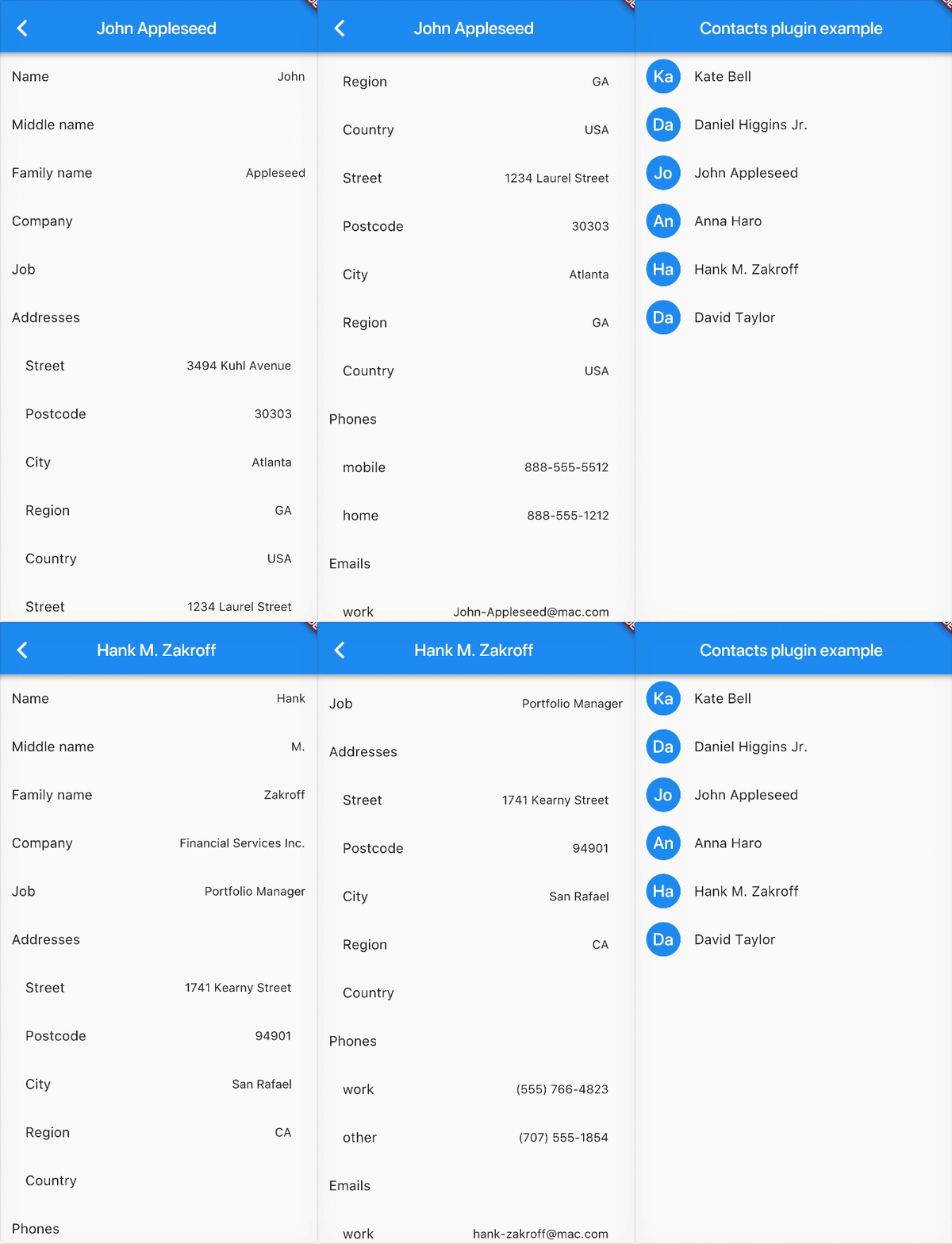
Example

Contributions

Contributions are welcome! If you find a bug or want a feature, please fill an issue.

If you want to contribute code please create a pull request under the staging branch.

Credits

Heavily inspired from rt2zz's react native plugin

カテゴリー

依存関係

依存関係一覧 2 件

ソースリポジトリ

このパッケージを使用しているプロジェクト