パッケージ、リポジトリ、アプリカテゴリを検索

custom_map_markers のカバー
パッケージ詳細v0.0.2+1

custom_map_markers

実行時ウィジェットをマップマーカーアイコンまたはバイト配列画像に変換するパッケージです。

AndroidiOSWeb
30日間ダウンロード
15
いいね数
86
Pub ポイント
140

パッケージをインストール

flutter pub add custom_map_markers

パッケージ概要

公開情報に基づく選定ガイドです。参考としてご利用ください。

実行時ウィジェットをカスタムマップマーカーアイコンとして使用するか、バイト配列の画像に変換してマップで使用できるようにするFlutterパッケージです。Android、iOS、Webプラットフォーム間でFlutterウィジェットをマップビューに直接統合できるため、動的かつインタラクティブなマーカーの作成プロセスを簡素化します。リアルタイムデータに基づいた個別化またはアニメーション付きマーカーが必要なアプリケーションに最適です。

用途

  • ユーザーのデータに基づく動的マーカーアイコン
  • アニメーションまたは状態付きマップピン
  • マップ上のカスタムUI要素
  • リアルタイム位置の可視化
  • インタラクティブマップオーバーレイ

主な機能

  • ウィジェットをマップマーカーに変換する
  • バイト配列出力のサポート
  • クロスプラットフォーム互換性
  • マッププラグインとの簡単な統合
  • 実行時マーカーのカスタマイズ

適している対象

  • インタラクティブマップを開発する開発者
  • リアルタイムの位置追跡機能付きアプリ
  • UI重視の位置情報機能
  • カスタマイズ可能なマップインターフェース
  • ウェブおよびモバイル地図アプリケーション

注意事項

  • 複雑なウィジェットによるパフォーマンスへの影響
  • 互換性のあるマッププラグインが必要です
  • 対応プラットフォームに限定
  • 頻繁な更新時のメモリ使用量
  • Web上のレンダリングの不一致の可能性

元の README

関連するソースリポジトリの README 原文のスナップショットです。最新の内容はリポジトリをご覧ください。

Custom Map Markers

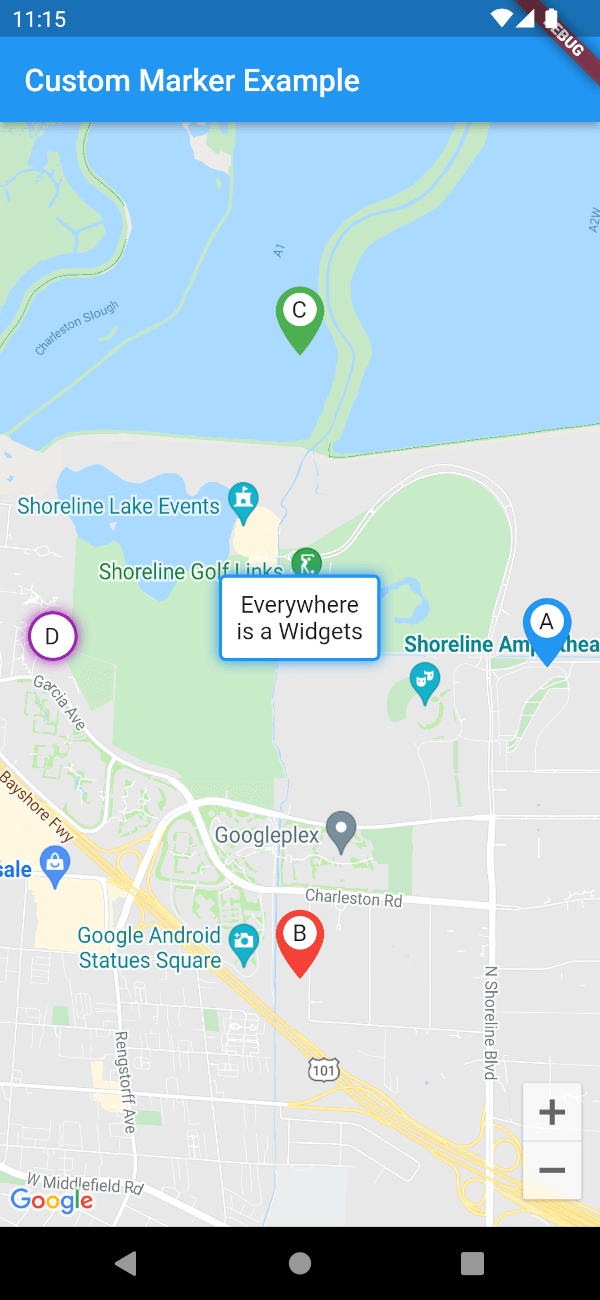
Not only "Everything is a widget" also "Everywhere is a widget".
custom_map_marker is a package that turns runtime widgets into map marker icons.

Features

this package providers the following features:

  • Ability to create runtime map markers using flutter widgets.
  • Capture Images of any list of widgets.

Getting started

First, add custom_map_markers as a dependency in your pubspec.yaml file.

dependencies:
  custom_map_markers: ^0.0.1

Usage

  1. Wrap your GoogleMaps widget with CustomGoogleMapMarkerBuilder.
  2. Define each marker and its custom widget in customMarkers
  3. Once custom markers are ready they will be passed as Set<Marer> in builder function.
final locations = const [  
  LatLng(37.42796133580664, -122.085749655962),  
  LatLng(37.41796133580664, -122.085749655962),  
];  

CustomGoogleMapMarkerBuilder(  
  customMarkers: [  
  MarkerData(  
        marker: Marker(  markerId: const MarkerId('id-1'), position: locations[0]),  
		child: _customMarker('A', Colors.black)),  
  MarkerData(  
        marker: Marker(  markerId: const MarkerId('id-2'), position: locations[1]),  
		child: _customMarker('B', Colors.red)),    
  ],  
  builder: (BuildContext context, Set<Marker>? markers) {  
    if (markers == null) {  
      return const Center(child: CircularProgressIndicator());  
  }  
    return GoogleMap(  
      initialCameraPosition: const CameraPosition(  
        target: LatLng(37.42796133580664, -122.085749655962),  
  zoom: 14.4746,  
  ),  
  markers: markers,  
  onMapCreated: (GoogleMapController controller) { },  
  );  
  },  
)

Not a google map user?

if you are not willing to use google maps you can use CustomMapMarkerBuilder that takes List<widgets> instead of List<MarkerData> and returns List<Uint8List> instead of Set<Marker> so you are free to use captured png images as you need.

Notes:
  1. Make sure your marker widget has boundaries.
  2. This package capture a png image of widget markers once they render, if your widget would take more time to render like Image.network you can use screenshotDelay parameter to daley the capture process making sure that your widget is rendered properly before capturing it.
  3. to run project example you have to add a valid google maps key to android/ios directories.

Features and bugs

Please feel free to:

カテゴリー

依存関係

依存関係一覧 3 件

ソースリポジトリ

このパッケージを使用しているプロジェクト

データはまだありません。