パッケージ、リポジトリ、アプリカテゴリを検索

customizable_space_bar のカバー
パッケージ詳細v0.2.0

customizable_space_bar

スクロール速度に応じてコンテンツを変更する AppBar。"Large Title" を実装可能

AndroidiOSWebmacOSWindowsLinux
30日間ダウンロード
682
いいね数
67
Pub ポイント
140

パッケージをインストール

flutter pub add customizable_space_bar

パッケージ概要

公開情報に基づく選定ガイドです。参考としてご利用ください。

スクロール速度に応じてコンテンツを動的に調整するカスタマイズ可能な AppBarで、「ラージタイトル」効果の実装が可能になります。ユーザーがコンテンツをスクロールする際にアプリバーが変化する、没入型で応答性のあるアプリインターフェースを作成するのに最適です。このパッケージはAndroid、iOS、Web、macOS、Windows、Linuxなど複数のプラットフォームをサポートしており、デバイス間で一貫した動作を提供します。展開状態と折りたたみ状態の間で滑らかな遷移を提供し、わずかな視覚フィードバックによりユーザーエクスペリエンスを向上させます。

用途

  • スクロール可能なリストで大タイトル効果を実装する
  • スクロール位置に応じて適応するダイナミックなアプリバーを作成する
  • モバイルおよびデスクトップアプリにおけるUIの没入感の向上
  • レスポンシブなナビゲーションヘッダーの設計
  • カスタムスクロール駆動型トランジションの構築

主な機能

  • スクロール速度に基づくコンテンツ変更
  • 大タイトルアニメーションのサポート
  • クロスプラットフォーム互換性
  • カスタマイズ可能な外観と動作
  • スムーズな状態遷移
  • 標準の ScrollView との統合

適している対象

  • マテリアルデザインアプリを開発する開発者
  • スクロール駆動型インタラクションを探しているUIデザイナー
  • 動的なヘッダー動作を必要とするアプリ
  • クロスプラットフォーム Flutter プロジェクト
  • 高度なスクロールパターンを使用する経験豊富なFlutter開発者

注意事項

  • ScrollViewまたはCustomScrollViewとの統合が必要です
  • 最適な視覚的結果を得るには、追加のスタイリングが必要になる場合があります
  • コンテンツが豊富で垂直スクロールが必要な画面に最適
  • パフォーマンスへの影響は、アニメーションコンテンツの複雑さに依存します
  • アプリバー固有の用途に限定され、一般的なレイアウトコンポーネントには対応していない

元の README

関連するソースリポジトリの README 原文のスナップショットです。最新の内容はリポジトリをご覧ください。

customizable_space_bar

pub package License: MIT

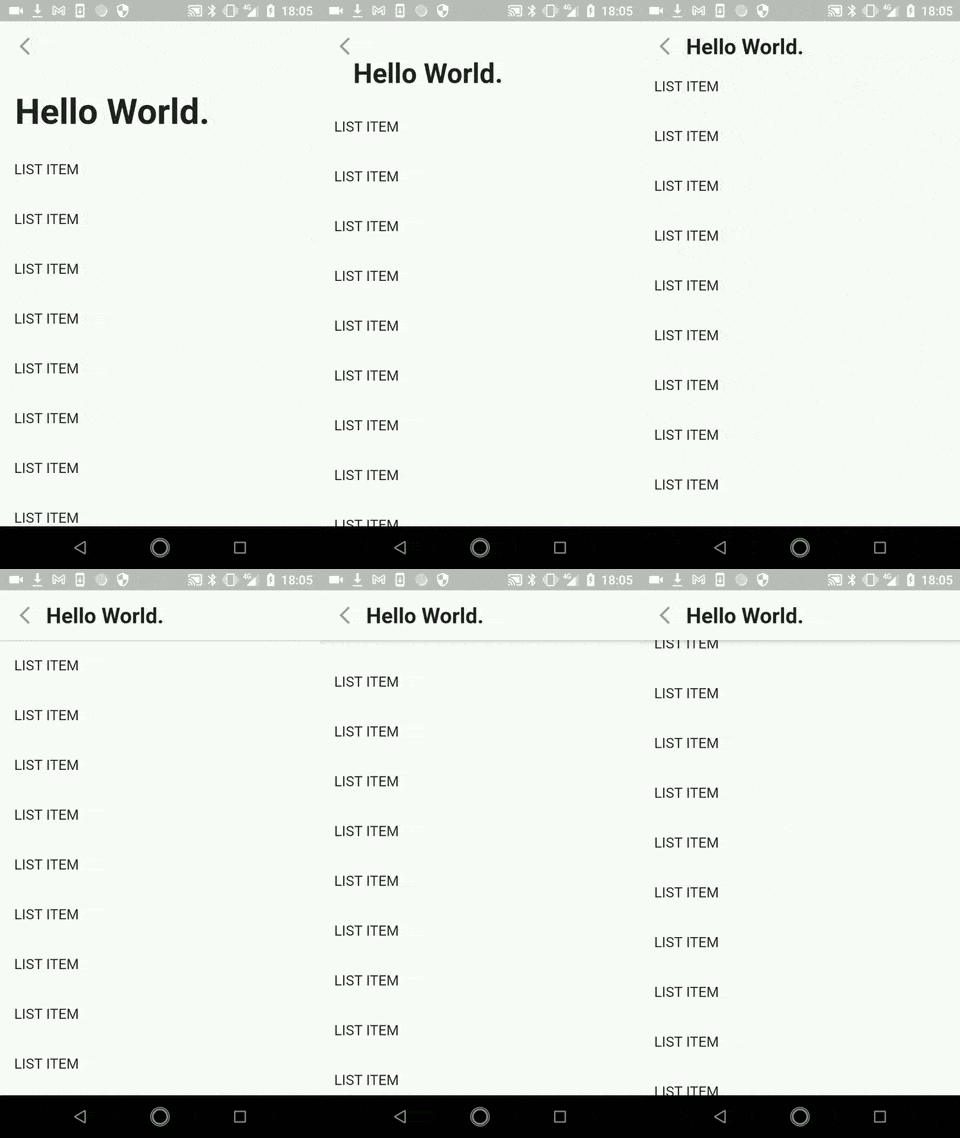
AppBar which changes the content with scrolling rate. Enables to implement "Large Title"

13063567123474

Usage

This package is expected to be used with flexibleSpace: in SliverAppBar, which means you also need to use CustomScrollView.

    CustomScrollView(
        slivers: [
          SliverAppBar(
            pinned: true,
            leading: IconButton(icon: Icon(Icons.arrow_back_ios_sharp)),
            backgroundColor: Theme.of(context).scaffoldBackgroundColor,

            /// This is the part you use this package
            flexibleSpace: CustomizableSpaceBar(
              builder: (context, scrollingRate) {
                /// Example content
                return Padding(
                  padding: EdgeInsets.only(
                      bottom: 13, left: 12 + 40 * scrollingRate),
                  child: Align(
                    alignment: Alignment.bottomLeft,
                    child: Text(
                      "Hello World.",
                      style: TextStyle(
                          fontSize: 42 - 18 * scrollingRate,
                          fontWeight: FontWeight.bold),
                    ),
                  ),
                );
              },
            ),
            /// End of the part

            expandedHeight: 150,
          ),
          SliverList(
            delegate: SliverChildBuilderDelegate(
              (context, index) {
                return ListTile(
                  title: Text("LIST ITEM"),
                );
              },
            ),
          )
        ],
      ),

You can control the layout in the AppBar with scrollingRate.

When the shape is fully expanded, scrollingRate is 0.0. When the shape is collapsed to AppBar, it reaches to the limit 1.0.

13063658045969

If you have any requests or questions, please feel free to ask on github.

カテゴリー

ソースリポジトリ

このパッケージを使用しているプロジェクト

データはまだありません。