パッケージ、リポジトリ、アプリカテゴリを検索

dashed_line のカバー
パッケージ詳細v0.1.0+3

dashed_line

任意の形状とスタイルで破線を描きます。その通りです。

AndroidiOSWebmacOSWindowsLinux
30日間ダウンロード
4
いいね数
77
Pub ポイント
160

パッケージをインストール

flutter pub add dashed_line

パッケージ概要

公開情報に基づく選定ガイドです。参考としてご利用ください。

任意の形状やスタイルでカスタマイズ可能な破線を描画するためのFlutterパッケージです。開発者が視覚的に魅力的な破線パスを簡単に作成できるようにし、ダッシュ長、ギャップサイズ、ストローク幅などのさまざまな設定をサポートしています。複数のプラットフォームでのアプリにおいて、区切り線、ボーダー、装飾的なラインなどのUI要素に最適です。軽量で、既存のFlutterプロジェクトにスムーズに統合できます。

用途

  • UIレイアウトでカスタム区切り線を作成する
  • 装飾的なラインパターンのデザイン
  • ウィジェットの周りに破線の枠を描く
  • チャートやグラフのビジュアライゼーションの向上
  • インタラクティブな描画ツールの構築

主な機能

  • 任意のパス形状をサポート
  • カスタマイズ可能なダッシュとギャップの長さ
  • 調整可能なストローク幅
  • クロスプラットフォーム互換性
  • シンプルな API インテグレーション

適している対象

  • 視覚的なバリエーションを求めるUIデザイナー
  • データ可視化コンポーネントを構築する開発者
  • スタイル付きの装飾要素を必要とするアプリ
  • クロスプラットフォームのFlutterアプリケーション

注意事項

  • 複雑なパスに対してパフォーマンス最適化が必要になる可能性があります
  • Flutter のキャンバス内の 2D レンダリングに制限
  • 追加の論理なしではアニメーションダッシュ効果には適していません

元の README

関連するソースリポジトリの README 原文のスナップショットです。最新の内容はリポジトリをご覧ください。

dashed_line

pub.dev build status

Draw dashed lines with any shape and style you want. Just like that.

Usage

Add the dependency to your pubspec.yaml (you can see the newest version in the pub badge):

dependencies:
  dashed_line: ^0.1.0

Use the widget:

import 'package:dashed_line/dashed_line.dart';

// ...

DashedLine(
  path: Path()..cubicTo(-40, 53, 14, 86, 61, 102),
  color: Colors.red,
)

...you can also use the SVG path commands instead of a Path:

DashedLine.svgPath(
  'C -40 53 14 86 61 102',
  color: Colors.red,
)

Where to obtain path methods/commands?

There are many ways.

You can construct the path yourself using the Path methods like lineTo or cubicTo.

You can also use the path commands used in the d attribute of SVG files. You can do this manually or via export from one of the vector graphics software, like Inkscape or Figma. We found SvgPathEditor quite useful too.

Example: Exporting path commands from Figma
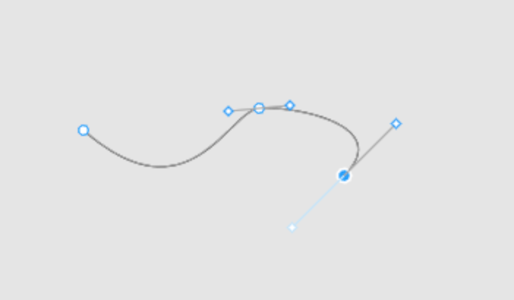
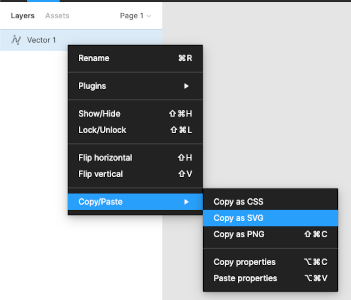
First step Second step
Create path using pen Export path as SVG

And now we have an SVG in the clipboard:

<svg width="190" height="48" viewBox="0 0 190 48" fill="none" xmlns="http://www.w3.org/2000/svg">
  <path d="M1 16C73 79 100 3 121 0.999997C142 -1 214.5 11.5 179 47" stroke="black"/>
</svg>

From here we can just copy the value of the path's d attribute and use for the DashedLine.svgPath constructor's first argument.

🚨 Note about paths

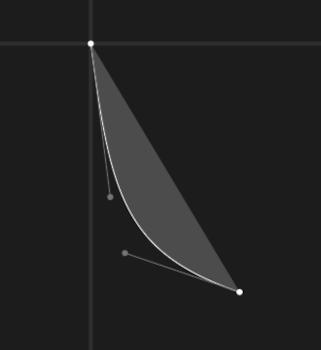
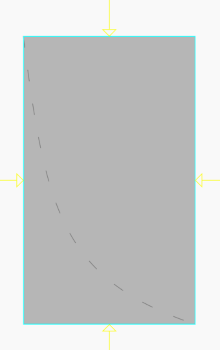
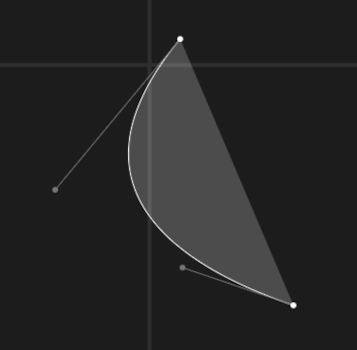
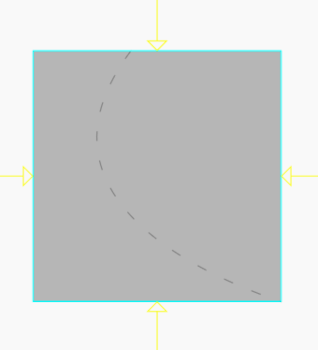
Due to how Paths work in Flutter and Skia, the DashedLine widget takes NOT as much space as the dashed line needs, but as much it needs to contain all the control points. Table below should help understand the problem.


Path commands Path Result line
C 8 63 14 86 61 102
C -40 53 14 86 61 102

License

See LICENSE.

カテゴリー

依存関係

依存関係一覧 1 件

ソースリポジトリ

このパッケージを使用しているプロジェクト

データはまだありません。