パッケージ、リポジトリ、アプリカテゴリを検索

パッケージ詳細v0.9.6

device_simulator

DeviceSimulator を使用すると、さまざまな画面解像度およびプラットフォームで Flutter アプリを簡単にテストできます。

30日間ダウンロード
80
いいね数
177
Pub ポイント
40

パッケージをインストール

flutter pub add device_simulator

パッケージ概要

公開情報に基づく選定ガイドです。参考としてご利用ください。

DeviceSimulator は、開発環境内でさまざまな画面解像度およびプラットフォームでアプリケーションをテストできるようにするFlutterパッケージです。異なるデバイスをシミュレートするための使いやすいインターフェースを提供し、レスポンシブデザインと一貫したユーザー体験を確保するのに役立ちます。物理的なデバイスや複雑なセットアップなしに、動的なプレビュー調整が可能になります。UI開発中の迅速な反復に最適であり、実際のデバイス動作を模倣することでテスト効率を高めます。

用途

  • レスポンシブレイアウトのテスト
  • 複数のデバイスでアプリの外観をプレビューする
  • 画面サイズに跨ってUIの一貫性を検証する
  • 迅速なUIプロトタイピング
  • クロスプラットフォーム互換性の確認
  • レイアウトの問題のデバッグ

主な機能

  • リアルタイムデバイスのシミュレーション
  • さまざまな画面解像度のサポート
  • Flutterプロジェクトへの簡単な統合
  • 動的プレビューの更新
  • 最小限の構成が必要
  • プラットフォームに依存しない設計

適している対象

  • UI/UXに注力するFlutter開発者
  • 複数デバイス間のテストを優先するチーム
  • 初心者がレスポンシブデザインを学ぶ
  • リモート開発ワークフロー
  • 複数のデバイスタイプをターゲットにするアプリ

注意事項

  • 実際のハードウェア動作をシミュレートしない
  • ビジュアルプレビューに限定され、完全な機能テストは行えない
  • 実行時パフォーマンスメトリクスなし
  • レイアウトの変更には手動での更新が必要です
  • 物理デバイステストの代替ではありません

元の README

関連するソースリポジトリの README 原文のスナップショットです。最新の内容はリポジトリをご覧ください。

DeviceSimulator

DeviceSimulator allows you to easily test your Flutter app for different screen resolutions and platforms. If you use this package, please consider downloading the Newsvoice app and giving us a five star review. Thanks!

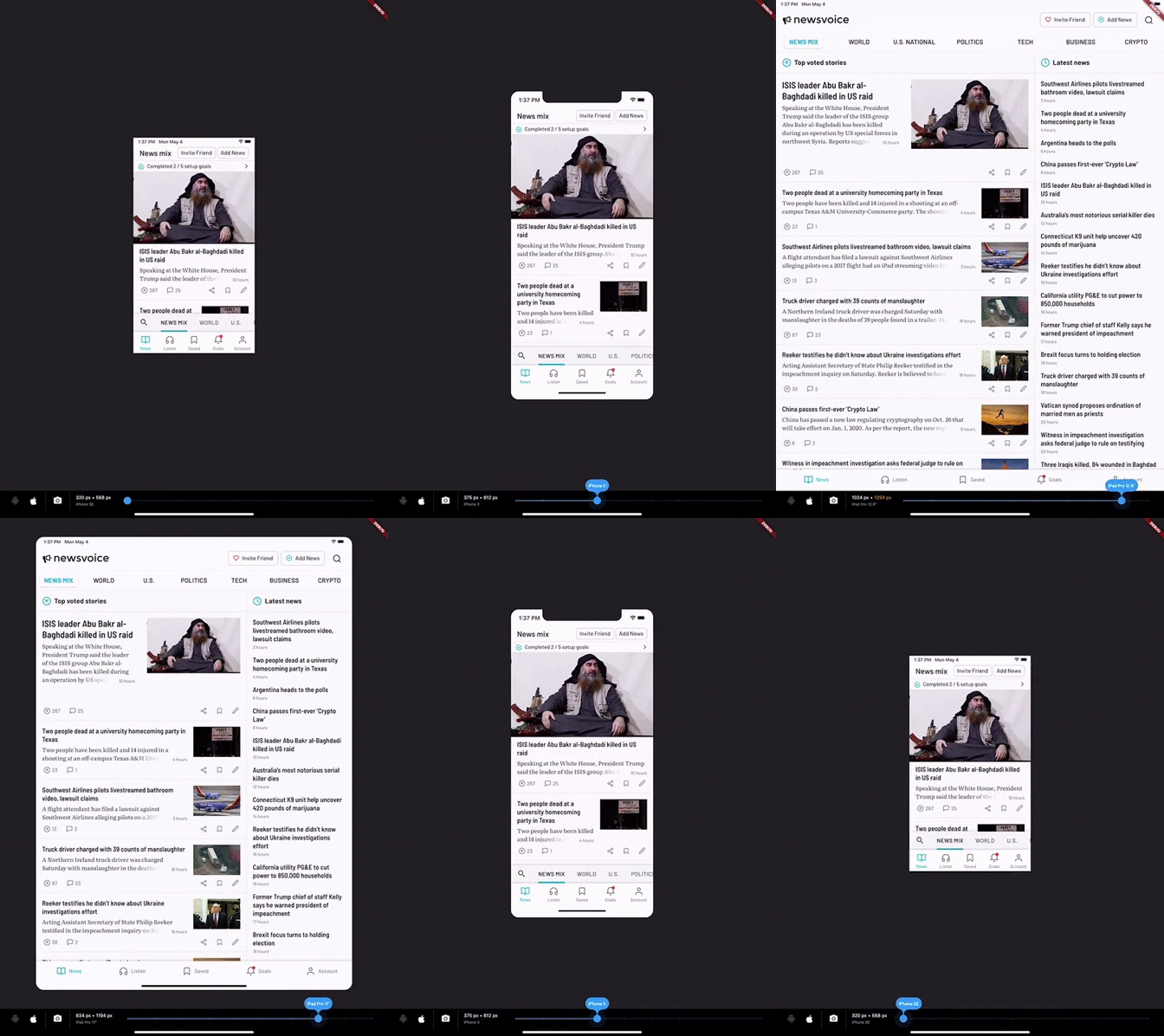
Device Simulator demo

With DeviceSimulator you will be able to get a quick look at what your app would look like on all iOS / iPadOS devices and a selection of common Android devices. In addition, there is a screenshot mode that makes it really easy to take screens in different resolutions for App Store and Google Play.

Getting Started

This project was born out of the frustration of testing apps on multiple devices to make sure that the layout looked good in all resolutions. DeviceSimulator will let you quickly emulate different device types. It works best if you run it on an iPad Pro, but it also works well on the iOS Simulator and smaller tablets.

To learn more about designing for multiple resolutions, check out the Medium article that I wrote on the topic.

Add DeviceSimulator to your widget tree

It's really easy to add DeviceSimulator to your app. Simply add it to the root of your widget tree, right under your App widget. Build the rest of the widget tree as you would normally do. This is a minimal example:

import 'package:flutter/material.dart';
import 'package:device_simulator/device_simulator.dart';

const bool debugEnableDeviceSimulator = true;

void main() => runApp(MyApp());

class MyApp extends StatelessWidget {
  @override
  Widget build(BuildContext context) {
    return MaterialApp(
      title: 'DeviceSimulator demo',
      home: DeviceSimulator(
        brightness: Brightness.dark,
        enable: debugEnableDeviceSimulator,
        child: Scaffold(
          appBar: AppBar(
            title: Text('DeviceSimulator Demo'),
          ),
          body: Center(
            child: Text('Hello multiple resolutions!'),
          ),
        ),
      ),
    );
  }
}
Known issues & limitations
  • Hero animations may be broken while having the DeviceSimulator enabled. It will not affect the production ready app.
  • It's currently only possible to use the home route of MaterialApp. To get around this limitation, you can place another Navigator as a child to MaterialApp.
Caveats

I built DeviceSimulator for my own needs and it's working great for me, but it's not heavily tested and provided as is. Feedback and pull requests are most welcome.

Enjoy! / Vik

カテゴリー

依存関係

依存関係一覧 1 件

ソースリポジトリ

このパッケージを使用しているプロジェクト

データはまだありません。