パッケージ、リポジトリ、アプリカテゴリを検索

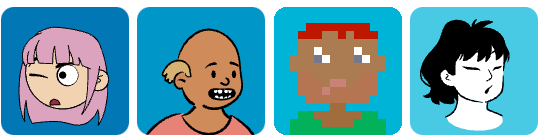
dice_bear のカバー
パッケージ詳細v1.0.4

dice_bear

DiceBear APIラッパー。DiceBearはデザイナーと開発者向けのアバターライブラリです。ランダムなアバターのプロフィール画像を生成します!

AndroidiOSWebmacOSWindowsLinux
30日間ダウンロード
1950
いいね数
46
Pub ポイント
130

パッケージをインストール

flutter pub add dice_bear

パッケージ概要

公開情報に基づく選定ガイドです。参考としてご利用ください。

DiceBearは、DiceBear APIをラップするFlutter/Dartパッケージであり、開発者が一意でランダムなプロフィールアバター画像を生成できるようにします。複数のスタイルとカスタマイズオプションをサポートしており、ユーザープロフィール、チャットインターフェース、ソーシャルアプリに最適です。Android、iOS、Web、macOS、Windows、Linuxなど、すべての主要プラットフォームで動作します。pub addによる簡単なインテグレーションにより、UIにパーソナライズされたアバターをシームレスに追加できます。

用途

  • ユーザーのプロフィール画像
  • チャットヘッドアバター
  • ソーシャルメディアアプリのUI
  • ダッシュボードユーザー指標
  • ゲームプレイヤーアバター

主な機能

  • ランダムアバター生成
  • 複数のアバター スタイル
  • カスタマイズ可能な外観
  • クロスプラットフォーム対応
  • pubを介した簡単な統合
  • API駆動型デザイン

適している対象

  • 迅速なアバターを求めるアプリ開発者
  • 一貫したアバターが必要なデザイナー
  • チャットまたはソーシャルアプリ
  • 現実的なユーザーのビジュアルを使ったプロトタイピング
  • 最小限のセットアップを必要とするプロジェクト

注意事項

  • アバター生成にはインターネット接続が必要です
  • 事前に定義された DiceBear スタイルに限定
  • 外部APIの利用可能性に依存
  • オフラインアバターの生成なし
  • スタイルカスタマイズはAPIの制約によって制限されています

元の README

関連するソースリポジトリの README 原文のスナップショットです。最新の内容はリポジトリをご覧ください。


dice_bear
Flutter Package

A fully-typed Dart/Flutter wrapper for the DiceBear API (v9.x) that generates unique avatar profile pictures with extensive customization options.

DiceBear is an avatar library for designers and developers. Generate random, deterministic avatar profile pictures from seeds, supporting 30+ unique art styles with fine-grained style-specific customization.

GitHub stars pub package

Features

✨ Full Type Safety — Every style option is a dedicated Dart class with compile-time validation

🎯 30+ Avatar Styles — Support for all DiceBear styles including Adventurer, Avataaars, PixelArt, and more

🔧 Style-Specific Customization — Each style has its own set of customization options (eyes, mouth, accessories, etc.)

📦 Flexible Output — Get SVG URLs, rendered Flutter widgets, or raw SVG bytes

🎲 Deterministic & Random — Generate consistent avatars from a seed or random ones each time

Installation

Add to your pubspec.yaml:

dependencies:
  dice_bear: ^1.0.0

Then run flutter pub get.

Quick Start

Basic Usage
import 'package:dice_bear/dice_bear.dart';

// Create a simple avatar request
final request = DiceBearRequest(
  style: DiceBearStyle.adventurer,
  coreOptions: DiceBearCoreOptions(
    seed: 'john_doe', // Deterministic: same seed = same avatar
  ),
);

// Render as Flutter widget
Widget widget = request.toImage(width: 200, height: 200);

// Get the SVG URL
Uri svgUrl = request.uri;

// Get raw SVG bytes
Uint8List? svgBytes = await request.fetchBytes();
Random Avatar
// Generate a new random avatar each time
final request = DiceBearRequest(
  style: DiceBearStyle.random,
  coreOptions: DiceBearCoreOptions(
    seed: DateTime.now().millisecondsSinceEpoch.toString(),
  ),
);

Advanced Usage

Style-Specific Customization

Each DiceBear style has its own options class for fine-grained control:

// Adventurer style with custom eye and mouth options
final request = DiceBearRequest<DiceBearAdventurerOptions>(
  style: DiceBearStyle.adventurer,
  coreOptions: DiceBearCoreOptions(
    seed: 'user123',
  ),
  styleOptions: DiceBearAdventurerOptions(
    eyes: ['variant01', 'variant05'],
    mouth: ['variant10'],
    glasses: ['variant02'],
    glassesProbability: 50,  // 50% chance of glasses
  ),
);
PixelArt with Customization
final request = DiceBearRequest<DiceBearPixelArtOptions>(
  style: DiceBearStyle.pixelArt,
  coreOptions: DiceBearCoreOptions(
    seed: 'pixel_user',
  ),
  styleOptions: DiceBearPixelArtOptions(
    accessories: ['variant01', 'variant02'],
    beard: ['variant03'],
    clothingColor: ['ff5733', 'fbf5e6'],
    eyesColor: ['647b90'],
  ),
);
Common Customization Parameters
Parameter Type Example Notes
backgroundColor Color? Color(0xFF3ECAF5) Applied to SVG background
radius int 10 Border radius (0-20)
scale int 100 Scale factor (0-200)
rotate int 45 Rotation in degrees (0-360)
flip bool true Flip horizontally
translateX, translateY int 10, -5 Translation offsets (-100 to 100)
size int 256 SVG size in pixels

Available Styles

Character-Based Styles (with eyes & mouth customization)
  • Adventurer / Adventurer Neutral — D&D-inspired characters
  • Avataaars / Avataaars Neutral — Cartoonish avatars
  • Big Ears / Big Ears Neutral — Quirky big-eared characters
  • Big Smile — Always happy expressions
  • Bottts / Bottts Neutral — Robot-like avatars
  • Croodles / Croodles Neutral — Minimalist faces
  • Fun Emoji — Expressive emoji style
  • Lorelei / Lorelei Neutral — Artistic character design
  • Micah — Stylized character portraits
  • Miniavs — Tiny avatar style
  • Personas — Professional-looking character avatars
  • Pixel Art / Pixel Art Neutral — 8-bit style avatars
  • Thumbs — Thumbs-up styled avatars
  • Toon Head — Cartoon character avatars
Geometric & Abstract Styles
  • Dylan — Gradient-based geometric design
  • Glass — Glassy geometric patterns
  • Icons — Icon-based avatars
  • Identicon — Hash-based geometric avatars
  • Initials — Two-letter initials display
  • Notionists / Notionists Neutral — Notion-inspired design
  • Open Peeps — Open-source character art
  • Rings — Concentric ring patterns
  • Shapes — Geometric shape arrangements

Widget Parameters

When calling .toImage(), you can pass additional Flutter parameters:

widget = request.toImage(
  width: 200,
  height: 200,
  fit: BoxFit.contain,
  alignment: Alignment.center,
  placeholderBuilder: (context) => CircularProgressIndicator(),
  semanticsLabel: 'User avatar for John Doe',
);
Parameter Type Default
width double? —
height double? —
fit BoxFit BoxFit.contain
alignment Alignment Alignment.center
placeholderBuilder WidgetBuilder? —
color Color? —
semanticsLabel String? —
clipBehavior Clip Clip.hardEdge
theme SvgTheme? —

Architecture

The library maintains a clean, semantically organized structure:

lib/
├── dice_bear.dart (main entry point)
└── src/
    └── style_options/
        ├── character_style_options.dart (abstract base)
        ├── adventurer_options.dart
        ├── avataaars_options.dart
        ├── big_ears_options.dart
        ├── big_smile_options.dart
        ├── bottts_options.dart
        ├── pixel_art_options.dart
        ├── persons_options.dart
        ├── rings_options.dart
        ├── shapes_options.dart
        └── ... (30 style option classes total)
Design Pattern
  • Abstract Base Class: DiceBearCharacterStyleOptions for humanoid styles with eyes and mouth fields
  • Standalone Implementations: Geometric and abstract styles directly implement DiceBearStyleOptions
  • Validation: Each style class validates its options before sending to the API
  • Composability: Mix and match styles with global and style-specific options

Minimum SDK

Requires Dart SDK >= 2.17.0 (supports super parameters syntax for cleaner inheritance)

Examples

Profile Picture Builder
class UserAvatar extends StatelessWidget {
  final String userId;
  final double size;
  
  const UserAvatar({
    required this.userId,
    this.size = 100,
  });
  
  @override
  Widget build(BuildContext context) {
    final request = DiceBearRequest(
      style: DiceBearStyle.avataaars,
      coreOptions: DiceBearCoreOptions(
        seed: userId,
        backgroundColor: DiceBearCoreOptions.fromColor(Colors.blue.shade100!),
      ),
    );
    
    return request.toImage(width: size, height: size);
  }
}
Random Avatar Gallery
ListView.builder(
  itemCount: 10,
  itemBuilder: (context, index) {
    final request = DiceBearRequest(
      style: DiceBearStyle.random,
      coreOptions: DiceBearCoreOptions(
        seed: index.toString(),
      ),
    );
    return request.toImage(width: 100, height: 100);
  },
)

Testing

The package includes comprehensive unit tests covering all style options and API interactions.

flutter test

License

This package is licensed under the MIT License. See LICENSE for details.

Contributing

Contributions are welcome! Please feel free to submit a pull request to the repository.

Support

Found an issue? Have a feature request? Open an issue on GitHub.

カテゴリー

依存関係

依存関係一覧 2 件

ソースリポジトリ

このパッケージを使用しているプロジェクト

データはまだありません。