パッケージ、リポジトリ、アプリカテゴリを検索

dotted_decoration のカバー
パッケージ詳細v3.0.0

dotted_decoration

ドットライン装飾は、ドット線の区切り線や長方形、円、ラウンドされた長方形のドット線の境界線を描画するための便利なパッケージです。

AndroidiOSWebmacOSWindowsLinux
30日間ダウンロード
10.5万
いいね数
156
Pub ポイント
150

パッケージをインストール

flutter pub add dotted_decoration

パッケージ概要

公開情報に基づく選定ガイドです。参考としてご利用ください。

dotted_decoration パッケージは、Flutter アプリケーションでドット線やボーダーを作成するためのシンプルかつ柔軟な方法を提供します。開発者は、ドットサイズ、間隔、色をカスタマイズ可能なドット付き区切り線や、長方形、円、ラウンドされた長方形の周りにボーダーを描画できます。セパレータ、アウトライン、装飾的なアクセントなどのUI要素に最適で、複雑なカスタムペイントなしでビジュアルデザインを強化します。このパッケージは軽量であり、Android、iOS、Web、macOS、Windows、Linux を含むすべての主要プラットフォームと互換性があります。

用途

  • リスト内のドット付き区切り線を作成する
  • カードやコンテナに点線の枠を追加する
  • 円形または丸いドットのアウトラインを設計する
  • フォームフィールドのスタイルの強化
  • カスタムUIセパレーターの作成
  • 装飾的なラインパターンを追加する

主な機能

  • 使いやすいドット装飾クラス
  • 長方形、円およびラウンドされた長方形をサポートしています
  • カスタマイズ可能なドットサイズと間隔
  • カスタマイズ可能な色とストローク幅
  • クロスプラットフォーム互換性
  • 軽量で最小限の依存関係

適している対象

  • 装飾的な要素を探しているUIデザイナー
  • フォームやリストを構築する開発者
  • 視覚的な区別や強調を必要とするアプリ
  • 一貫したデザインシステムを持つプロジェクト
  • Flutterの初心者がカスタム装飾を探索しています

注意事項

  • 基本的なドットパターンに限定
  • ダッシュやカスタムストロークスタイルのサポートなし
  • 正確なレイアウトには手動の整合が必要になる場合があります
  • 高性能アニメーションには適していません
  • 静的または低頻度のレンダリングに最適

元の README

関連するソースリポジトリの README 原文のスナップショットです。最新の内容はリポジトリをご覧ください。

dotted_decoration

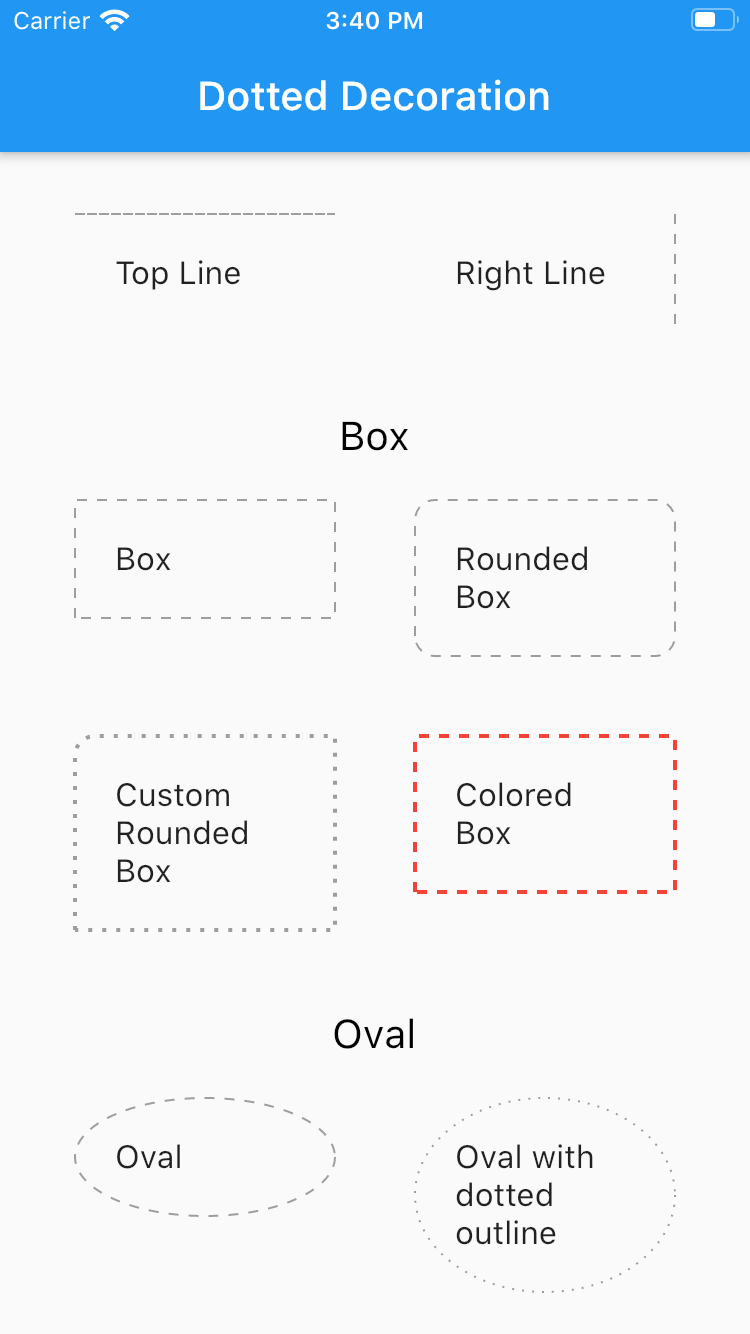
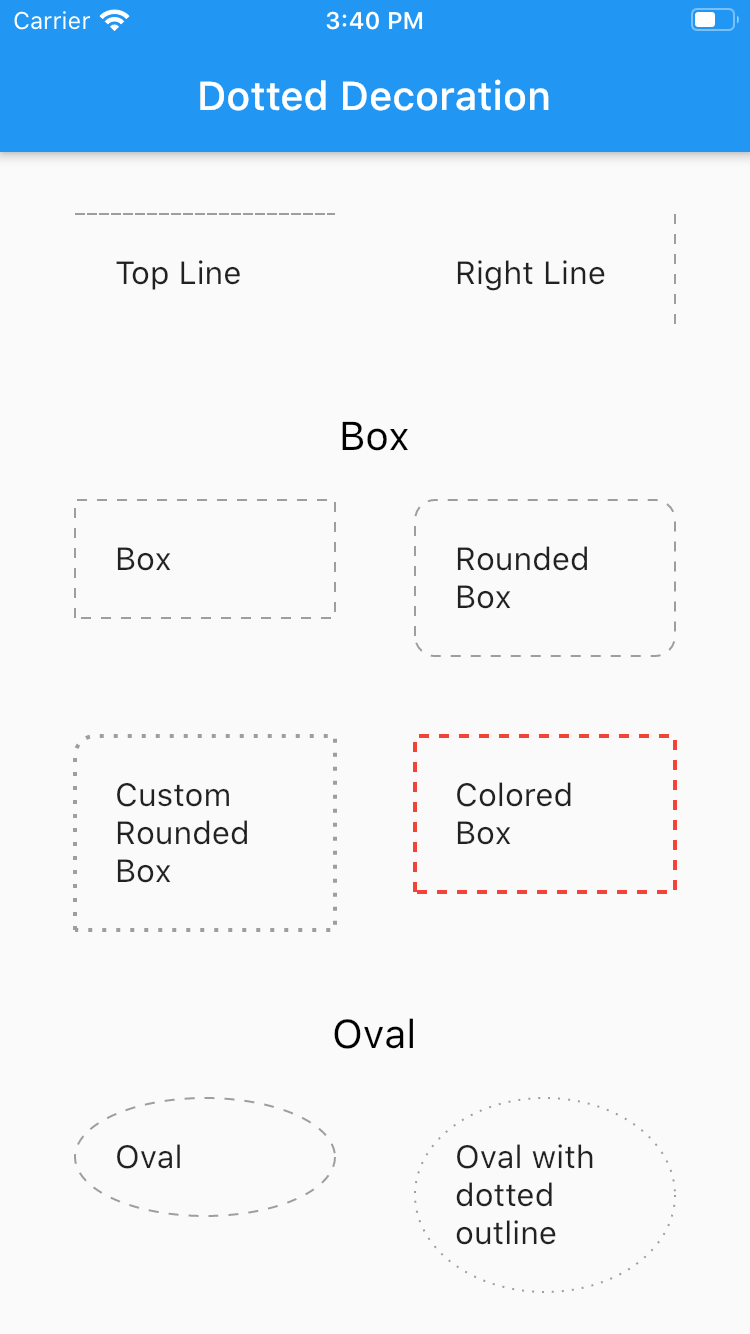
Dotted line decoration is custom decoration as simple as BoxDocoration can be used in Container widget to draw dotted divider, dotted border for rectangle, oval or circle.

Preview

Flutter Dotted Decoration screenshot

Installing

To use this package, add dotted_decoration as a dependency in your pubspec.yaml file.

Usage

Create a container widget and assign DottedDecoration as decoration

Container(
    decoration: DottedDecoration()
    child: Text('Dotted Decoration')
)
Container(
    decoration: DottedDecoration()
    child: Text('Dotted Decoration')
)

To draw line

DottedDecoration(
  shape: Shape.line, linePosition: LinePosition.bottom),

To add rounded rection

DottedDecoration(
  shape: Shape.box,
  borderRadius: BorderRadius.circular(10), //remove this to get plane rectange
),

To add circle

//make sure width & height of container is same to get perfect circle or else it will end up in oval
DottedDecoration(shape: Shape.circle, dash: <int>[1, 4]);

Parameters

Shape

Kind of outline shape, default shape is Shape.line.

shape: Shape.line shape: Shape.box shape: Shape.oval

linePosition

Where line is located, default shape is LinePosition.bottom.

linePosition: LinePosition.bottom linePosition: LinePosition.left linePosition: LinePosition.right linePosition: LinePosition.top

dash

Border line order, first in dash and second is space.

dash: <int>[2, 5]

strokeWidth

Line width.

strokeWidth: 2

color

Color of line, default shape is Colors.grey.

color: Colors.red

カテゴリー

ソースリポジトリ

このパッケージを使用しているプロジェクト