パッケージ、リポジトリ、アプリカテゴリを検索

dotted_line のカバー
パッケージ詳細v3.3.0

dotted_line

このパッケージを使用すると、Flutterで点線を描画できます。美しい点線を描画できます。

AndroidiOSWebmacOSWindowsLinux
30日間ダウンロード
19.4万
いいね数
328
Pub ポイント
160

パッケージをインストール

flutter pub add dotted_line

パッケージ概要

公開情報に基づく選定ガイドです。参考としてご利用ください。

dotted_line パッケージは、Flutter アプリケーションで視覚的に魅力的な点線を簡単に作成できるようにします。さまざまな UI 要素に破線または点線を描画するためのシンプルでカスタマイズ可能な方法を提供し、最小限のコードでインターフェースのデザインを向上させます。このパッケージは Android、iOS、Web、macOS、Windows、Linux など複数のプラットフォームをサポートしており、クロスプラットフォーム開発に適しています。直感的な設定オプションにより、現代的なアプリデザインにおける区切り線、区切り、装飾要素の追加に最適です。

用途

  • リスト内の視覚的区切りを作成する
  • フォーム内のカスタム区切り線の設計
  • 装飾的なライン要素でUIを強化する
  • 破線のボーダーでレスポンシブレイアウトを構築する
  • カードコンポーネントにスタイリスティックなアクセントを追加する

主な機能

  • Flutter ウィジェットとの簡単な統合
  • カスタマイズ可能なドットサイズと間隔
  • 水平および垂直線のサポート
  • クロスプラットフォーム互換性
  • 軽量でパフォーマンスに優れる
  • ストロークの色と太さをカスタマイズ可能

適している対象

  • 装飾的な要素を探しているUIデザイナー
  • 洗練された現代的なインターフェースを構築する開発者
  • 一貫したビジュアルスタイルを必要とするプロジェクト
  • 繊細なグラフィカルなアクセントが必要なアプリ
  • クロスプラットフォームのFlutterアプリケーション

注意事項

  • 行ベースの装飾のみに制限されています
  • アニメーションドットのサポートなし
  • 複雑なレイアウトでは、手動での整列が必要です
  • 高性能な描画シナリオには適していません
  • 滑らかな表示のためにFlutterのレンダリングパイプラインに依存しています

元の README

関連するソースリポジトリの README 原文のスナップショットです。最新の内容はリポジトリをご覧ください。

logo.png


About

This package allows you to draw dotted lines with Flutter.

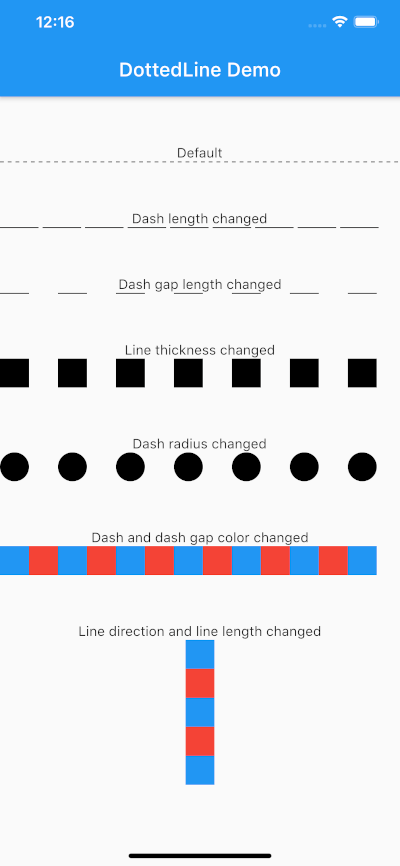
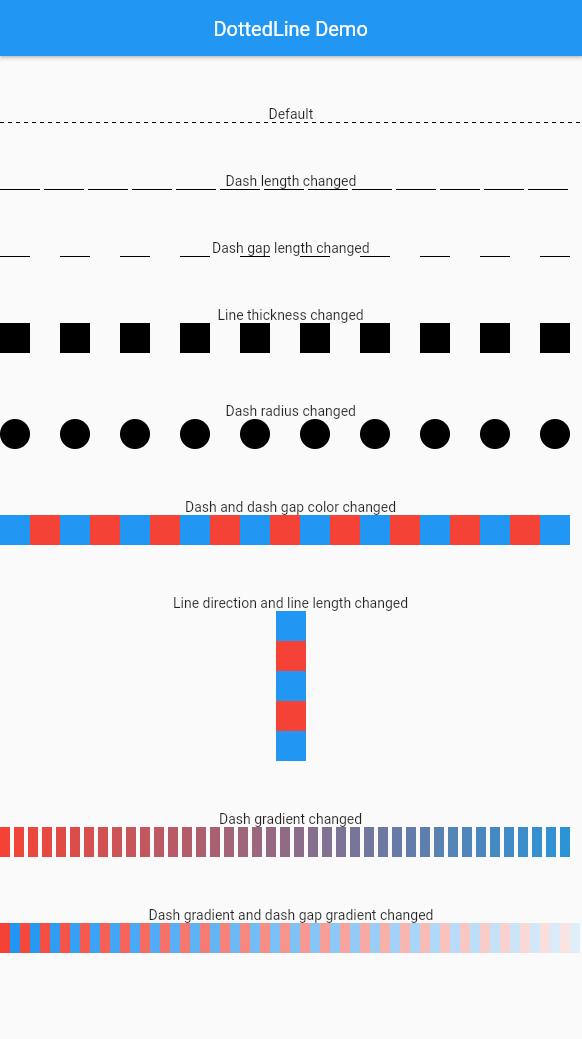
screenshot.png

Usage

Parameter Default Description
direction Axis.horizontal The direction of the entire dotted line.
alignment WrapAlignment.center The alignment of the entire dotted line.
lineLength double.infinity The length of the entire dotted line.
lineThickness 1.0 The thickness of the entire dotted line.
dashLength 4.0 The length of the dash.
dashColor Colors.black The color of the dash.
dashGradient null The gradient colors of the dash.
dashRadius 0.0 The radius of the dash.
dashGapLength 4.0 The length of the dash gap.
dashGapColor Colors.transparent The color of the dash gap.
dashGapGradient null The gradient colors of the dash gap.
dashGapRadius 0.0 The radius of the dash gap.
addRepaintBoundary false Whether to wrap the dotted line with a RepaintBoundary.

This can be used without parameters.

import 'package:dotted_line/dotted_line.dart';

DottedLine()

You can also customize by specifying parameters.

import 'package:dotted_line/dotted_line.dart';

DottedLine(
  direction: Axis.horizontal,
  alignment: WrapAlignment.center,
  lineLength: double.infinity,
  lineThickness: 1.0,
  dashLength: 4.0,
  dashColor: Colors.black,
  dashGradient: [Colors.red, Colors.blue],
  dashRadius: 0.0,
  dashGapLength: 4.0,
  dashGapColor: Colors.transparent,
  dashGapGradient: [Colors.red, Colors.blue],
  dashGapRadius: 0.0,
  addRepaintBoundary: true,
)

Performance Optimization

If your DottedLine is placed inside a widget that rebuilds frequently, you might experience performance issues (dropped frames) because the dashes and gaps are constantly repainted.

In such cases, setting addRepaintBoundary: true can improve performance by wrapping the DottedLine in a RepaintBoundary, isolating its paint step.

Note: The default is false to prevent unexpected memory overhead. Keep it false if you are displaying hundreds of dotted lines (e.g., in a large list) to avoid excessive memory usage.

Example

The sample code can be found under the example package. You can try changing all parameters.

カテゴリー

ソースリポジトリ

このパッケージを使用しているプロジェクト