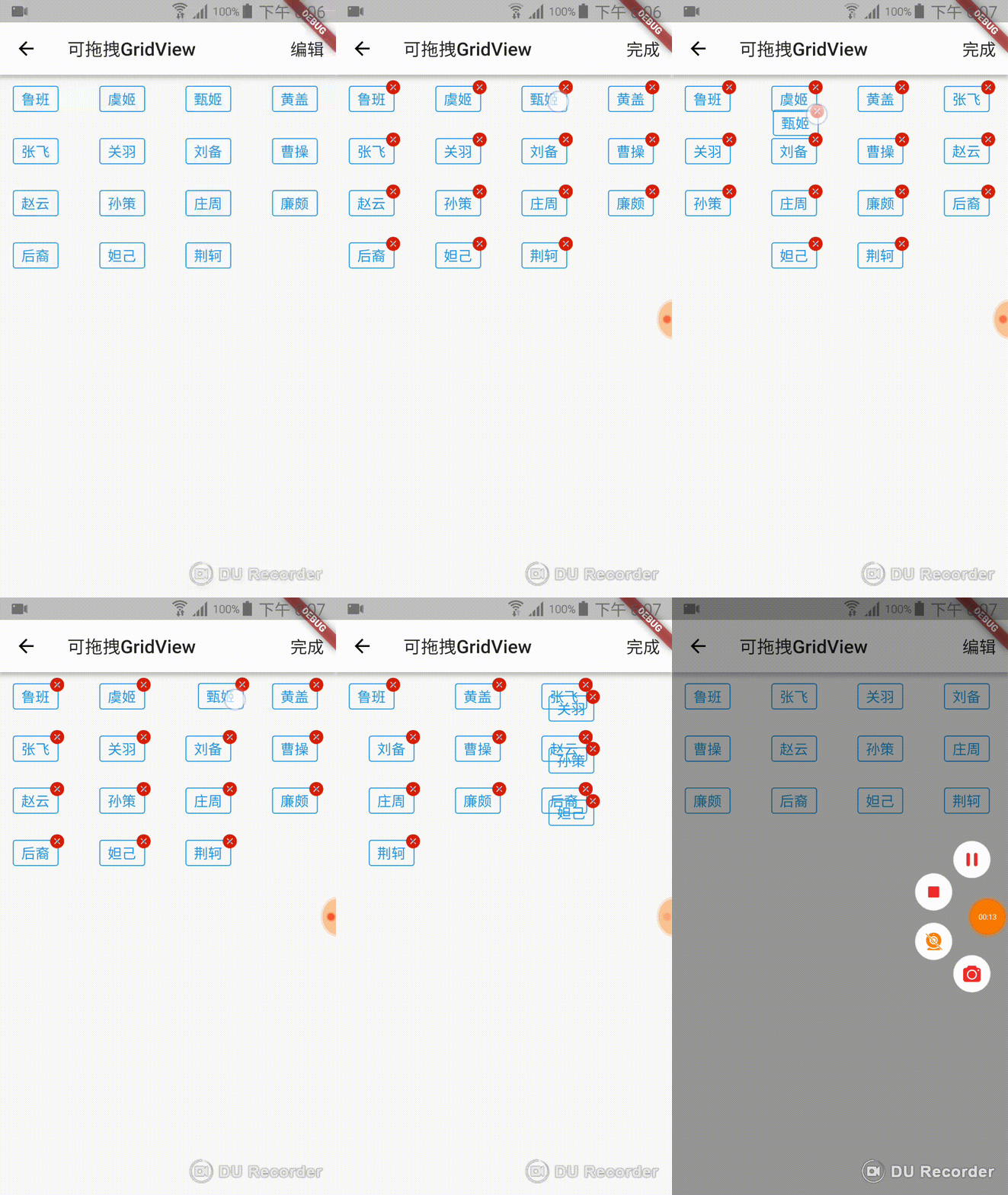
A dragable gridview,Long-pressed triggers draggable state,When dragging until covere other items, other Items trigger the animation to make room for the draggable
Item,GridView reordering after release your finger,Now I have added "Delete Animation"; some people may only need the delete animation, some people only need the drag
animation, and some people need it all. We can control the function by properties.
Please do not update the added data or deleted data while dragging
import 'package:dragablegridview_flutter/dragablegridview_flutter.dart';
import 'package:flutter/material.dart';

import 'gridviewitembin.dart';


class DragAbleGridViewDemo extends StatefulWidget{
  @override
  State<StatefulWidget> createState() {
    return new DragAbleGridViewDemoState();
  }
}

class DragAbleGridViewDemoState extends State<DragAbleGridViewDemo>{

  List<ItemBin> itemBins=new List();
  String actionTxtEdit="编辑";
  String actionTxtComplete="完成";
  String actionTxt;
  var editSwitchController=EditSwitchController();
  final List<String> heroes=["鲁班","虞姬","甄姬","黄盖","张飞","关羽","刘备","曹操","赵云","孙策","庄周","廉颇","后裔","妲己","荆轲",];

  @override
  void initState() {
    super.initState();
    actionTxt=actionTxtEdit;
    heroes.forEach((heroName) {
        itemBins.add(new ItemBin(heroName));
      }
    );
  }

  @override
  Widget build(BuildContext context) {
    return new Scaffold(
      appBar: new AppBar(
        title: new Text("可拖拽GridView"),
        actions: <Widget>[
          new Center(
              child: new GestureDetector(
                child: new Container(
                  child: new Text(actionTxt,style: TextStyle(fontSize: 19.0),),
                  margin: EdgeInsets.only(right: 12),
                ),
                onTap: (){
                  changeActionState();
                  editSwitchController.editStateChanged();
                },
              )
          )
        ],
      ),
      body: new DragAbleGridView(
        mainAxisSpacing:10.0,
        crossAxisSpacing:10.0,
        childAspectRatio:1.8,
        crossAxisCount: 4,
        itemBins:itemBins,
        editSwitchController:editSwitchController,
        /******************************new parameter*********************************/
        isOpenDragAble: true,
        animationDuration: 300, //milliseconds
        longPressDuration: 800, //milliseconds
        /******************************new parameter*********************************/
        deleteIcon: new Image.asset("images/close.png",width: 15.0 ,height: 15.0 ),
        child: (int position){
          return new Container(
            padding: EdgeInsets.fromLTRB(8.0, 5.0, 8.0, 5.0),
            decoration: new BoxDecoration(
              borderRadius: BorderRadius.all(new Radius.circular(3.0)),
              border: new Border.all(color: Colors.blue),
            ),
            //因为本布局和删除图标同处于一个Stack内,设置marginTop和marginRight能让图标处于合适的位置
            //Because this layout and the delete_Icon are in the same Stack, setting marginTop and marginRight will make the icon in the proper position.
            margin: EdgeInsets.only(top: 6.0,right: 6.0),
            child: new Text(
              itemBins[position].data,
              style: new TextStyle(fontSize: 16.0,color: Colors.blue),),
          );
        },
        editChangeListener: (){
          changeActionState();
        },
      ),
    );
  }

  void changeActionState(){
    if(actionTxt==actionTxtEdit){
      setState(() {
        actionTxt=actionTxtComplete;
      });
    }else{
      setState(() {
        actionTxt=actionTxtEdit;
      });
    }
  }
}
Properties
properties
type
defaults
description
child
typedef
@required
gridview's child at each position
itemBins
List
@required
the data to be show by gridview's children
crossAxisCount
int
4
how many children to be show in a row ; 一行显示几个child
crossAxisSpacing
double
1.0
cross axis spacing ; 和滑动方向垂直的那个方向上 child之间的空隙
mainAxisSpacing
double
0.0
main axis spacing ; 滑动方向child之间的空隙
childAspectRatio
double
0.0
child aspect ratio ; child的纵横比
editSwitchController
class
null
the switch controller that to trigger editing by clicking the button ; 编辑开关控制器,可通过点击按钮触发编辑
editChangeListener
typedef
null
when you long press to trigger the edit state, you can listener this state to change the state of the edit button ; 长按触发编辑状态,可监听状态来改变编辑按钮(编辑开关 ,通过按钮触发编辑)的状态
isOpenDragAble
bool
false
whether to enable the dragable function;是否启用拖动功能
animationDuration
int
300
animation duration;动画持续的时长
longPressDuration
int
800
long press duration;长按触发拖动的时长
deleteIcon
Image
null
Delete button icon,Do not set this property if you do not use the delete function;删除按钮的图标,如果不使用删除功能,不要设置此属性
LICENSE
MIT License

Copyright (c) 2018

Permission is hereby granted, free of charge, to any person obtaining a copy
of this software and associated documentation files (the "Software"), to deal
in the Software without restriction, including without limitation the rights
to use, copy, modify, merge, publish, distribute, sublicense, and/or sell
copies of the Software, and to permit persons to whom the Software is
furnished to do so, subject to the following conditions:

The above copyright notice and this permission notice shall be included in all
copies or substantial portions of the Software.

THE SOFTWARE IS PROVIDED "AS IS", WITHOUT WARRANTY OF ANY KIND, EXPRESS OR
IMPLIED, INCLUDING BUT NOT LIMITED TO THE WARRANTIES OF MERCHANTABILITY,
FITNESS FOR A PARTICULAR PURPOSE AND NONINFRINGEMENT. IN NO EVENT SHALL THE
AUTHORS OR COPYRIGHT HOLDERS BE LIABLE FOR ANY CLAIM, DAMAGES OR OTHER
LIABILITY, WHETHER IN AN ACTION OF CONTRACT, TORT OR OTHERWISE, ARISING FROM,
OUT OF OR IN CONNECTION WITH THE SOFTWARE OR THE USE OR OTHER DEALINGS IN THE
SOFTWARE.