It's an easy-to-use and elegant library based on event bus. It was greatly inspired by EventBus and made much simpler.
About Event Bus
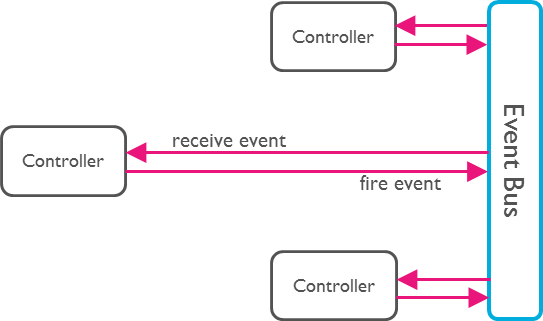
An Event Bus follows the publish/subscribe pattern. It allows listeners to
subscribe for events and publishers to fire events. This enables objects to
interact without requiring to explicitly define listeners and keeping track of
them.
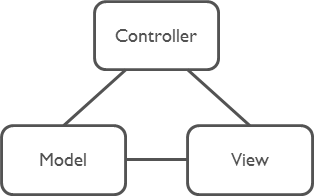
The Event Bus pattern is especially helpful for decoupling MVC
(or MVP) applications.
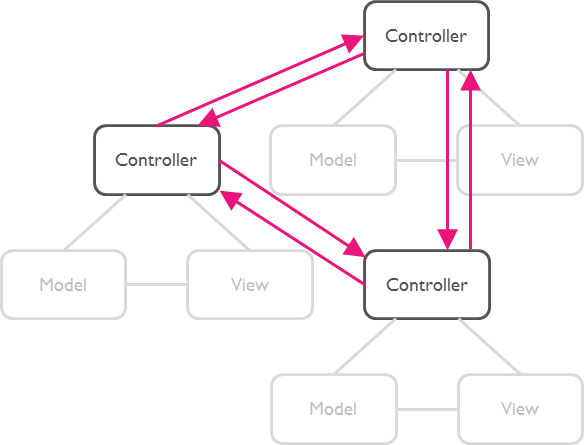
One group of MVC is not a problem.
But as soon as there are multiple groups of MVCs, those groups will have to talk
to each other. This creates a tight coupling between the controllers.
By communication through an Event Bus, the coupling is reduced.
Usage
Step 1: Subscribe to an Event
First, set up a subscription for the desired event. This allows you to listen for and react to the event whenever it is triggered.
EasyEventBus.on('sayHello', (event) {
  print(event); // write your code here.
});
Step 2: Trigger the Event
Next, trigger the event at the appropriate time in your application. This will notify all subscribers of the event.
EasyEventBus.fire('sayHello', 'hello world'); // Triggers the event with a any data.
Note: The event data can be of any type, giving you flexibility in what information you pass to the subscribers.
That's All!
Advance
1. Cancel Subscription
To cancel a subscription, you call the cancel method. This example shows how to cancel all subscriptions for the 'sayHello' event, both anonymous and with identifiers.
// Cancel all subscriptions to the 'sayHello' event.EasyEventBus.cancel('sayHello');
2. Cancel Specific Subscription
Before canceling a specific subscription, you first need to create a subscription with an identifier (id). Here is how to subscribe to an event with an id and then cancel that specific subscription by calling the cancel method with the same id.
First, subscribe to an event with an id:
// Subscribe to the 'sayHello' event with an identifier.EasyEventBus.on('sayHello', (event) {
print('Received: $event');
}, id: 'uniqueId123');
Then, cancel the subscription using the same id:
// Cancel the subscription to the 'sayHello' event using the identifier 'uniqueId123'.EasyEventBus.cancel('sayHello', id: 'uniqueId123');
3. Cancel All Subscriptions
You can cancel all subscriptions by calling the cancelAll method. This method cancels all subscriptions for all events and closes all event controllers.
// Cancel all subscriptions and close all event controllers.EasyEventBus.cancelAll();