パッケージ、リポジトリ、アプリカテゴリを検索

error_stack のカバー
パッケージ詳細v2.1.7

error_stack

ErrorStack は、Flutter アプリケーション内のエラーを迅速に処理するのに役立ちます!カスタムエラーハンドリングUIとログ記録で生産性を維持します。

AndroidiOSmacOSWindowsLinux
30日間ダウンロード
1230
いいね数
63
Pub ポイント
160

パッケージをインストール

flutter pub add error_stack

パッケージ概要

公開情報に基づく選定ガイドです。参考としてご利用ください。

ErrorStack は、エラーを表示するカスタマイズ可能な UI と堅牢なログ記録機能を提供することで、アプリケーションにおけるエラー処理を簡素化することを目的とした Flutter パッケージです。開発および本番環境で問題を迅速に特定・解決できるようにし、デバッグの効率を向上させます。複数のプラットフォームをサポートしており、既存のワークフローにスムーズに統合できます。例外が発生した際には、明確かつ実行可能なフィードバックを提供することで生産性を高めます。

用途

  • 実行時エラーのデバッグ
  • ユーザーにやさしいエラーメッセージの表示
  • 分析用に例外をログ記録する
  • アプリの安定性向上
  • 本番環境でのクラッシュのモニタリング
  • 開発者のワークフローの向上

主な機能

  • カスタマイズ可能なエラー UI
  • 組み込みエラーロギング
  • クロスプラットフォーム対応
  • Flutterアプリへの簡単な統合
  • リアルタイムエラーレポート
  • 設定可能なエラー処理動作

適している対象

  • Flutter開発者
  • CI/CD パイプラインを使用するチーム
  • 堅牢なエラー監視を必要とするアプリ
  • 障害時にUXに焦点を当てる開発者
  • 厳格なエラー追跡要件を持つプロジェクト
  • デバッグ速度を最優先とするフロントエンドチーム

注意事項

  • 完全な機能を実現するには構成が必要です
  • アプリのサイズがわずかに増加する可能性があります
  • ログの適切な設定に依存しています
  • カスタマイズなしでは本番環境での利用を想定していない
  • エラー表示およびログ記録の範囲に限定
  • 他のモニタリングツールと併用するのが最適です

元の README

関連するソースリポジトリの README 原文のスナップショットです。最新の内容はリポジトリをご覧ください。

Error Stack for Flutter

pub package License: MIT

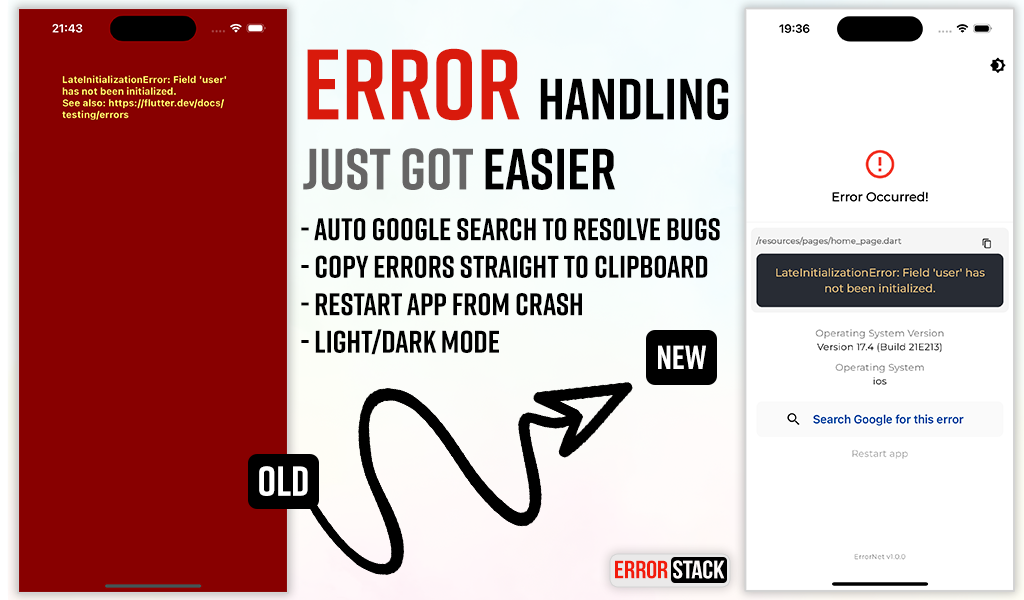
Error Stack is a comprehensive error handling and debugging toolkit for Flutter. It provides beautiful error screens in debug mode with actionable information, customizable error pages for production, and a powerful dev panel for runtime debugging.

Features

  • Beautiful debug error screens with Google search links and stack traces
  • Customizable production error pages
  • Light and dark mode support
  • Dev Panel - Runtime debugging tool with:
    • API request/response logging
    • Console logging with severity levels
    • Navigation route tracking
    • Local storage viewer (Secure Storage & Shared Preferences)
    • UI debugging overlays (grid, layout bounds, etc.)
  • Dio interceptor for automatic HTTP logging
  • SOLID architecture with dependency injection support

Installation

Add the following to your pubspec.yaml:

dependencies:
  error_stack: ^2.1.7

Or install via command line:

dart pub add error_stack

Quick Start

Basic Setup
import 'package:flutter/material.dart';
import 'package:error_stack/error_stack.dart';

void main() async {
  WidgetsFlutterBinding.ensureInitialized();
  await ErrorStack.init();
  runApp(MyApp());
}

class MyApp extends StatelessWidget {
  @override
  Widget build(BuildContext context) {
    return MaterialApp(
      builder: ErrorStack.builder, // Adds dev panel and UI debug overlays
      home: HomePage(),
    );
  }
}
Nylo Integration
import 'package:error_stack/error_stack.dart';

class AppProvider {
  @override
  boot(Nylo nylo) async {
    nylo.useErrorStack();
  }
}

Configuration

Full Initialization Options
await ErrorStack.init(
  level: ErrorStackLogLevel.verbose,  // verbose | minimal
  initialRoute: '/',                   // Route for "Restart app" button
  forceDebugWidget: false,             // Show debug widget in release mode
  enableDevPanel: true,                // Enable/disable dev panel (default: debug mode only)
  devPanelConfig: DevPanelConfig(
    enableApiLogging: true,
    enableConsoleLogging: true,
    enableRouteTracking: true,
    apiLogLimit: 100,
    consoleLogLimit: 100,
    routeHistoryLimit: 50,
  ),
  errorWidget: (errorDetails) {        // Custom release mode error widget
    return Scaffold(
      body: Center(
        child: Text('Something went wrong'),
      ),
    );
  },
);
Log Levels
  • ErrorStackLogLevel.verbose (default) - Full stack trace and details
  • ErrorStackLogLevel.minimal - Basic error information only

Dev Panel

The Dev Panel is a runtime debugging tool accessible in debug mode. It provides 4 main tabs plus UI debugging tools.

Setup
import 'package:error_stack/error_stack.dart';

void main() async {
  WidgetsFlutterBinding.ensureInitialized();
  await ErrorStack.init();
  runApp(MyApp());
}

class MyApp extends StatelessWidget {
  @override
  Widget build(BuildContext context) {
    return MaterialApp(
      navigatorObservers: [ErrorStackNavigatorObserver()], // Route tracking
      builder: ErrorStack.builder, // Dev panel bar and UI overlays
      home: HomePage(),
    );
  }
}
Opening the Dev Panel

Option 1: Long-press the "Dev Mode" bar at the bottom of the screen

Option 2: Call programmatically:

ErrorStack.showDevPanel(context);

API Tab

View HTTP requests and responses with timing, headers, and body data.

Dio Integration
import 'package:error_stack/error_stack_dio.dart';

final dio = Dio();
dio.interceptors.add(ErrorStackDioInterceptor());

// All requests are automatically logged
final response = await dio.get('https://api.example.com/users');
Manual API Logging
// Log a complete request
DevPanelStore.instance.logApi(
  method: 'GET',
  url: 'https://api.example.com/users',
  statusCode: 200,
  durationMs: 150,
  requestHeaders: {'Authorization': 'Bearer token'},
  responseBody: {'users': []},
);

// Or track pending requests
final requestId = DevPanelStore.instance.startApiRequest(
  method: 'POST',
  url: 'https://api.example.com/data',
  requestBody: {'key': 'value'},
);

// Later, complete the request
DevPanelStore.instance.completeApiRequest(
  requestId: requestId,
  statusCode: 201,
  durationMs: 250,
  responseBody: {'success': true},
);

Logs Tab

Console logs with filtering by severity level. Tap the copy icon on any log entry to copy the full entry (level, timestamp, tag, message, and stack trace) to the clipboard.

import 'package:error_stack/error_stack.dart';

// Log at different levels
DevPanelStore.instance.debug('Debug message');
DevPanelStore.instance.info('User logged in', tag: 'auth');
DevPanelStore.instance.warning('Cache miss for key');
DevPanelStore.instance.error('Failed to load data', stackTrace: trace.toString());

// With metadata
DevPanelStore.instance.info(
  'Payment processed',
  tag: 'payments',
  metadata: {'amount': 99.99, 'currency': 'USD'},
);

Routes Tab

Navigation history with route names, arguments, and actions. Tap a route to open its details sheet, where you can copy the route name to the clipboard.

Route tracking is automatic when using ErrorStackNavigatorObserver:

MaterialApp(
  navigatorObservers: [ErrorStackNavigatorObserver()],
  // ...
)

Manual tracking is also available:

DevPanelStore.instance.trackRoutePush('/profile', arguments: {'userId': 123});
DevPanelStore.instance.trackRoutePop('/profile');
DevPanelStore.instance.trackRouteReplace('/home');

Storage Tab

View all local storage data from both Secure Storage and Shared Preferences. Tap an entry to open the edit modal, where you can copy the key or value to the clipboard or update the stored value.


UI Debug Tools

The dev panel includes visual debugging overlays:

Tool Description
Grid Paper Overlay grid for alignment checking
Layout Bounds Show widget boundaries
Text Scale Override text scale (0.5-3.0x)
Color Blindness Simulate protanopia, deuteranopia, tritanopia
Slow Animations 5x animation slowdown
Performance Overlay Flutter performance metrics
Safe Areas Visualize safe area boundaries

Control programmatically:

final store = DevPanelStore.instance;

store.toggleGridPaper(true);
store.setGridSpacing(24.0);
store.toggleLayoutBounds(true);
store.setTextScaleFactor(1.5);
store.setColorBlindnessMode(ColorBlindnessMode.protanopia);
store.toggleSlowAnimations(true);
store.togglePerformanceOverlay(true);
store.toggleSafeAreas(true);

// Reset all to defaults
store.resetUIDebugSettings();

Architecture

Error Stack follows SOLID principles with a modular design:

lib/
├── error_stack.dart              # Main entry point & exports
├── error_stack_dio.dart          # Dio interceptor export
├── src/
│   ├── config/                   # Configuration classes
│   ├── storage/                  # Storage abstraction
│   ├── handler/                  # Error handling logic
│   └── dev_panel/                # Dev panel components
│       ├── data/                 # Store, models, collections
│       ├── widgets/              # Panel UI widgets
│       ├── interceptors/         # Dio interceptor
│       └── observers/            # Navigator observer
└── widgets/                      # Error display widgets

Example

Check out the example app for comprehensive demos including:

  • Basic setup
  • Custom error widgets
  • Dev panel features
  • Dio integration

Changelog

See CHANGELOG for release history.

Social

License

The MIT License (MIT). See LICENSE for details.

カテゴリー

依存関係

依存関係一覧 4 件

ソースリポジトリ

このパッケージを使用しているプロジェクト