パッケージ、リポジトリ、アプリカテゴリを検索

パッケージ詳細v2.0.1

event_bus

Dart ストリームを使用したシンプルなイベントバス、アプリケーションの結合を緩和するため

AndroidiOSWebmacOSWindowsLinux
30日間ダウンロード
35.6万
いいね数
749
Pub ポイント
150

パッケージをインストール

flutter pub add event_bus

パッケージ概要

公開情報に基づく選定ガイドです。参考としてご利用ください。

イベントバスは、ストリームを使用してアプリケーション内のコンポーネント間のイベント駆動型通信を可能にする軽量なDartパッケージです。オブジェクトがイベントを発行し、それらにサブスクライブできるようにすることで、直接的な依存関係なしに結合度を低くします。UIの更新、状態の変更、またはモジュール間の相互作用など、アプリのさまざまな部分でのアクションの調整に最適です。このパッケージは簡単に統合でき、Flutterがサポートするすべての主要プラットフォームでスムーズに動作します。

用途

  • UIコンポーネントの分離
  • グローバル状態の変更を処理する
  • アプリ全体への通知をブロードキャストする
  • モジュール間通信の簡素化
  • 非同期イベントの管理
  • 状態管理におけるボイラープレートの削減

主な機能

  • ストリームベースのイベント配信
  • シンプルな発行/購読パターン
  • クロスプラットフォーム互換性
  • 最小限のAPI表面
  • タイプ付きイベントをサポート
  • 外部の依存関係なし

適している対象

  • 緩い結合が必要なアプリ
  • 複雑な状態マネージャーを避ける開発者
  • 頻繁にコンポーネント間の通信を行うプロジェクト
  • 迅速なイベントフローのプロトタイピング
  • 構成よりもシンプルさを好むチーム

注意事項

  • 大規模な状態管理には適していない
  • 限定された組み込みエラー処理
  • 衝突を避けるために、イベント名に注意が必要です
  • アプリの再起動後にイベントを保持しない
  • 複雑なアプリ向けに、他の状態管理ソリューションと併用するのが最適です

元の README

関連するソースリポジトリの README 原文のスナップショットです。最新の内容はリポジトリをご覧ください。

Event Bus

A simple Event Bus using Dart Streams for decoupling applications.

Star this Repo Pub Package

GitHub | Pub | Demos and Examples

Event Bus Pattern

An Event Bus follows the publish/subscribe pattern. It allows listeners to subscribe for events and publishers to fire events. This enables objects to interact without requiring to explicitly define listeners and keeping track of them.

Event Bus and MVC

The Event Bus pattern is especially helpful for decoupling MVC (or MVP) applications.

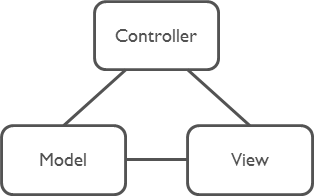
One group of MVC is not a problem.

Model-View-Controller

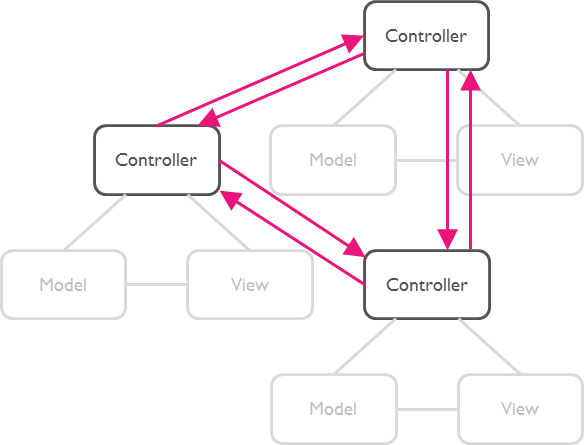
But as soon as there are multiple groups of MVCs, those groups will have to talk to each other. This creates a tight coupling between the controllers.

Multi Model-View-Controllers

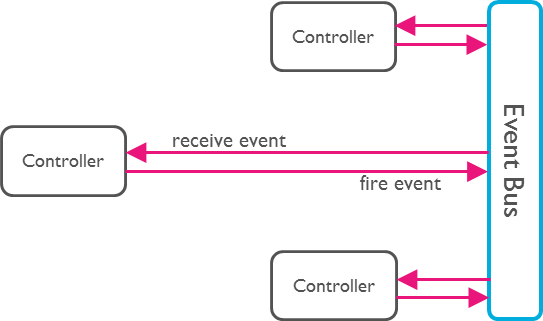
By communication through an Event Bus, the coupling is reduced.

Event Bus

Usage

1. Create an Event Bus

Create an instance of EventBus and make it available to other classes.

Usually there is just one Event Bus per application, but more than one may be set up to group a specific set of events.

import 'package:event_bus/event_bus.dart';

EventBus eventBus = EventBus();

Note: The default constructor will create an asynchronous event bus. To create a synchronous bus you must provide the optional sync: true attribute.

2. Define Events

Any Dart class can be used as an event.

class UserLoggedInEvent {
  User user;

  UserLoggedInEvent(this.user);
}

class NewOrderEvent {
  Order order;

  NewOrderEvent(this.order);
}
3. Register Listeners

Register listeners for specific events:

eventBus.on<UserLoggedInEvent>().listen((event) {
  // All events are of type UserLoggedInEvent (or subtypes of it).
  print(event.user);
});

Register listeners for all events:

eventBus.on().listen((event) {
  // Print the runtime type. Such a set up could be used for logging.
  print(event.runtimeType);
});
About Dart Streams

EventBus uses Dart Streams as its underlying mechanism to keep track of listeners. You may use all functionality available by the Stream API. One example is the use of StreamSubscriptions to later unsubscribe from the events.

StreamSubscription loginSubscription = eventBus.on<UserLoggedInEvent>().listen((event) {
  print(event.user);
});

loginSubscription.cancel();
4. Fire Events

Finally, we need to fire an event.

User myUser = User('Mickey');
eventBus.fire(UserLoggedInEvent(myUser));

Using Custom Stream Controllers

Instead of using the default StreamController you can use the following constructor to provide your own.

An example would be to use an RxDart Subject as the controller.

import 'package:rxdart/rxdart.dart';

EventBus behaviorBus = EventBus.customController(BehaviorSubject());

Running / Building / Testing

  • Run from the terminal: webdev serve
  • Build from the terminal: webdev build
  • Testing: pub run build_runner test -- -p chrome

License

The MIT License (MIT)

カテゴリー

ソースリポジトリ

このパッケージを使用しているプロジェクト