パッケージ、リポジトリ、アプリカテゴリを検索

expandable_text のカバー
パッケージ詳細v2.3.0

expandable_text

テキストの最初の行だけを表示し、完全なテキストを展開するリンクを追加するウィジェット。

AndroidiOSWebmacOSWindowsLinux
30日間ダウンロード
3.2万
いいね数
291
Pub ポイント
140

パッケージをインストール

flutter pub add expandable_text

パッケージ概要

公開情報に基づく選定ガイドです。参考としてご利用ください。

expandable_text パッケージは、初期の行のみを表示し、完全なコンテンツを表示するためのクリック可能なリンクを備えた Flutter ウィジェットを提供します。長いテキストスニペットを洗練された、ユーザーに優しい方法で管理するのに最適です。拡張または折りたたみ時に滑らかなアニメーションをサポートしており、Android、iOS、Web、macOS、Windows、Linux などすべての主要プラットフォームで動作します。過剰な垂直スペースの使用を防ぎながら読みやすさを向上させつつ、アクセシビリティも維持しています。

用途

  • リストに長い説明を表示する
  • 切り捨てられたレビューまたはコメントを表示
  • 大規模なテキストブロックによるUIパフォーマンスの向上
  • インタラクティブなコンテンツセクションの作成
  • チャットインターフェースにおける画面の雑多さの軽減

主な機能

  • スムーズな展開/折りたたみアニメーション
  • 表示可能な行数のカスタマイズ
  • 設定可能な展開/折りたたみテキスト
  • リッチテキストおよびスタイリングをサポート
  • クロスプラットフォーム互換性
  • 既存のウィジェットとの簡単な統合

適している対象

  • 長いテキストコンテンツを持つアプリ
  • 動的なテキスト拡張を必要とするユーザーインターフェース
  • 軽量なテキスト管理を求める開発者
  • 応答性テキストレイアウトが必要なプロジェクト
  • ミニマリズムに焦点を当てたUI/UXデザイナー

注意事項

  • 一貫した外観を確保するため、追加のスタイル設定が必要になる場合があります
  • 非常に大きなテキストを使用した場合のパフォーマンスへの影響
  • 複雑なレイアウトに対するカスタマイズの制限
  • 非インタラクティブなテキスト表示には適していません
  • テキストオーバーフローの取り扱いに注意が必要です

元の README

関連するソースリポジトリの README 原文のスナップショットです。最新の内容はリポジトリをご覧ください。

Build pub package codecov license

This Flutter package includes the widget ExpandableText which you can use to initially only show a defined number of lines of a probably long text. The widget appends a configurable text link which lets the user expand the full text, or collapse it again.

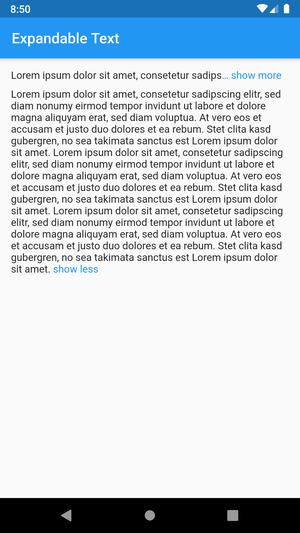
Example with maxLines=1

Getting started

Add this to your package's pubspec.yaml file:

dependencies:
  expandable_text: 2.3.0

Next, import the package into your dart code:

import 'package:expandable_text/expandable_text.dart';
Usage

Show an expandable text if longText exceeds one line:

Widget build(BuildContext context) {
    return ExpandableText(
        longText,
        expandText: 'show more',
        collapseText: 'show less',
        maxLines: 1,
        linkColor: Colors.blue,
    );
}
Advanced example

This example shows a message that was posted by a user. The username is always visible right before the text and tapping on it opens the user profile. The text is truncated after two lines and can be expanded by tapping on the link show more at the end or the text itself. After the text was expanded it cannot be collapsed again as no collapseText was provided. URLs, @mentions and #hashtags in the text are styled differently and can be tapped to open the browser or the user profile.

Widget build(BuildContext context) {
    return ExpandableText(
        message,
        expandText: 'show more',
        maxLines: 2,
        linkColor: Colors.blue,
        animation: true,
        collapseOnTextTap: true,
        prefixText: username,
        onPrefixTap: () => showProfile(username),
        prefixStyle: TextStyle(fontWeight: FontWeight.bold),
        onHashtagTap: (name) => showHashtag(name),
        hashtagStyle: TextStyle(
            color: Color(0xFF30B6F9),
        ),
        onMentionTap: (username) => showProfile(username),
        mentionStyle: TextStyle(
            fontWeight: FontWeight.w600,
        ),
        onUrlTap: (url) => launchUrl(url),
        urlStyle: TextStyle(
            decoration: TextDecoration.underline,
        ),
    );
}

Features

  • Link to expand the collapsed text (expandText)
  • Expand and collapse animation (animation, animationDuration, animationCurve)
  • Optional link to collapse the expanded text (collapseText)
  • Configure the style of the link (linkStyle / linkColor)
  • Control whether the ellipsis is part of the link (linkEllipsis)
  • Optional prefix text with style and tap callback (prefixText, prefixStyle, onPrefixTap)
  • Text with tappable and styled links (onUrlTap, urlStyle)
  • Text with tappable and styled @mentions (onMentionTap, mentionStyle)
  • Text with tappable and styled #hashtags (onHashtagTap, hashtagStyle)
  • Configure the number of visible lines of the collapsed text (maxLines)
  • Control the default expanded state (expanded, onLinkTap)
  • Callback for expanded changed event (onExpandedChanged)
  • Tap on the text to expand or collapse the text (expandOnTextTap, collapseOnTextTap)

Bugs and feature requests

Have a bug or a feature request? Please first search for existing and closed issues. If your problem or idea is not addressed yet, please open a new issue.

Copyright & License

Code copyright 2020–2022 Florian Weinaug. Code released under the MIT license.

カテゴリー

ソースリポジトリ

このパッケージを使用しているプロジェクト