パッケージ、リポジトリ、アプリカテゴリを検索

fab_circular_menu_plus のカバー
パッケージ詳細v0.0.4

fab_circular_menu_plus

Floating Action Button を使用して、美しい円形メニューを作成するための Flutter パッケージ。

AndroidiOSWebmacOSWindowsLinux
30日間ダウンロード
571
いいね数
56
Pub ポイント
160

パッケージをインストール

flutter pub add fab_circular_menu_plus

パッケージ概要

公開情報に基づく選定ガイドです。参考としてご利用ください。

フローティングアクションボタン(FAB)を中心とした洗練された円形メニューの作成を可能にするFlutterパッケージです。滑らかなアニメーションとカスタマイズ可能なメニュー項目オプションを提供し、モバイルおよびウェブアプリケーションにおけるユーザーインタラクションの向上に最適です。Android、iOS、Web、macOS、Windows、Linuxなど複数のプラットフォームをサポートしており、デバイス間で一貫した動作を保証します。直感的な設定とレスポンシブデザインにより、FABベースのナビゲーションの実装が簡単にできます。

用途

  • モバイルアプリにインタラクティブなFABメニューを追加する
  • アニメーション付き円形アクションパネルによるUIの向上
  • コンテキストに応じたクイックアクションインターフェースの作成
  • ウェブアプリでのジェスチャー駆動型ナビゲーションの実装
  • アクセシブルなタッチ対応コントロールの設計

主な機能

  • メニュー拡張のためのスムーズな円形アニメーション
  • カスタマイズ可能なメニュー項目のレイアウトとスタイル
  • 複数のプラットフォームターゲットのサポート
  • 既存の FAB コンポーネントとの簡単な統合
  • カスタマイズ可能なトリガーのジェスチャーとタイミング

適している対象

  • 機能豊富なモバイルUIを構築する開発者
  • ダイナミックな FAB インタラクションを求めるデザイナー
  • クロスプラットフォームの一貫性を目指すチーム
  • 直感的なジェスチャーによるナビゲーションを必要とするアプリ
  • 視覚的な洗練とユーザー参加を重視するプロジェクト

注意事項

  • 低スペックデバイスではパフォーマンスチューニングが必要になる場合があります
  • 複雑なメニュー動作に対するカスタマイズの制限
  • Flutterのジェスチャー システムの安定性に依存しています
  • 濃密なメニュー構造には適していません
  • メニュー項目の数が中程度(4〜8個)の場合に最適

元の README

関連するソースリポジトリの README 原文のスナップショットです。最新の内容はリポジトリをご覧ください。

FAB Circular Menu

Pub package License Null safety Platform

A Flutter package to create a nice circular menu using a Floating Action Button.

Originally inspired by Mayur Kshirsagar's great FAB Microinteraction design. It is implemented as a Flutter plugin by Mariano Cordova (source code). This plugin is the continuation of the discontinued original plugin. I merged some of my bug fixes and made some changes to my liking.

I forked this plugin out of necessity and I have only a very limited time for maintenance, so PRs are highly welcome if any change is desired.

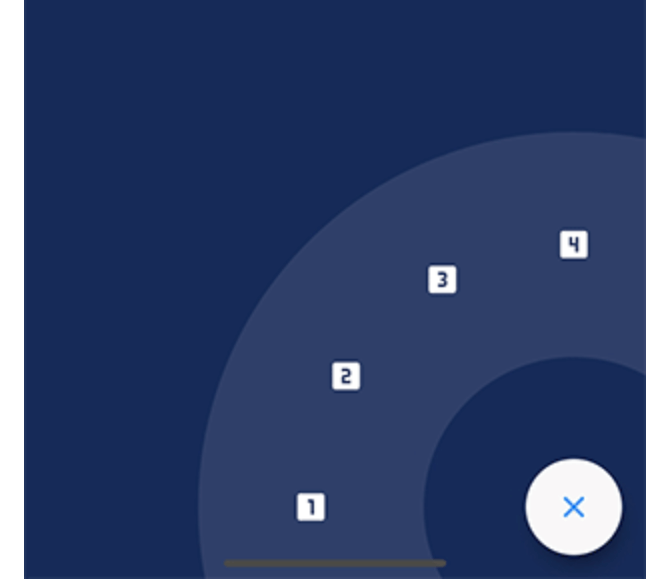
Showcase

Installation

Just add fab_circular_menu_plus to your pubspec.yml file

dependencies:
  fab_circular_menu_plus: ^0.0.1

Example

class MyApp extends StatelessWidget {
  @override
  Widget build(BuildContext context) {
    return MaterialApp(
      home: Scaffold(
        body: Placeholder(),
        floatingActionButton: FabCircularMenuPlus(
          children: <Widget>[
            IconButton(icon: Icon(Icons.home), onPressed: () {
              print('Home');
            }),
            IconButton(icon: Icon(Icons.favorite), onPressed: () {
              print('Favorite');
            })
          ]
        )
      )
    );
  }
}

You can check for a more complete example in the example directory.

Customize

You can customize the widget appearance using the following properties:

Property Description Default
alignment Sets the widget alignment Alignment.bottomRight
ringColor Sets the ring color accentColor
ringDiameterLimitFactor Sets the ring diameter limit factor 1.5
ringDiameter Sets the ring diameter screenWidth * ringDiameterLimitFactor (portrait)
screenHeight * ringDiameterLimitFactor (landscape)
ringWidthLimitFactor Sets the ring width limit factor 0.2
ringWidth Sets the ring width ringDiameter * ringWidthLimitFactor
fabSize Sets the FAB size 64.0
fabElevation Sets the elevation for the FAB 8.0
fabColor Sets the FAB color primaryColor
fabOpenColor Sets the FAB color while the menu is open. This property takes precedence over fabColor -
fabCloseColor Sets the FAB color while the menu is closed. This property takes precedence over fabColor -
fabChild Sets the child inside the FAB. This property takes precedence over fabOpenicon and fabCloseIcon -
fabOpenIcon Sets the FAB icon while the menu is open Icon(Icons.menu)
fabCloseIcon Sets the FAB icon while the menu is closed Icon(Icons.close)
fabMargin Sets the widget margin EdgeInsets.all(16.0)
animationDuration Changes the animation duration Duration(milliseconds: 800)
animationCurve Allows you to modify the animation curve Curves.easeInOutCirc
onDisplayChange This callback is called every time the menu is opened or closed, passing the current state as a parameter. -

Handling the menu programmatically

It is possible to handle the menu programmatically by using a key. Just create a key and set it in the key property of the FabCircularMenuPlus, then use the key to get the current state and open, close or check the status of the menu.

class MyApp extends StatelessWidget {
  final GlobalKey<FabCircularMenuPlusState> fabKey = GlobalKey();

  @override
  Widget build(BuildContext context) {
    return MaterialApp(
      home: Scaffold(
        body: RaisedButton(
          onPressed: () {
            if (fabKey.currentState.isOpen) {
              fabKey.currentState.close();
            } else {
              fabKey.currentState.open();
            }
          },
          child: Text('Toggle menu')
        ),
        floatingActionButton: FabCircularMenuPlus(
          key: fabKey,
          children: <Widget>[
            // ...
          ]
        )
      )
    );
  }
}

Contributing

I will be very happy if you contribute to this project, feel free to submit a PR.

カテゴリー

依存関係

依存関係一覧 1 件

ソースリポジトリ

このパッケージを使用しているプロジェクト