パッケージ、リポジトリ、アプリカテゴリを検索

パッケージ詳細v2.2.0

file_picker_writable

ユーザーがファイル/ドキュメントを開き、後に読み取りおよび書き戻すことができ、また外部メディアに新しいファイルを作成できるようにするFlutterプラグイン。

AndroidiOSmacOS
30日間ダウンロード
252
いいね数
14
Pub ポイント
160

パッケージをインストール

flutter pub add file_picker_writable

パッケージ概要

公開情報に基づく選定ガイドです。参考としてご利用ください。

Android、iOS、macOS で外部ストレージ上のファイルを開き、読み取り、書き込みできるFlutterプラグインです。既存のファイル操作および新しいファイルの作成をサポートしており、永続的なファイル処理が必要なアプリに最適です。プラグインは標準のファイル選択機能を拡張し、変更後のデータを保存できる書き込み機能を追加しています。ネイティブファイルシステムとのシームレスな統合を目的としており、複数のプラットフォーム間で一貫した体験を提供します。

用途

  • オフラインでドキュメントを編集する
  • ユーザーが生成したコンテンツの保存
  • アプリでプロジェクトファイルを管理する
  • アプリからデバイスへのデータエクスポート
  • 設定ファイルの保存
  • クリエイティブアプリでのメディアファイルの処理

主な機能

  • ファイルアクセスの読み取りと書き込み
  • 外部ストレージに新しいファイルを作成する
  • クロスプラットフォーム対応(Android、iOS、macOS)
  • セキュアなファイル処理
  • ネイティブファイルピッカーとの統合
  • 永続的なファイルストレージ

適している対象

  • 生産性アプリ
  • ドキュメントエディタ
  • メディア管理ツール
  • データのエクスポート/インポート機能
  • クリエイティブなアプリケーション
  • ファイルベースの設定システム

注意事項

  • 適切なプラットフォーム権限が必要です
  • 実行時権限のリクエストが必要になる場合があります
  • ファイルパスはプラットフォーム固有です
  • 外部ストレージへのアクセスに限定
  • 内部アプリデータには適していません
  • ユーザーはファイルシステムへのアクセス権限を付与する必要があります

元の README

関連するソースリポジトリの README 原文のスナップショットです。最新の内容はリポジトリをご覧ください。

Pub Version

file_picker_writable

Flutter plugin to choose files which can be read, referenced and written back at a later time (persistent permissions on android, secure bookmarks on iOS).

It also offers handlers for open intents when the user wants to open associated files from other apps. In the same way it will also handle arbitrary URLs and pass them back to dart.

Requirements

iOS

  • iOS 8 + Swift 5
  • Only tested on iOS 13+, so let me know ;-)
Support for file handlers
  1. Configure an OTI Type: https://developer.apple.com/library/archive/qa/qa1587/_index.html
  2. Add to plist file:
     <key>UISupportsDocumentBrowser</key>
     <false/>
     <key>LSSupportsOpeningDocumentsInPlace</key>
     <true/>
    

Android

Support for file handlers
AndroidManifest.xlm
            <intent-filter>
                <action android:name="android.intent.action.VIEW"  />
                <category android:name="android.intent.category.DEFAULT" />
                <category android:name="android.intent.category.BROWSABLE" />
                <data android:scheme="file" />
                <data android:scheme="content" />
                <data android:host="*"  />
                <data android:mimeType="*/*" />
                <!-- https://stackoverflow.com/a/52384331/109219 ?? -->
                <data android:pathPattern=".*\\.codeux" />
                <data android:pathPattern=".*\\..*\\.codeux" />
                <data android:pathPattern=".*\\..*\\..*\\.codeux" />
                <data android:pathPattern=".*\\..*\\..*\\..*\\.codeux" />
                <data android:pathPattern=".*\\..*\\..*\\..*\\..*\\.codeux" />
                <data android:pathPattern=".*\\..*\\..*\\..*\\.*\\..*\\.codeux" />
            </intent-filter>

MacOS

Is currently not supported. The only thing the plugin will do is listen for URL Events and pass them through to the dart side.

Getting Started

See the example on how to implement it in a simple application.

Future<void> readFile() async {
  final fileInfo = await FilePickerWritable().openFile((fileInfo, file) async {
    _logger.fine('Got picker result: $fileInfo');

    // now do something useful with the selected file...
    _logger.info('Got file contents in temporary file: $file');
    _logger.info('fileName: ${fileInfo.fileName}');
    _logger.info('Identifier which can be persisted for later retrieval:'
        '${fileInfo.identifier}');
    return fileInfo;
  });
  if (fileInfo == null) {
    _logger.info('User canceled.');
    return;
  }
}

The returned fileInfo.identifier can be used later to write or read from the data, even after an app restart.

Future<void> persistChanges(FileInfo fileInfo, Uint8List newContent) async {
  // tell FilePickerWritable plugin to write the new contents over the user selected file
  await FilePickerWritable().writeFile(
      identifier: fileInfo.identifier,
      writer: (file) async {
        // write new content into the temporary file.
        await file.writeBytes(newContent);
      });
}

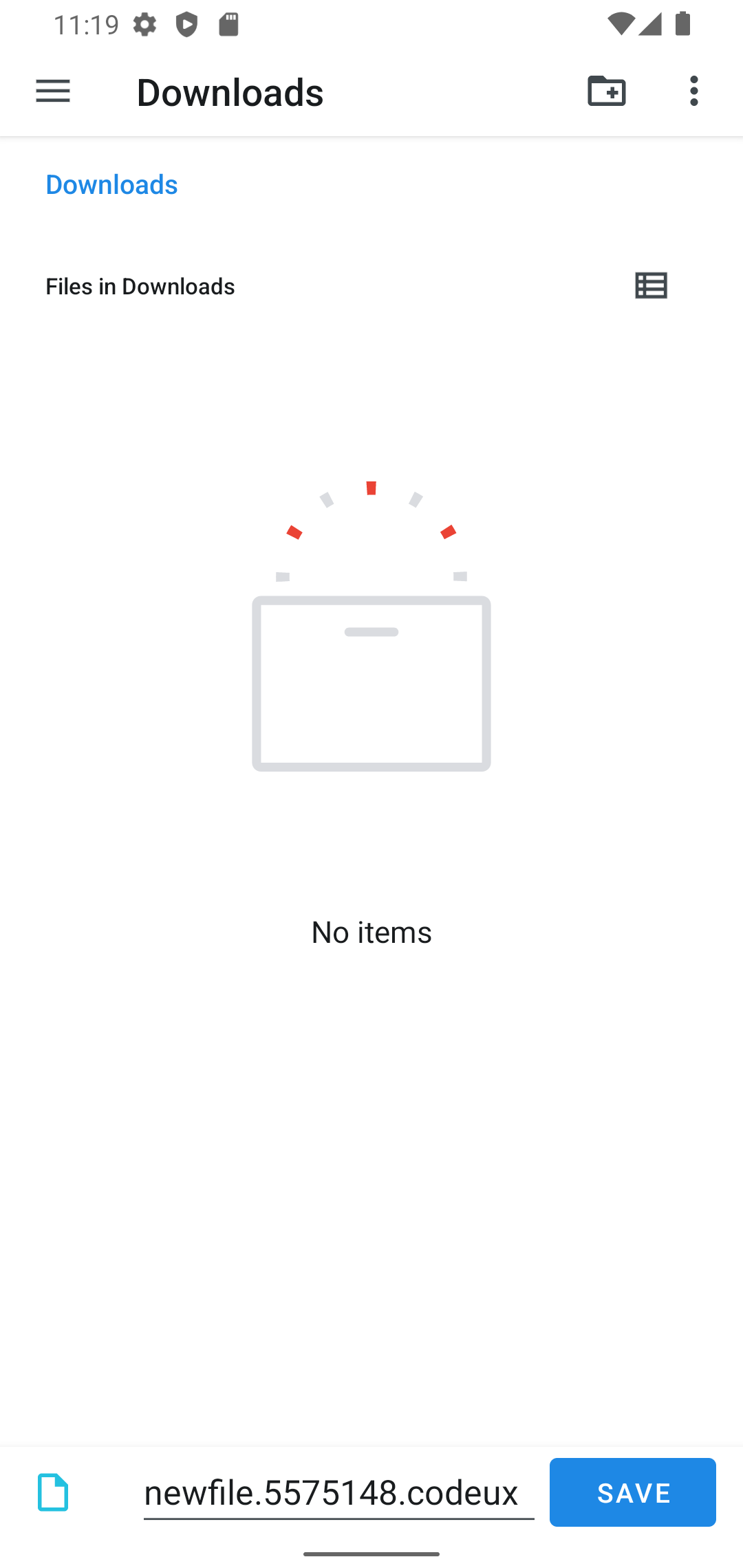
Create a new file by letting the user choose a directory and file name:

final rand = Random().nextInt(10000000);
final fileInfo = await FilePickerWritable().openFileForCreate(
  fileName: 'newfile.$rand.codeux',
  writer: (file) async {
    final content = 'File created at ${DateTime.now()}\n\n';
    await file.writeAsString(content);
  },
);
if (fileInfo == null) {
  _logger.info('User canceled.');
  return;
}
final data = await _appDataBloc.store.load();
await _appDataBloc.store
    .save(data.copyWith(files: data.files + [fileInfo]));
}

This will open the following screen on Android:

create file screenshot

カテゴリー

依存関係

依存関係一覧 5 件

ソースリポジトリ

このパッケージを使用しているプロジェクト