パッケージ、リポジトリ、アプリカテゴリを検索

flicked_cards のカバー
パッケージ詳細v0.0.3

flicked_cards

ジェスチャー駆動型でカスタマイズ可能かつ拡張可能なカードウィジェット

AndroidiOSWebmacOSWindowsLinux
30日間ダウンロード
33
いいね数
82
Pub ポイント
145

パッケージをインストール

flutter pub add flicked_cards

パッケージ概要

公開情報に基づく選定ガイドです。参考としてご利用ください。

Flicked Cards は、Flutter 向けのジェスチャー駆動型でカスタマイズ可能かつ拡張可能なカードウィジェットであり、インタラクティブなカードの裏返しやスワイプアニメーションを可能にします。滑らかなトランジションと応答性のあるジェスチャーを備えており、開発者が直感的なタッチ操作でカードを裏返したり、破棄したりできる魅力的なユーザーインターフェースを作成できます。このパッケージは Android、iOS、Web、macOS、Windows、Linux など複数のプラットフォームをサポートしており、動的なカードベースのナビゲーションやコンテンツ表示を必要とするクロスプラットフォームアプリに最適です。

用途

  • インタラクティブカードスライダー
  • スワイプで非表示にするインターフェース
  • ジェスチャー駆動型のコンテンツ探索
  • ダッシュボード内のカードフリップアニメーション
  • スワイプ可能なカードを備えたユーザーのオンボーディングフロー

主な機能

  • ジェスチャー駆動型カードインタラクション
  • カスタマイズ可能なフリップおよびスワイプアニメーション
  • カスタム動作用の拡張可能な設計
  • クロスプラットフォーム互換性
  • 複数のインタラクション状態をサポート
  • 設定可能な遷移期間

適している対象

  • インタラクティブなカードUIを構築する開発者
  • スワイプまたはフリップジェスチャーを必要とするアプリ
  • アニメーションカード体験を求めるデザイナー
  • クロスプラットフォームのモバイルおよびウェブアプリ
  • インタラクティブなレイアウトのプロトタイピング

注意事項

  • 大規模なカードリストにはパフォーマンスチューニングが必要になる場合があります
  • カスタマイズには、より深いDartの知識が必要になる場合があります
  • 他のパッケージと比較して、組み込みテーマが限られている
  • アニメーションのオーバーヘッドのため、中程度のカード数に最適です

元の README

関連するソースリポジトリの README 原文のスナップショットです。最新の内容はリポジトリをご覧ください。

flicked_cards

Build Status Codecov Pub Package MIT License

A gesture driven card swipping widget supporting custom animations.

Features

  • Awesome default animations provided out of the box
  • Progress through cards swipping both direction or in a single direction
  • Extensible through custom provided animations
  • Support piling or popping (depending on animation spec)

Examples

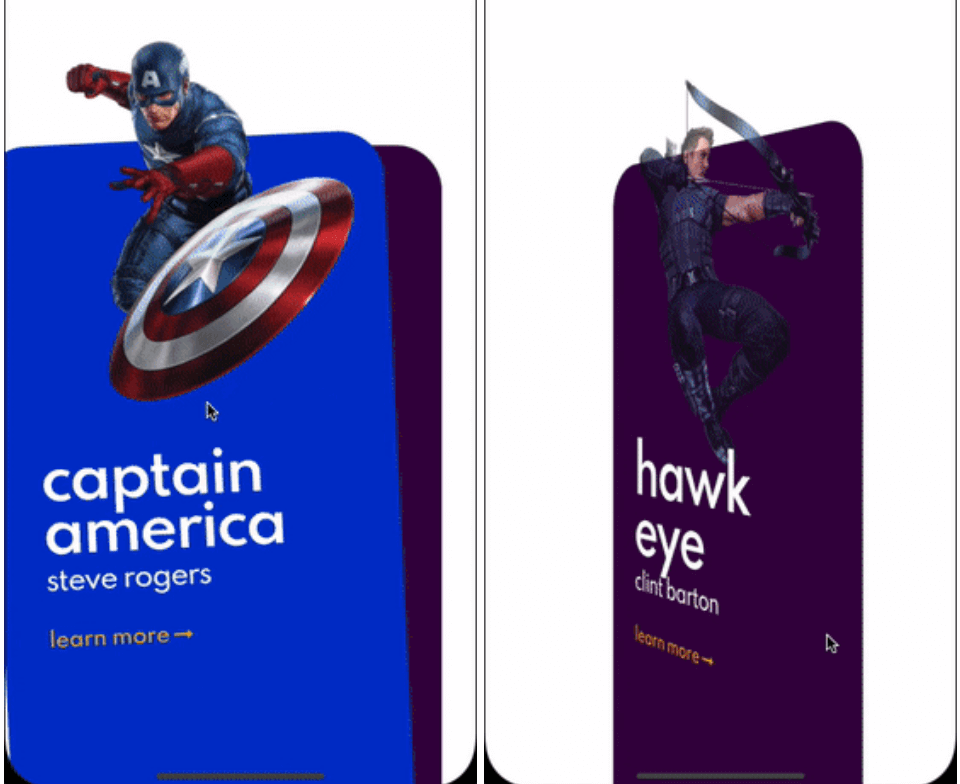
Here are some of the animation provided out of the box, take a look at the example to see all.

Cards used in these examples where taken from Brocodev

Example usage

FlickedCards(
  count: Superhero.marvelHeroes.length,
  animationStyle: FlipAnimation(),
  onSwiped: (idx, dir) => print('>>> $dir $idx'),
  builder: (index, progress, context) {
    final superHeroe = Superhero.marvelHeroes[index];
    return Container(
      child: Center(
        child: SuperheroCard(
            superhero: superHeroe,
            factorChange: 1 - progress),
      ),
    );
  },
)

Custom animations

flicked_cards provides an easy way to create custom animations but it is required to have a basic understanding of how cards can be layed out and how to position them depending on the drag progress and some of the properties in AnimationConfig.

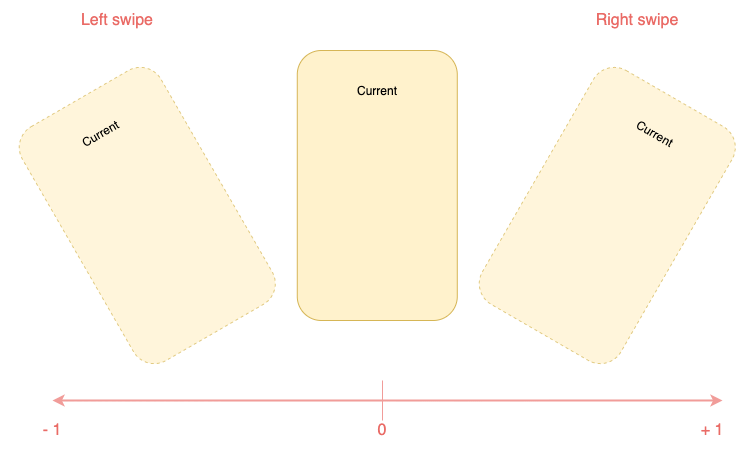
Animations will be provided a progress value in the range (-1, 1) you should try to make you animation symmetric around 0 when posible. Like this:

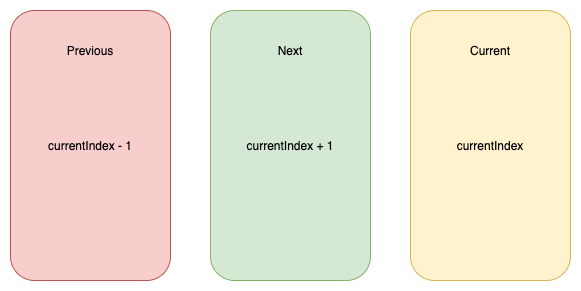
You will have to reason about relative card indices:

Interface for animations

All animations will need to implement CardAnimation which basically defines:

  • animation of a particular card depending on swipe progress required
  • opacity of a particular card depending on swipe progress optional
  • where to apply transformations on cards (Fractional Offset)
typedef SwipeAnimation = Matrix4 Function(double progress);
typedef OpacityAnimation = double Function(double progress);

abstract class CardAnimation {
  AnimationConfig get config;
  LayoutConfig get layoutConfig;

  SwipeAnimation animationForCard({required int relativeIndex});

  OpacityAnimation opacityForCard({required int relativeIndex}) {
    return (_) => 1;
  }

  FractionalOffset fractionalOffsetForCard({required int relativeIndex});
}

Additionally to make this process a bit easier, 2 extra abstract classes that implement CardAnimation which are:

  • SymmetricCardAnimation
  • AsymmetricCardAnimation

Carousel animation is an example of a SymmetricCardAnimation take a look here

If struggling to make the animationlook at how the animations provided out of the box where implemented: here

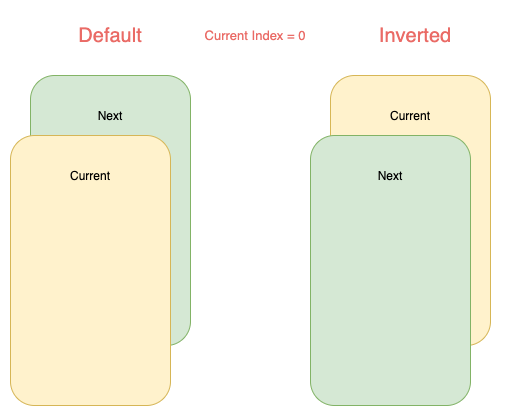
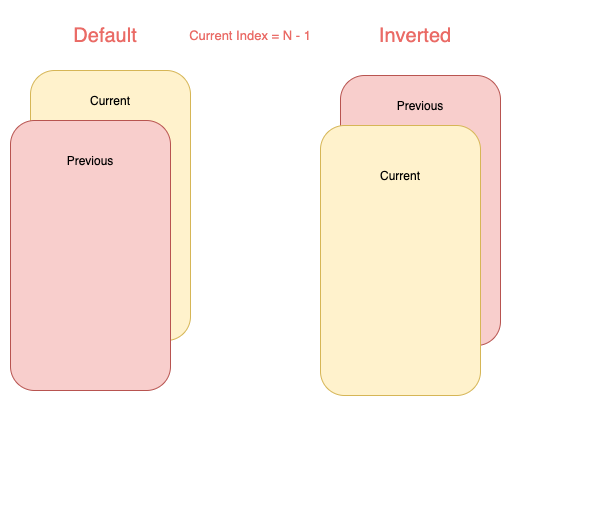
Card layouts

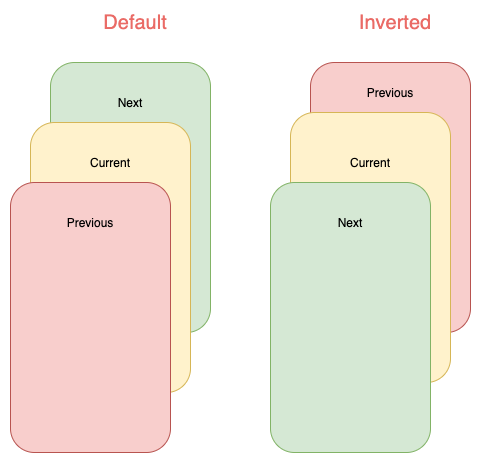
Internally cards are placed in Stack widget so an animation can choose to work with a single or both of the following layouts:

Note that depending on the index some of cards will not be displayed:

カテゴリー

ソースリポジトリ

このパッケージを使用しているプロジェクト

データはまだありません。