パッケージ、リポジトリ、アプリカテゴリを検索

flip_box_bar_plus のカバー
パッケージ詳細v1.0.0

flip_box_bar_plus

DannnielによるDribbbleデザインからインスパイアされた3D BottomNavigationBar

AndroidiOSWebmacOSWindowsLinux
30日間ダウンロード
38
いいね数
34
Pub ポイント
140

パッケージをインストール

flutter pub add flip_box_bar_plus

パッケージ概要

公開情報に基づく選定ガイドです。参考としてご利用ください。

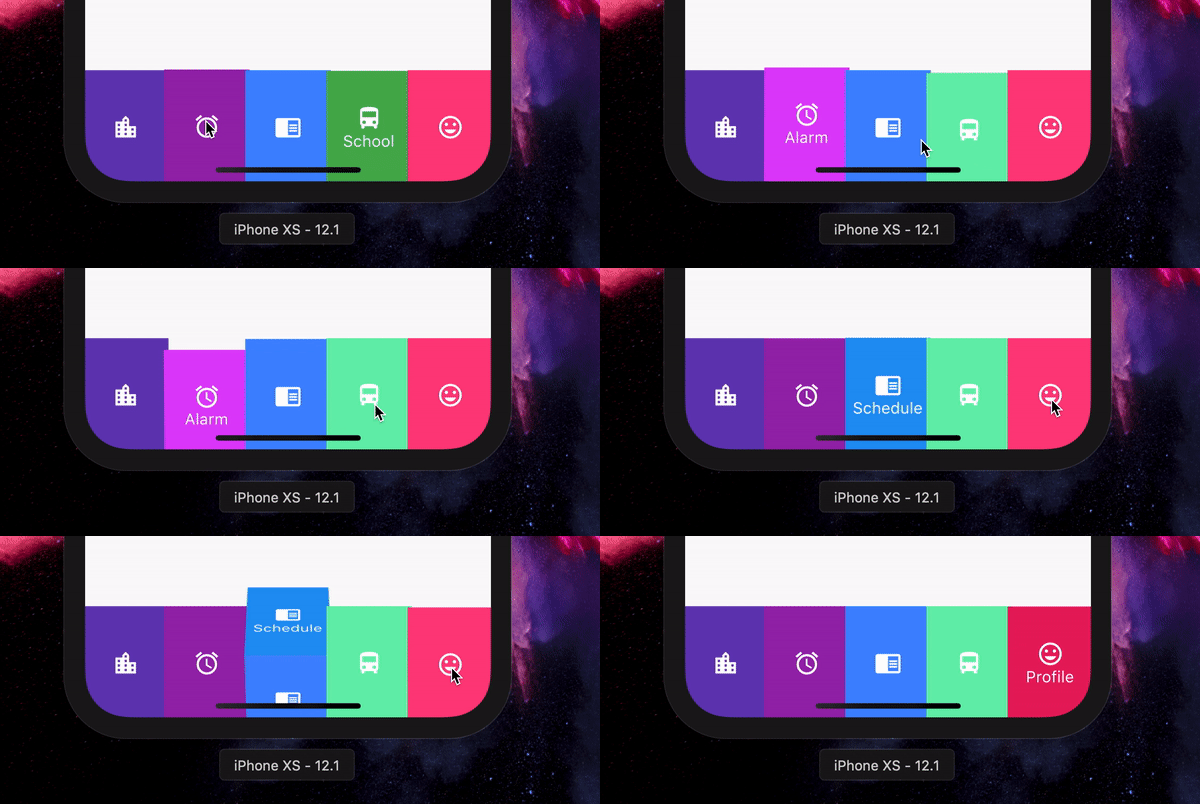
FlipBoxBarPlus は、Flutter用の3Dインスパイアされた下部ナビゲーションバーであり、DannnielによるDribbbleコンセプトからインスピレーションを受けています。ユーザーインタラクションと視覚的魅力を高めるためのダイナミックなフリップアニメーション効果を備えています。Android、iOS、Web、macOS、Windows、Linuxなど複数のプラットフォームをサポートしており、非常に汎用性が高いです。滑らかな遷移とカスタマイズ可能なスタイルにより、遊び心がありながらもプロフェッショナルな雰囲気を持つ現代的なアプリインターフェースに最適です。pub.dev経由で簡単に統合でき、オープンソースであるため、コミュニティの貢献を促進しています。

用途

  • モダンなモバイルアプリインターフェース
  • インタラクティブUI要素
  • クロスプラットフォームアプリケーション
  • デザイン重視のダッシュボード
  • アニメーションナビゲーションバー

主な機能

  • 3D フリップアニメーション
  • クロスプラットフォーム互換性
  • カスタマイズ可能な外観
  • スムーズなトランジション効果
  • オープンソースでコミュニティ主導

適している対象

  • アニメーションナビゲーションを探している開発者
  • デザインに意識のあるアプリ作成者
  • インタラクティブUIを備えたFlutterプロジェクト
  • 複数のオペレーティングシステムをターゲットにするアプリ
  • 創造的で視覚的に魅力的なアプリ

注意事項

  • 低スペックデバイスでのパフォーマンスに影響を与える可能性があります
  • 最適なアニメーション速度を得るためには慎重な調整が必要です
  • コア機能を超えるカスタマイズは限定的
  • 最小限のナビゲーション項目を持つアプリに最適
  • アクセシビリティ重視のアプリケーションには推奨されません

元の README

関連するソースリポジトリの README 原文のスナップショットです。最新の内容はリポジトリをご覧ください。

Flip_box_bar_plus

Forked from Flip_box_bar, added support for vertical position

Installation Guide

A 3D BottomNavigationBar inspired by Dribbble design by Dannniel.

Demo

Example Use

      // In Scaffold
      int selectedIndex = 0;
      
      FlipBoxBarPlus(
              selectedIndex: index,
              items: [
                FlipBarItem(icon: Icon(Icons.map), text: Text("Map"), frontColor: Colors.blue, backColor: Colors.blueAccent),
                FlipBarItem(icon: Icon(Icons.add), text: Text("Add"), frontColor: Colors.cyan, backColor: Colors.cyanAccent),
                FlipBarItem(icon: Icon(Icons.chrome_reader_mode), text: Text("Read"), frontColor: Colors.orange, backColor: Colors.orangeAccent),
                FlipBarItem(icon: Icon(Icons.print), text: Text("Print"), frontColor: Colors.purple, backColor: Colors.purpleAccent),
                FlipBarItem(icon: Icon(Icons.print), text: Text("Print"), frontColor: Colors.pink, backColor: Colors.pinkAccent),
              ],
              onIndexChanged: (newIndex) {
                setState() {
                    selectedIndex = newIndex;
                }
              },
            ),

For vertical position set isVerticalBar = true

Properties

List<FlipBarItem> items;

The items to be displayed in the NavBar.

Duration animationDuration;

The duration of the animation of the box flip.

ValueChanged<int> onIndexChanged;

Callback for getting value of item selection.

int initialIndex;

The initial selected index of the NavBar.

double navBarHeight;

The height of the NavBar when it is in bottom nav position.

bool isVerticalBar;

Set the navigation bar as vertical.

double navBarWidth;

The width of the NavBar when it is in vertical position.

カテゴリー

ソースリポジトリ

このパッケージを使用しているプロジェクト

データはまだありません。