パッケージ、リポジトリ、アプリカテゴリを検索

flip_panel_plus のカバー
パッケージ詳細v2.0.0

flip_panel_plus

画像、カウントダウン、時計などのフリップパネルアイテム用のパッケージで、組み込みアニメーション付き。

AndroidiOSWebmacOSWindowsLinux
30日間ダウンロード
297
いいね数
37
Pub ポイント
160

パッケージをインストール

flutter pub add flip_panel_plus

パッケージ概要

公開情報に基づく選定ガイドです。参考としてご利用ください。

FlipPanelPlus は、画像、カウントダウン、時計などのコンテンツを表示するためのアニメーション付きフリップパネルウィジェットを可能にするFlutterパッケージです。物理的なパネルの裏返し効果をシミュレートするスムーズな組み込みアニメーションを備えており、タイマー、スコアボード、または動的データ表示に最適です。Android、iOS、Web、macOS、Windows、Linuxなど複数のプラットフォームをサポートしており、クロスプラットフォームアプリケーションに非常に柔軟に対応できます。pub addによる簡単な統合により、魅力的な視覚フィードバックでユーザー体験を向上させます。

用途

  • カウントダウンタイマー
  • デジタル時計
  • スコア表示
  • 画像のフリップ遷移
  • インタラクティブダッシュボード
  • ゲームスコアトラッカー

主な機能

  • 組み込みのフリップアニメーション
  • 複数のコンテンツタイプのサポート
  • クロスプラットフォーム互換性
  • 簡単な統合
  • カスタマイズ可能な外観
  • スムーズなパフォーマンス

適している対象

  • タイマーに基づくアプリ
  • ゲーム化機能
  • ダッシュボードウィジェット
  • 教育ツール
  • リアルタイムデータ可視化
  • インタラクティブUIコンポーネント

注意事項

  • 低性能デバイスでのパフォーマンスに影響を与える可能性があります
  • 基本的なスタイル設定を超えるカスタマイズが限られている
  • 状態付きコンテキストでは注意が必要です
  • 複雑なアニメーションには適していません
  • 静的または予測可能なコンテンツと組み合わせて使用するのが最適です
  • 一貫したデータ更新に依存しています

元の README

関連するソースリポジトリの README 原文のスナップショットです。最新の内容はリポジトリをご覧ください。

Flip Panel Plus

3D flip-panel widgets for Flutter: a countdown timer, a flip clock, and flipping digits you can drive from any value.

FlipCountdown

Why this package

A countdown is easy to get wrong. Most implementations subtract a second on every tick, which quietly drifts when a frame is slow, and jumps to the wrong value after the app has been in the background.

FlipCountdown derives the time left from how much time has actually passed, and reads two clocks to do it (a monotonic one and the wall clock), taking whichever has advanced further:

  • Late or dropped ticks cannot cause drift; the value is recomputed, not decremented.
  • Backgrounding or device sleep is handled: the wall clock catches the countdown back up.
  • Moving the device clock backwards cannot rewind the countdown.
  • Server-driven deadlines are supported directly: pass referenceTime and the device's own clock is never used to decide how long is left.

Install

dependencies:
  flip_panel_plus: ^2.0.0
import 'package:flip_panel_plus/flip_panel_plus.dart';

Countdown

Count down to a moment:

FlipCountdown(
  targetDate: saleEndsAt,
  referenceTime: serverNow, // optional; keeps the device clock out of it
  onDone: () => setState(() => _finished = true),
)

Or for a fixed length:

FlipCountdown(
  duration: const Duration(hours: 1, minutes: 30),
  showLabels: true,
  onTick: (remaining) => debugPrint('$remaining'),
)

Segments are chosen automatically. Days only appear when the countdown is a day or more, hours only when it is an hour or more. Override with showDays, showHours, showMinutes and showSeconds.

flip_countdown_controller

Controlling it

Pass a FlipCountdownController when you need to drive the countdown from elsewhere. A controller you create is yours to dispose.

final controller = FlipCountdownController(
  duration: const Duration(minutes: 10),
  autoStart: false,
);

FlipCountdown(controller: controller);

controller.start();
controller.pause();
controller.resume();
controller.addTime(const Duration(minutes: 5));
controller.reset(autoStart: true);

controller.remaining; // Duration
controller.progress;  // 0.0 -> 1.0
controller.status;    // idle | running | paused | completed

Styling

Appearance lives in one object, [FlipDigitStyle], so a look can be defined once and reused across every widget in the package.

Styles
FlipCountdown(
  duration: d,
  style: FlipDigitStyle.card(seed: Colors.indigo),
)

Four presets to start from, each adjustable with copyWith:

Preset Look
FlipDigitStyle.dark() the classic split-flap board
FlipDigitStyle.light() inverted, with a hairline border
FlipDigitStyle.card() tinted and raised, with a shadow
FlipDigitStyle.minimal() no box at all, for overlaying artwork

Gradients, borders and shadows are supported directly:

const FlipDigitStyle(
  fontSize: 26,
  borderRadius: BorderRadius.all(Radius.circular(10)),
  gradient: LinearGradient(colors: [Color(0xFFFF7A18), Color(0xFFE1231C)]),
)
Removing the split line

A flip panel is drawn as two halves, and the gap between them is what gives a split-flap its seam. Set panelSpacing: 0 for a seamless digit:

FlipCountdown(duration: d, panelSpacing: 0)
Labels, separators and segments
FlipCountdown(
  duration: d,
  showLabels: true,
  labelPosition: FlipLabelPosition.above,   // or below
  labels: const FlipCountdownLabels.short(), // D / H / M / S
  separator: const SizedBox(width: 10),      // or SizedBox.shrink() to remove
  showSeconds: false,                        // hide any segment
  curve: Curves.easeOutBack,                 // easing on the fold
)
More looks, by composition

FlipCountdown is an ordinary widget, so looks that are not a digit style come from wrapping it. Two common ones:

Ruled and compact strip

Ruled, with rules above and below and no boxes:

Column(
  mainAxisSize: MainAxisSize.min,
  children: [
    Container(height: 1.5, color: Colors.white24),
    const Padding(
      padding: EdgeInsets.symmetric(vertical: 8),
      child: FlipCountdown(
        duration: d,
        panelSpacing: 0,
        separator: SizedBox(width: 8),
        style: FlipDigitStyle.minimal(fontSize: 30),
      ),
    ),
    Container(height: 1.5, color: Colors.white24),
  ],
)

Compact strip, with an icon, a caption and the time on one line:

Container(
  padding: const EdgeInsets.symmetric(horizontal: 14, vertical: 10),
  decoration: BoxDecoration(
    color: const Color(0xFF1F6F4A),
    borderRadius: BorderRadius.circular(10),
  ),
  child: const Row(
    mainAxisSize: MainAxisSize.min,
    children: [
      Icon(Icons.timer_outlined, color: Colors.white, size: 18),
      SizedBox(width: 6),
      Text('ENDS IN', style: TextStyle(color: Colors.white, fontSize: 12)),
      SizedBox(width: 12),
      FlipCountdown(
        duration: d,
        panelSpacing: 0,
        style: FlipDigitStyle.minimal(fontSize: 18, width: 15, height: 26),
      ),
    ],
  ),
)

Tip on flip speed. flipDuration defaults to 450ms. Against a one-second tick that means the digit is mid-fold for nearly half of every second, which is fine behind a solid panel but reads as a broken glyph on the box-less styles above. Shorten it (240 to 300ms) whenever the digits have no panel to fold against.

Languages and RTL

Labels are ordinary strings, so pass whatever language you need:

FlipCountdown(
  duration: d,
  showLabels: true,
  labels: const FlipCountdownLabels(
    days: 'أيام',
    hours: 'ساعات',
    minutes: 'دقائق',
    seconds: 'ثوانٍ',
  ),
)

Digits can use another numeral system through digitFormatter:

style: const FlipDigitStyle.dark()
    .copyWith(digitFormatter: FlipDigitStyle.easternArabicNumerals), // ١٢:٣٤

In an RTL app the countdown still reads left to right. A clock is not mirrored in Arabic or Hebrew: the hours stay on the left, and 12 stays 12 rather than becoming 21. The package pins the layout direction for you, so dropping it inside an RTL Directionality needs no extra work. If you do want the segments mirrored, ask for it explicitly:

FlipCountdown(duration: d, textDirection: TextDirection.rtl)
When it finishes
FlipCountdown(
  duration: d,
  completedBuilder: (context) => const Text('EXPIRED'),
)
Complete control

digitBuilder replaces the digit rendering entirely:

FlipCountdown(
  duration: d,
  digitBuilder: (context, digit) => MyOwnDigit(digit),
)

And [FlipCountdownBuilder] gives you the timing engine with no UI at all, so the countdown can drive anything: a progress ring, a sentence, a chart.

FlipCountdownBuilder(
  targetDate: saleEndsAt,
  builder: (context, remaining, status) =>
      Text('${remaining.inMinutes} min left'),
)

Flip digits

FlipDigit and FlipNumber flip whenever their value changes, with no stream to set up. Only the digits that actually change will flip.

FlipDigit(value: 7)

FlipNumber(value: score, minDigits: 4) // 0042

Flip clock

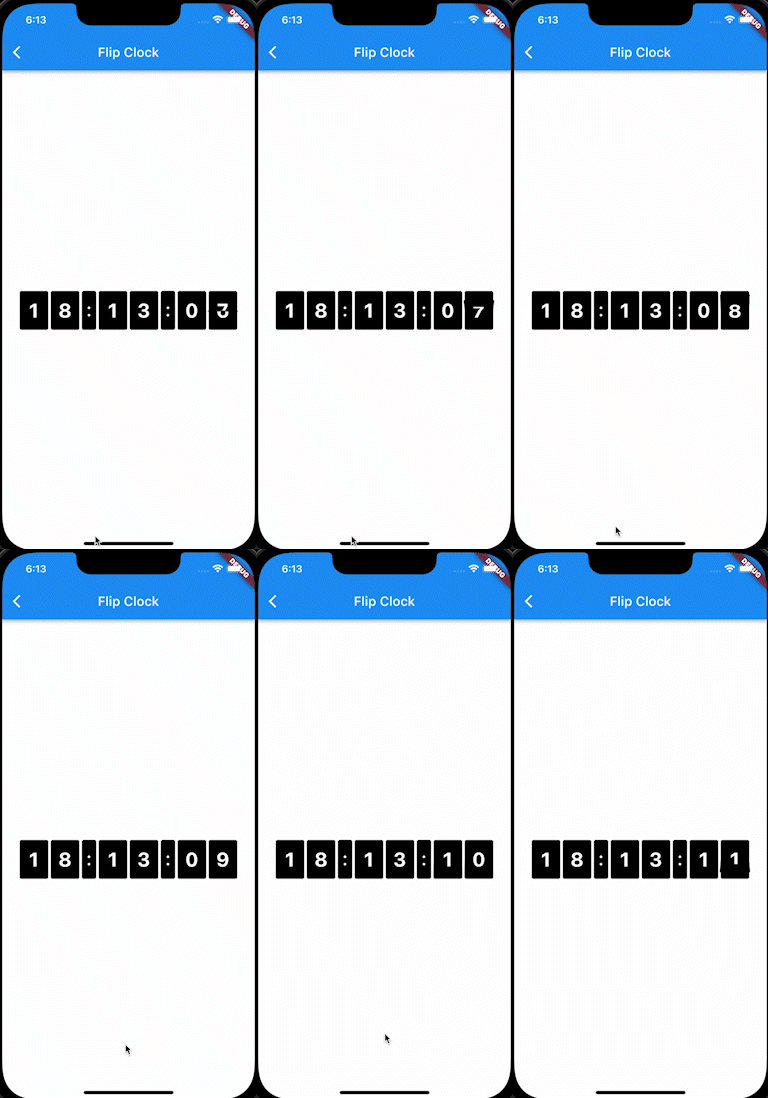
FlipClockPlus.simple(
  startTime: DateTime.now(),
  digitColor: Colors.white,
  backgroundColor: Colors.black,
  digitSize: 30.0,
  borderRadius: const BorderRadius.all(Radius.circular(3.0)),
)

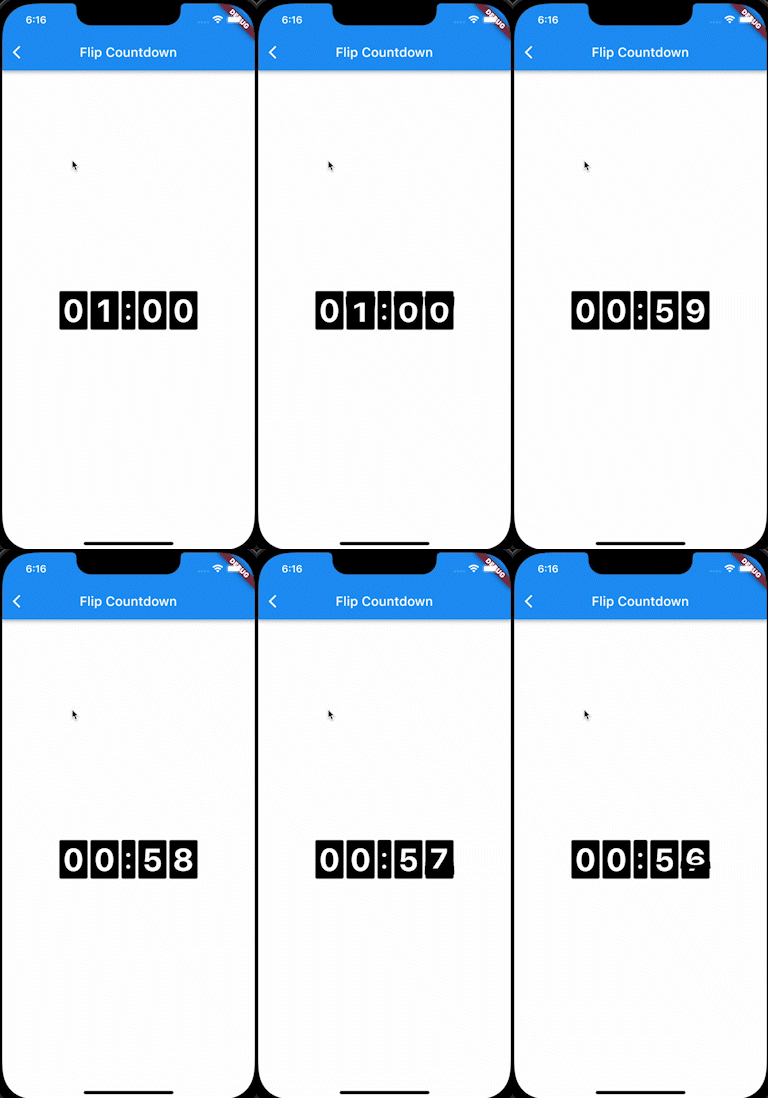
A countdown in the same style:

FlipClockPlus.countdown(
  duration: const Duration(hours: 1),
  digitColor: Colors.white,
  backgroundColor: Colors.black,
  digitSize: 48.0,
  borderRadius: const BorderRadius.all(Radius.circular(3.0)),
  onDone: () => debugPrint('done'),
)

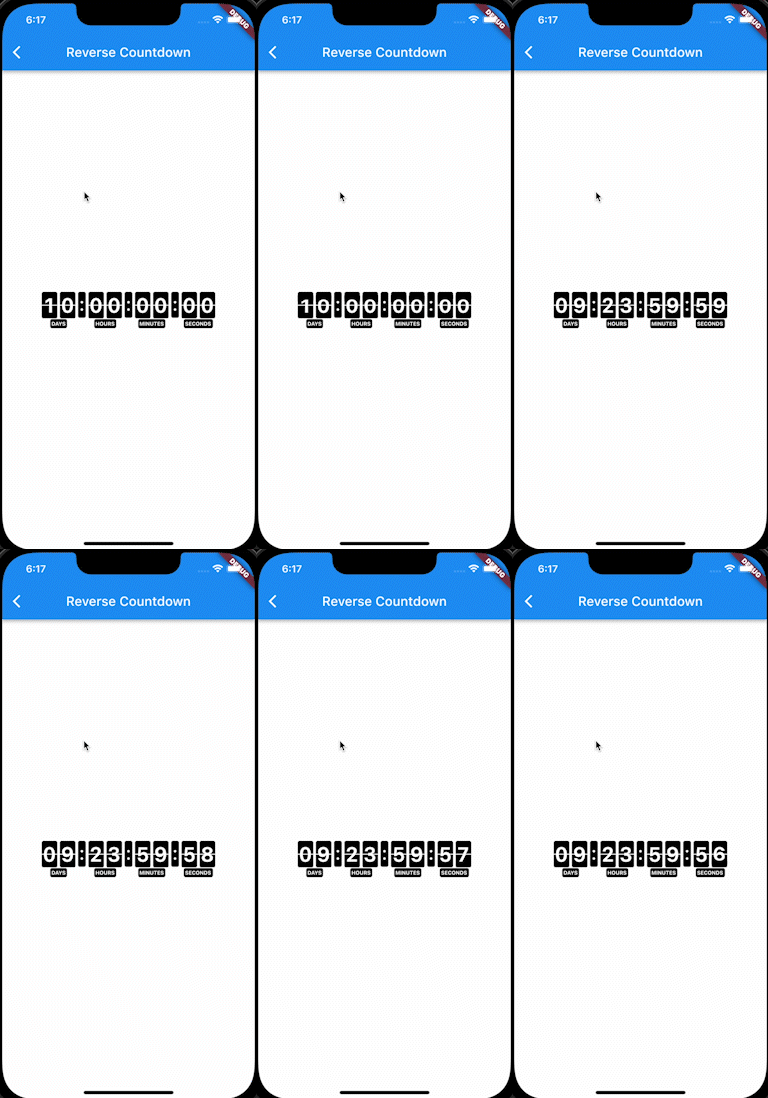
With days and captions:

FlipClockPlus.reverseCountdown(
  duration: const Duration(days: 10),
  digitColor: Colors.white,
  backgroundColor: Colors.black,
  digitSize: 30.0,
  borderRadius: const BorderRadius.all(Radius.circular(3.0)),
  onDone: () => debugPrint('done'),
)

Flipping any widget

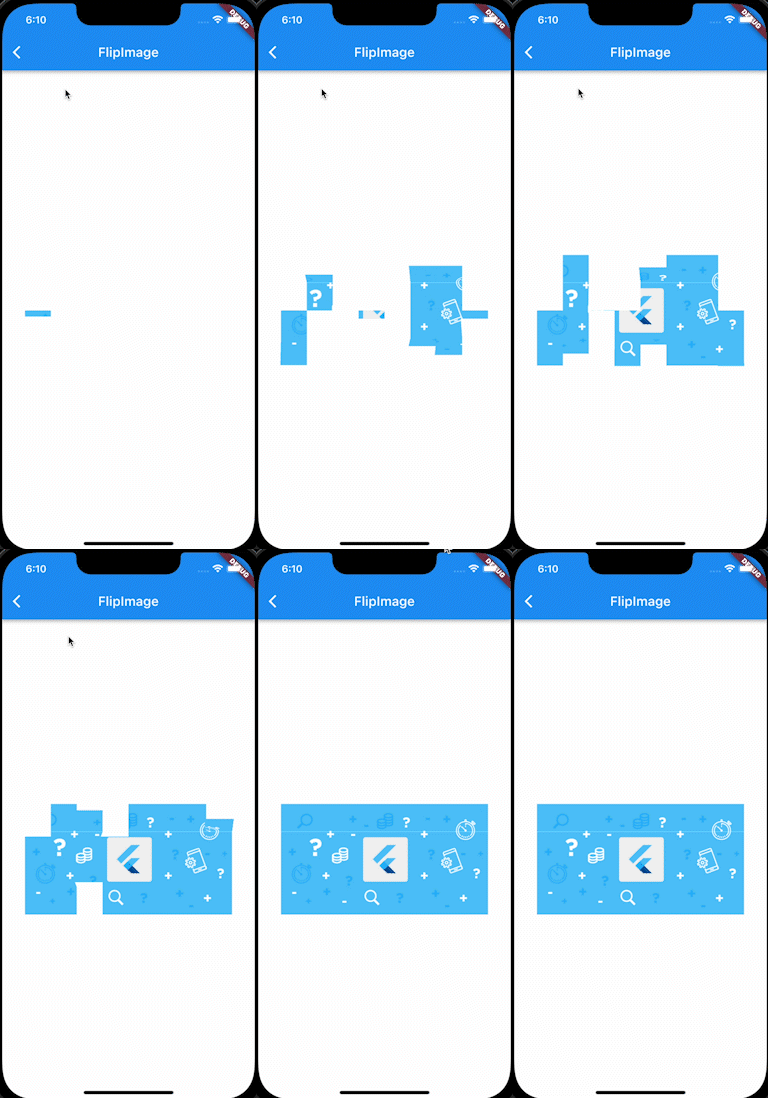
FlipPanelPlus is the animation underneath, and works with any widget.

From a list:

final digits = [0, 1, 2, 3, 4, 5, 6, 7, 8, 9];

FlipPanelPlus.builder(
  itemBuilder: (context, index) => Container(
    color: Colors.black,
    padding: const EdgeInsets.symmetric(horizontal: 6.0),
    child: Text(
      '${digits[index]}',
      style: const TextStyle(
        fontWeight: FontWeight.bold,
        fontSize: 50.0,
        color: Colors.white,
      ),
    ),
  ),
  itemsCount: digits.length,
  period: const Duration(milliseconds: 1000),
  loop: -1, // forever
)

From a stream:

FlipPanelPlus<int>.stream(
  itemStream: myStream,
  itemBuilder: (context, value) => Text('$value'),
  initValue: 0,
)

period must be at least twice duration, otherwise the animation has no time to settle between flips.

Testing

Time is read through package:clock, so countdowns can be driven deterministically in tests with withClock, and they advance normally under testWidgets and fakeAsync.

Credits

Based on flip_panel, which is no longer maintained.

License

MIT. See LICENSE.

カテゴリー

依存関係

依存関係一覧 1 件

ソースリポジトリ

このパッケージを使用しているプロジェクト

データはまだありません。