パッケージ、リポジトリ、アプリカテゴリを検索

floating のカバー
パッケージ詳細v6.0.0

floating

Flutter用のピクチャインピクチャーモード管理。Android専用。

Android
30日間ダウンロード
2.3万
いいね数
270
Pub ポイント
160

パッケージをインストール

flutter pub add floating

パッケージ概要

公開情報に基づく選定ガイドです。参考としてご利用ください。

フローティングパッケージは、Flutterアプリケーションにおけるピクチャインピクチャ(PiP)モードの管理を可能にし、特にAndroid向けです。開発者はメディア再生を小さな浮遊ウィンドウにスムーズに切り替えることができ、ユーザーが他のアプリと相互作用している間もウィンドウを移動・リサイズできます。これは、バックグラウンドで継続的に再生が必要な動画やオーディオコンテンツにとって特に役立ちます。このパッケージはAndroidのPiP APIと直接統合されており、PiP動作を制御するための簡単なインターフェースを提供します。フルアプリフォーカスなしで継続的な再生が必要なビデオおよびオーディオユースケースをサポートしています。

用途

  • バックグラウンド動画再生
  • PiPモードでのオーディオストリーミング
  • 連続再生を必要とするメディアアプリ
  • Androidにおけるマルチタスク対応
  • 最小化ビューでのビデオ通話

主な機能

  • Android専用のPiPサポート
  • PiP 向けの簡単な API
  • 自動ピップ状態の処理
  • カスタマイズ可能なピップサイズと位置
  • Android の PiP API との統合

適している対象

  • 動画プレイヤー アプリ
  • オーディオストリーミングアプリ
  • メディアコンテンツを備えた教育アプリ
  • マルチタスク機能を必要とするアプリ
  • Androidデバイスをターゲットにする開発者

注意事項

  • Androidでのみ利用可能
  • Android 8.0+ (API 26) を必要とします
  • メディア再生のシナリオに限定
  • iOS 対応なし
  • PiPライフサイクルイベントを適切に処理する必要があります

元の README

関連するソースリポジトリの README 原文のスナップショットです。最新の内容はリポジトリをご覧ください。

floating

codecov

Picture in Picture management for Flutter. Android only

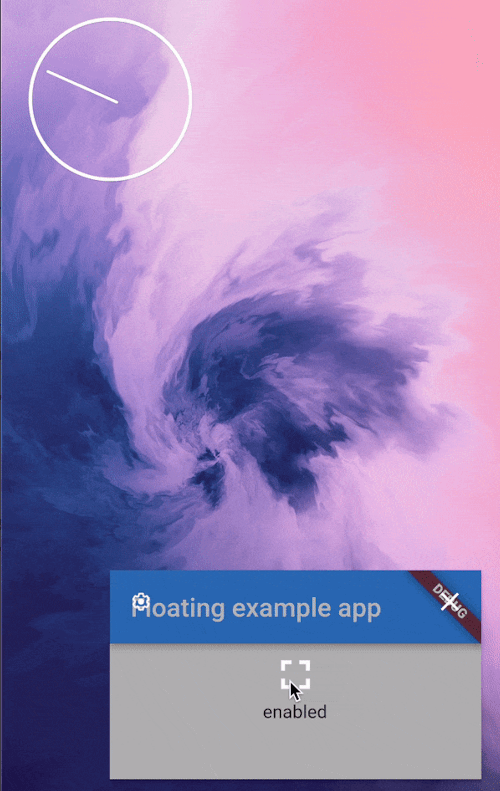
Picture in picture demo

App configuration

Add android:supportsPictureInPicture="true" line to the <activity> tag in android/src/main/AndroidManifest.xml:

<manifest>
   <application>
        <activity
            android:name=".MainActivity"
            android:supportsPictureInPicture="true"
            ...

Widget

This package provides a helper PiPSwitcher widget for switching the displayed widgets according to current PiP status. Use it like so:

PiPSwitcher(
    childWhenDisabled: Scaffold(...),
    childWhenEnabled: JustVideo(), 
)

API

PiP mode in desired mode is available only in Android so iOS and web support is not planned until the platforms adds native support for such feature.

Create a Floating instance
final floating = Floating();
Check if PiP is available
final canUsePiP = await floating.isPipAvailable;

PiP may be unavailable because of system settings managed by admin or device manufacturer. Also, the device may have Android version that was released without this feature.

Check if app is in PiP mode
final currentStatus = await floating.pipStatus;

Possible statuses:

Status Description Will enable() have an effect?
disabled PiP is available to use but currently disabled. Yes
enabled PiP is enabled. The app can display content but will not receive user inputs until the user decides to bring the app to it's full size. No
automatic PiP will be enabled automatically by the OS. Yes
unavailable PiP is disabled on given device. No
Enable PiP mode

Enable PiP right away:

final statusAfterEnabling = await floating.enable(ImmediatePiP());

Enable PiP when the app gets minimized via system gesture:

final statusAfterEnabling = await floating.enable(OnLeavePiP());

To later cancel, use .cancelOnLeavePiP().

When enabled, PiP mode can be toggled off by the user via system UI.

Arguments
aspectRatio:

The default 16/9 aspect ratio can be overridden with custom Rational. Eg. to make PiP square use: .enable(aspectRatio: Rational(1, 1)) or .enable(aspectRatio: Rational.square()).

sourceRectHint:

By default, system will simply use fade animation to tween between full app and PiP. Switching animation can be smoother by using source rect hint (example animation).

Check the example project to see an example of usage.

カテゴリー

ソースリポジトリ

このパッケージを使用しているプロジェクト